
Property Management
Premium Launch −30%Let your units, invoice the rent every period and see who has not paid: leases, receipts and unpaid rent in Odoo Community.
| Technical name | oski_property |
|---|---|
| License | OPL-1 |
| Author | OdooSkills |
$ 89.00
$ 62.30
Launch price — 30% off until December 31, 2026
A ready-to-use Odoo database with demo data, deleted after 1 hour. Odoo 20, 19, 18.
Missing a feature or found a bug?
Request a change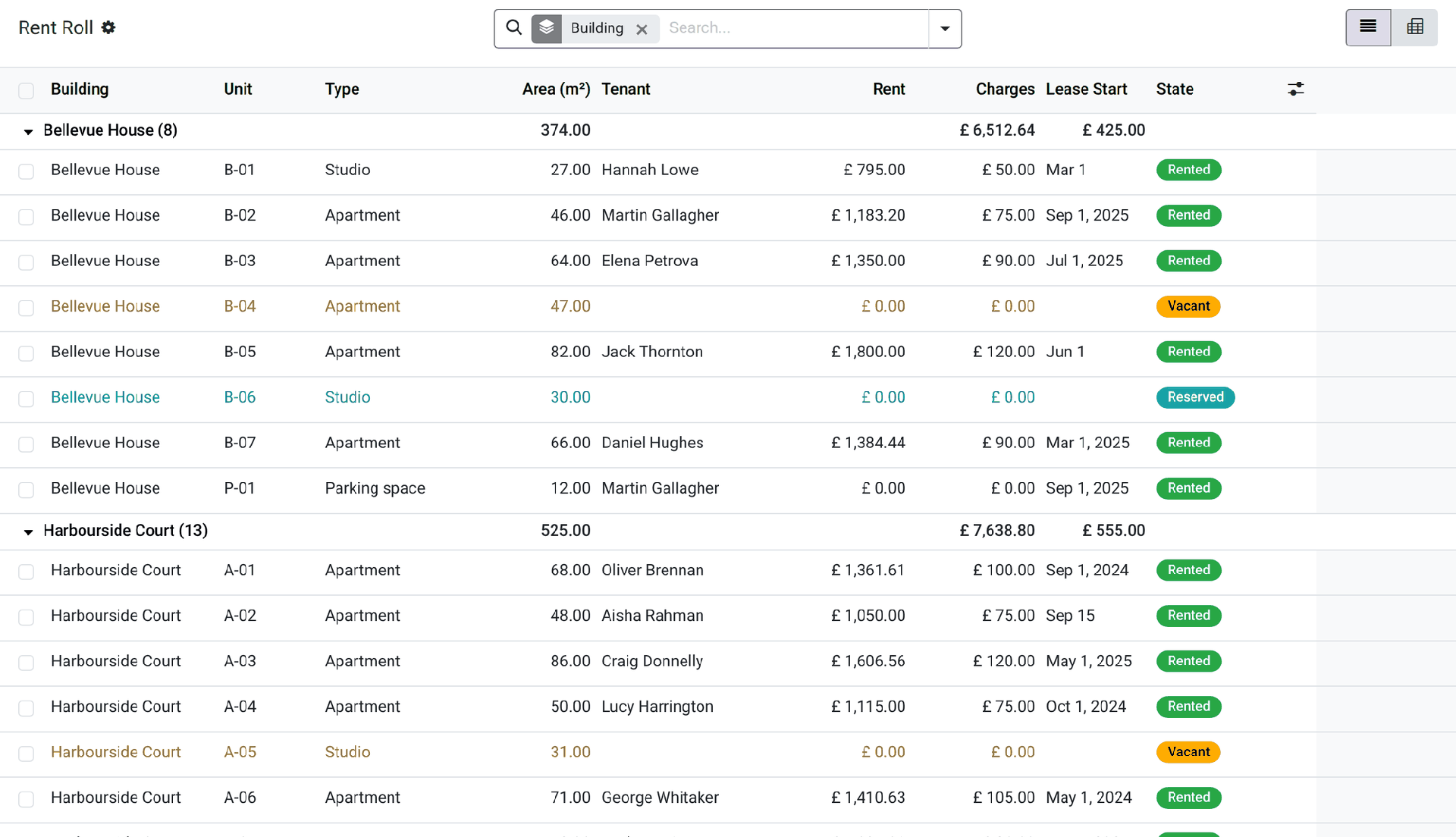
Property Management
Let your units, invoice the rent every period and see who has not paid: leases, receipts and unpaid rent in Odoo Community.
A landlord with a dozen units, or an agency with a few buildings, keeps the leases in folders, the rents in a spreadsheet and the receipts in a word processor. Every month somebody checks who paid, types the invoices again and prepares the receipts; a lease that ends or a rent that changes is found out late. This app puts buildings, units and leases in Odoo, invoices the rent by itself and shows at once who rents what and who is behind.
What it does
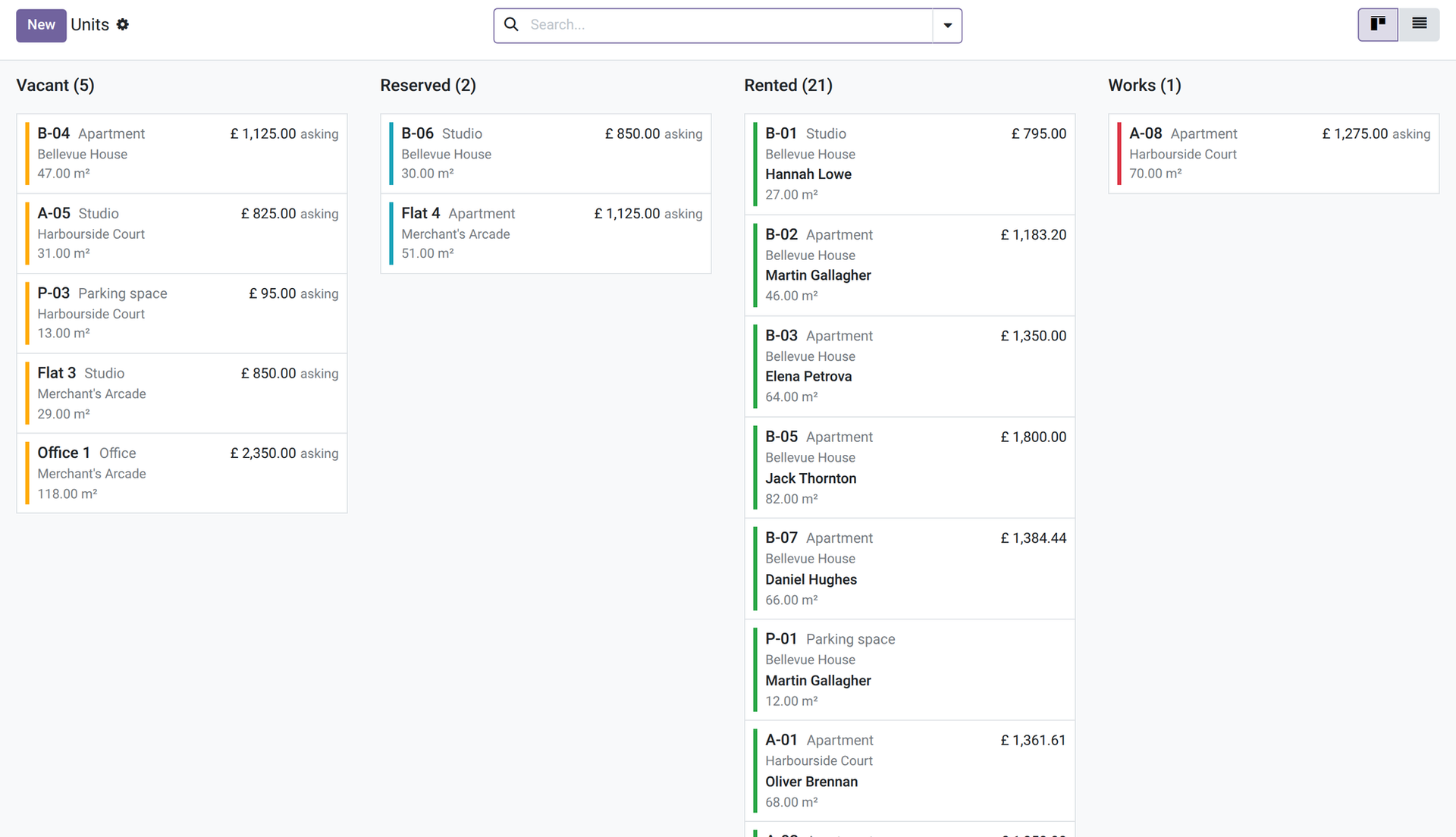
- 🏢 Buildings and units — a building with its address, owner and occupancy rate; units with a type (apartment, shop, office, parking space… editable), area, rooms, floor, amenities and an asking rent. The state of each unit (Vacant, Reserved — a draft lease, or a lease starting later —, Rented or Works) shows on its form and in the column and colour of its kanban card.
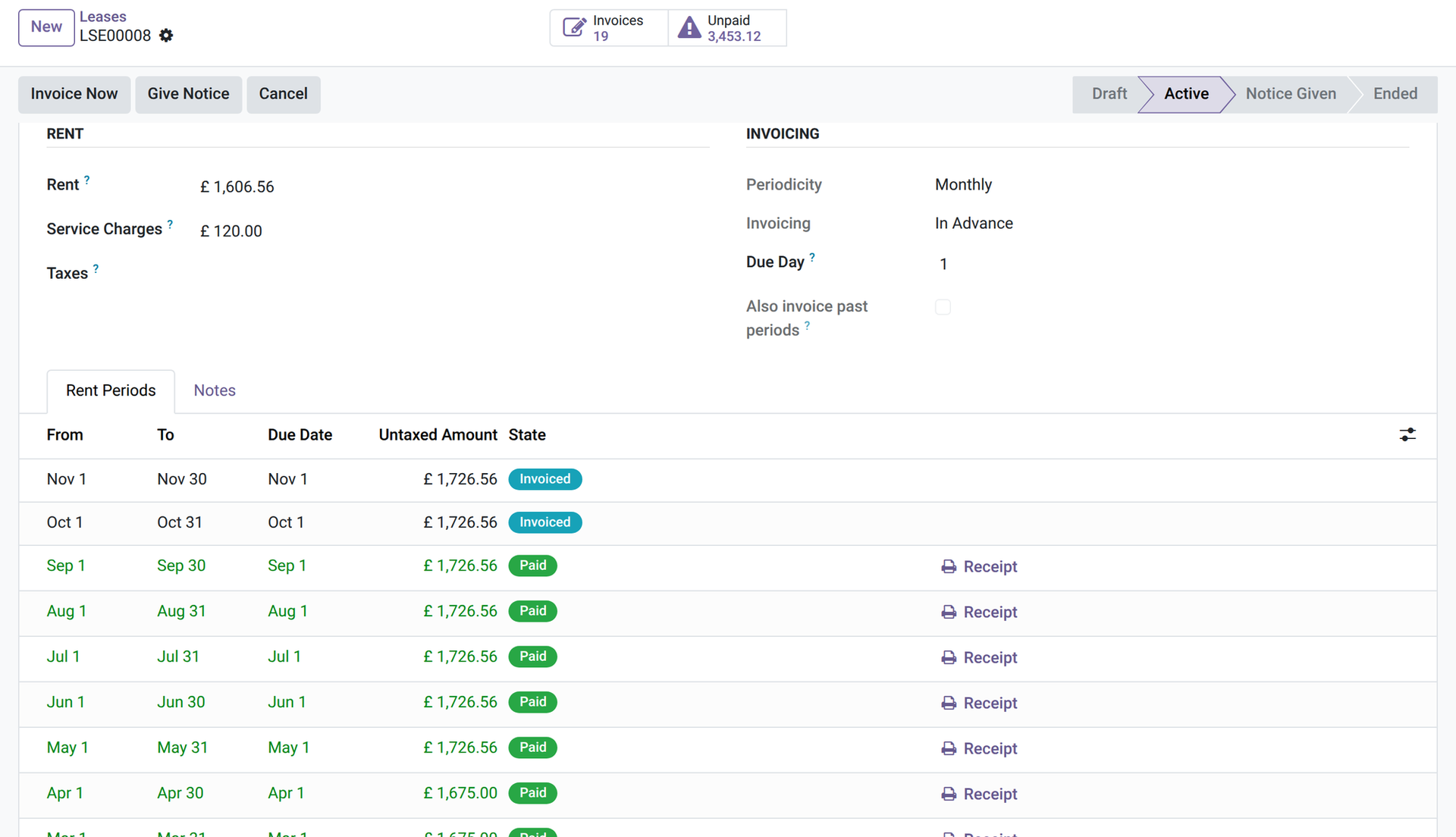
- 📄 The lease — main unit and annexes (parking, storage), tenant, co-tenants and guarantors, start date, rent, service charges, taxes, monthly, quarterly or yearly rent, in advance or in arrears, due day. It goes from Draft to Active, Notice Given, then Ended.
- 🧾 Rent invoiced by itself — a daily job creates the invoice of each period once, never twice, in the tenant's language; the first and last periods are prorated to the day. Invoices stay in draft for you to check, or are posted at once if you choose. “Invoice Now” does it on demand, and “Also invoice past periods”, ticked before activation, brings an old lease up to date.
- 🔔 A failure does not go unnoticed — if a lease cannot be invoiced, its agent gets a to-do with the reason, and the other leases carry on.
- 🚪 Notice and exit — “Give Notice” records the notice date and the exit date; the rent is invoiced up to the exit day and the lease ends by itself after it. A manager can withdraw the notice or change the exit date until the lease has ended.
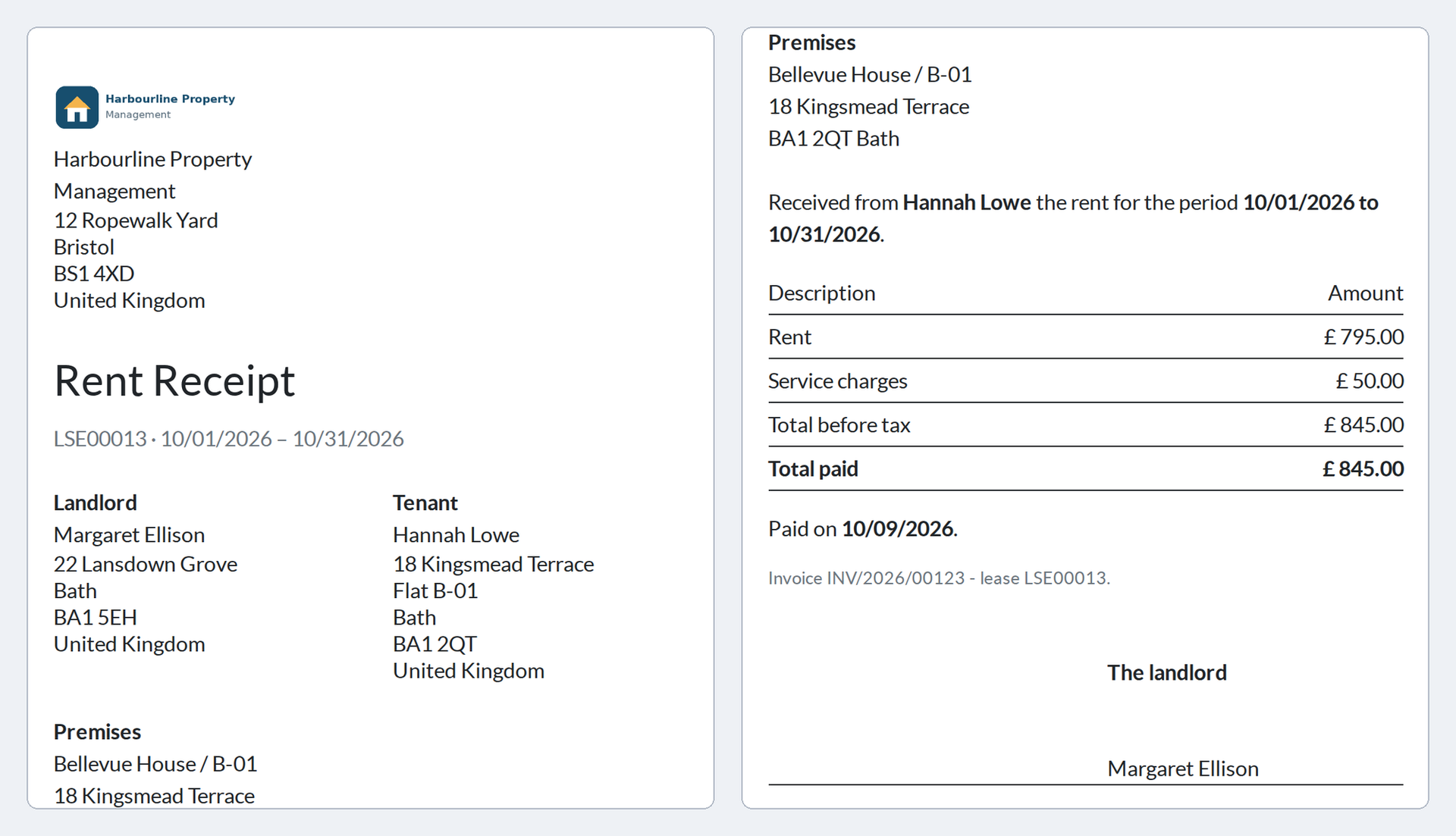
- 🖨️ The rent receipt — a paid period prints its receipt (landlord, tenant, premises, amounts), from the period or from its invoice; it is not offered for an unpaid period.
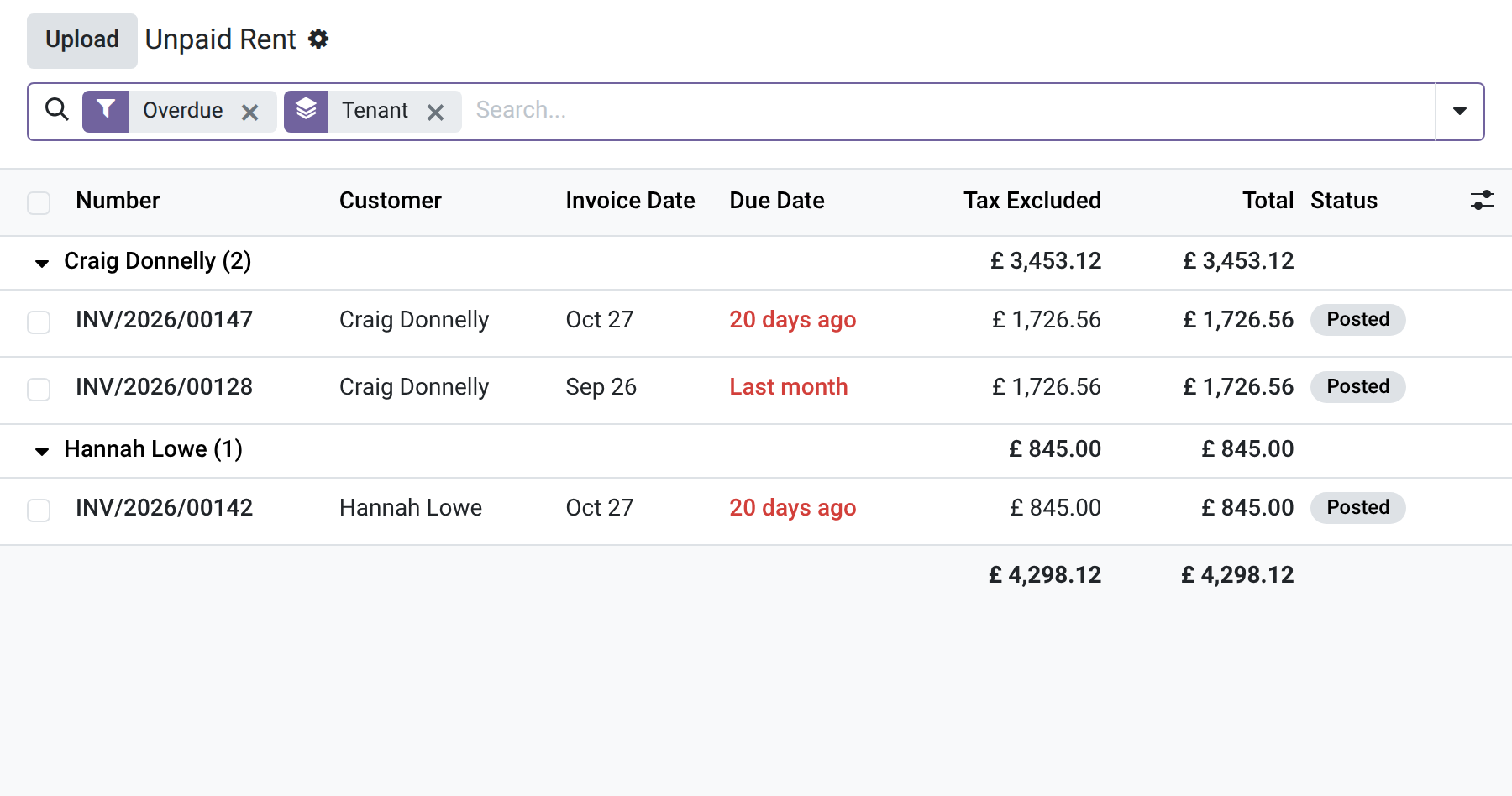
- ⚠️ Unpaid rent — the Unpaid Rent list groups by tenant the posted rent invoices past their due date (for users with invoicing rights), and each lease shows its unpaid amount, in the list and as a button on its form.
- 📊 The rent roll — every unit by building with its tenant, rent, charges, lease start and state, with totals and a pivot (for managers).
- 🔒 Two profiles — the agent manages units and leases and invoices the rent; the manager configures, creates the buildings, changes the rent of an activated lease, changes or withdraws a notice, ends or cancels an activated lease and sees the rent roll. Multi-company: each company sees its own.
In screenshots
1. Who rents what, at a glance
The rent roll: every unit by building with its tenant, rent, charges, lease start and state, with totals.
2. A lease and its rent periods
An active monthly lease with its annex: the rent periods show which are paid and which are invoiced but not paid yet.
3. Every unit by state
The units in columns: vacant, reserved, rented and under works, with the tenant and the rent.
4. Who is behind
Posted rent invoices past their due date, grouped by tenant.
5. The rent receipt
The receipt of a paid period: landlord, tenant, premises, rent and charges, total paid.
Why install it
- You see who rents what, and who is behind, without a spreadsheet.
- Rent invoices and receipts come from the lease: nothing is typed twice.
- Country-neutral: you set your own taxes and choose the notice and exit dates — nothing legal or country-specific is built in.
- Honest limits: one main unit per lease (with annexes); no late-payment penalties, no rent steps or rent-free periods; the term of a lease is for information, it only ends through a notice.
- It is the base of the Property Management family: deposits, rent review, charges, inspections, works, owner management, tenant portal, timeline and website listings plug into it.
Part of the OdooSkills Property Management family
Property Management is the base and the other modules plug into it, some with a prerequisite: the timeline needs Gantt View (sold separately), the tenant portal needs the Odoo Portal, the listings need the Odoo Website app. Some also work together: the works charged to the owner show on the owner statement, and a tenant can report a problem from the portal once Maintenance is installed:
- 💰 Property — Deposits — $39: ask for the deposit, hold it, record the deductions at exit and settle it with a statement.
- 📈 Property — Rent Review — $29: rent review by index or fixed percentage: a proposal to validate, then a notice for the tenant.
- 🧮 Property — Charges — $39: building expenses, allocation keys and the reconciliation of service charges against the provisions.
- 📋 Property — Inspections — $39: entry and exit condition reports, room by room, with photos, signatures and a comparison at exit.
- 🛠️ Property — Maintenance — $39: maintenance requests and works per unit: vendor, quote, cost, who pays, re-invoicing the tenant.
- 🤝 Property — Owners — $59: manage units for their owners: mandates, fees and an owner statement for each period.
- 🌐 Property — Tenant Portal — $29: tenants see their leases, rent periods and receipts, and report a problem, from their portal.
- 📅 Property — Timeline — $29: every unit and every lease on one twelve-month timeline, vacancies included (needs Gantt View, sold separately).
- 🏷️ Property — Listings — $39: publish your vacant units on your website with photos, filters and a visit request form.
📦 Need it all? The Property Management Suite installs the ten modules for $249 instead of $430. The timeline and the suite also require Gantt View ($89), sold separately.
Compatibility and license
Odoo 18, 19 and 20, developed and tested on Community. OPL-1 license. Stands alone: no other paid module is needed. It uses the Odoo Invoicing app (installed automatically). Interface available in English and French. A specific need? The “Request a change” button on this page sends it to us. Support: apps@odooskills.com.
Discussion
Sign in to join the discussion.