
Property — Charges
Premium Launch −30%Split the building's expenses between tenants, prorated to their days of occupation, and settle the balance against the provisions.
| Technical name | oski_property_charges |
|---|---|
| License | OPL-1 |
| Author | OdooSkills |
$ 39.00
$ 27.30
Launch price — 30% off until December 31, 2026
A ready-to-use Odoo database with demo data, deleted after 1 hour. Odoo 20, 19, 18.
Missing a feature or found a bug?
Request a change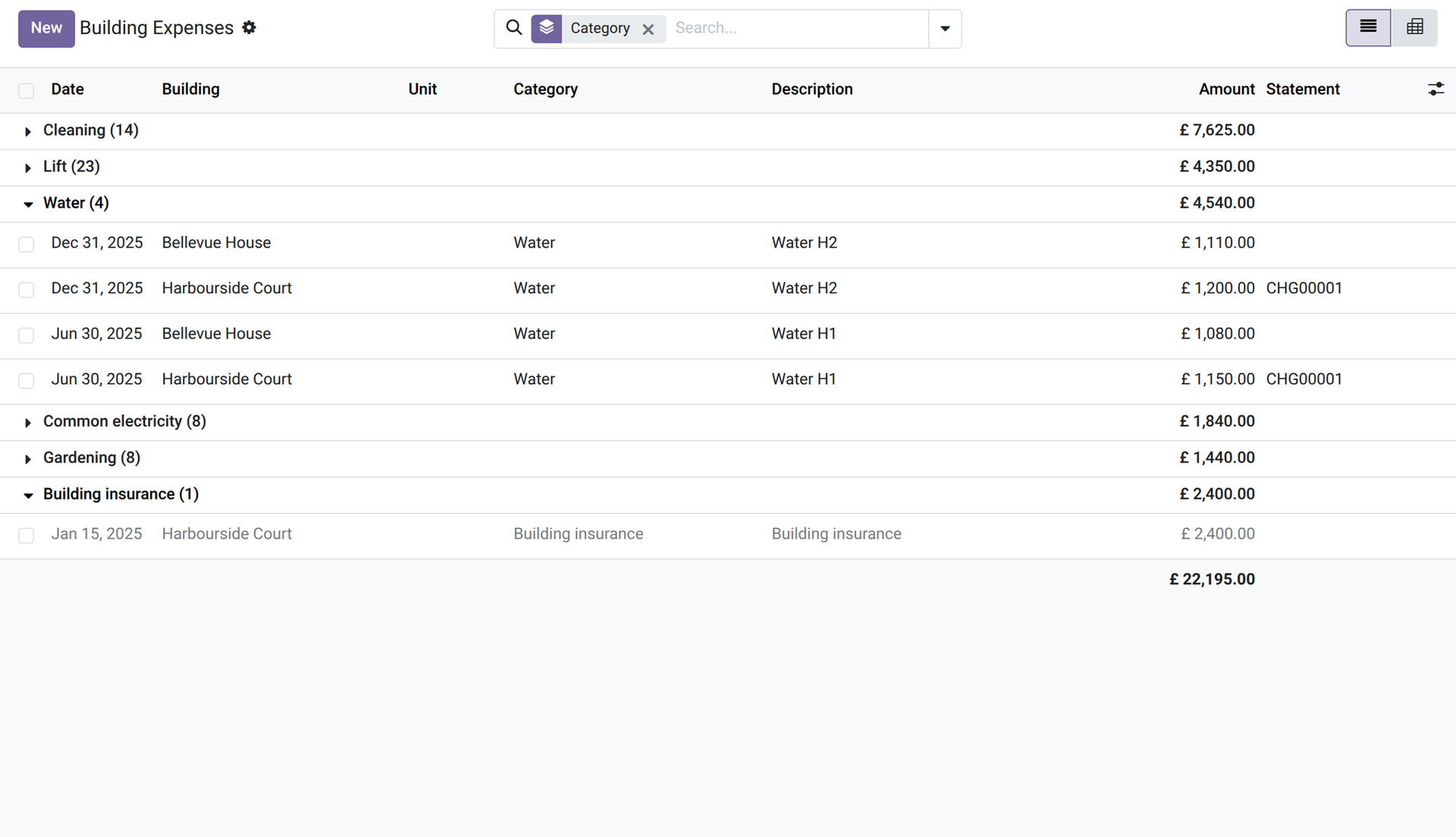
Property — Charges
Split the building's expenses between tenants, prorated to their days of occupation, and settle the balance against the provisions.
Every year the owner pays for the cleaning, the lift, the water and the insurance of the building, while the tenants have paid monthly provisions. Splitting the real costs between the units, taking into account who lived there for how many days, and comparing them with the provisions is a long calculation, often done late or roughly. This module does it from the expenses you record.
What it does
- 🏷️ Categories and keys — cleaning, lift, water, electricity, gardening, insurance: for each category choose how it is split (by area, by charge shares or in equal parts) and whether it is recovered from the tenants or borne by the owner.
- 🧾 Building expenses — record each expense with its date, category and amount without tax, for the whole building or for one unit, and link the supplier's bill for reference (users with invoicing rights). An expense already recovered is locked.
- 📐 Prorated to the days — each lease bears its share for the days it occupied the units during the period; the share of vacant units and days stays with the owner.
- 🧮 The reconciliation — “Compute” builds, for a building and a period, one line per tenant: days occupied, actual charges, provisions invoiced and balance, with the breakdown by category.
- ⚖️ Provisions compared — the provisions are the service charges of the rent periods whose invoice is posted, for their days inside the period (a cancelled invoice, or one fully reversed by credit notes, does not count).
- 💳 Invoice or credit note — “Confirm” (manager) creates for each tenant the invoice of the balance due or the credit note of the balance in their favour — as drafts, posted at once if your company posts its rent invoices automatically — and locks the expenses. It refuses if expenses, units, leases or provisions changed since the computation.
- 🖨️ A statement per tenant — a PDF for each tenant: the premises, the days occupied, each category with its key and share, the actual charges, the provisions and the balance.
In screenshots
1. The building's expenses
Expenses by category, with their amount without tax; those borne by the owner are greyed.
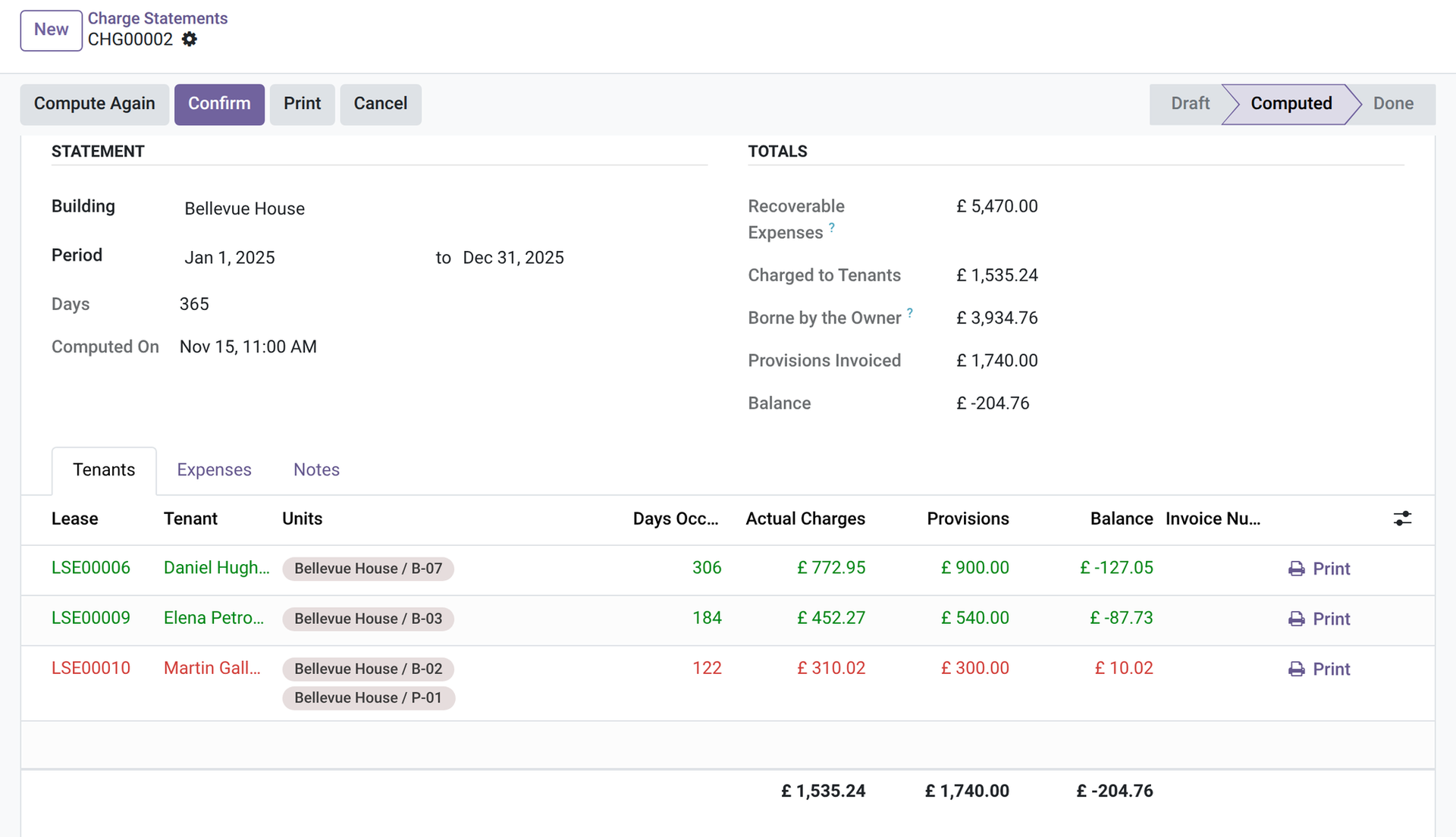
2. The reconciliation
A computed statement: totals, and one line per tenant with days occupied, actual charges, provisions and balance.
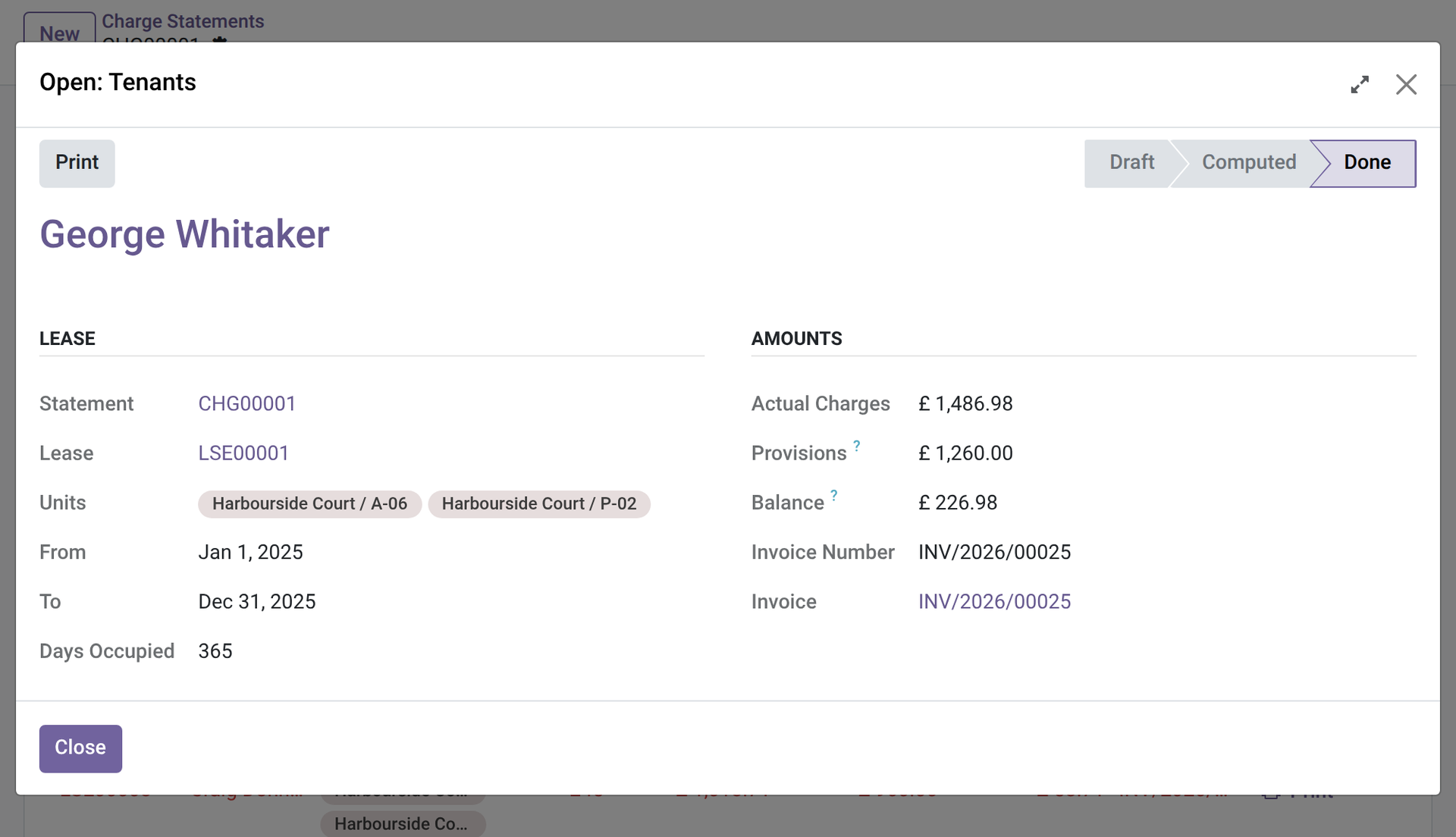
3. Line by line
One tenant's breakdown by category: key, share in percent, days and the tenant's share.
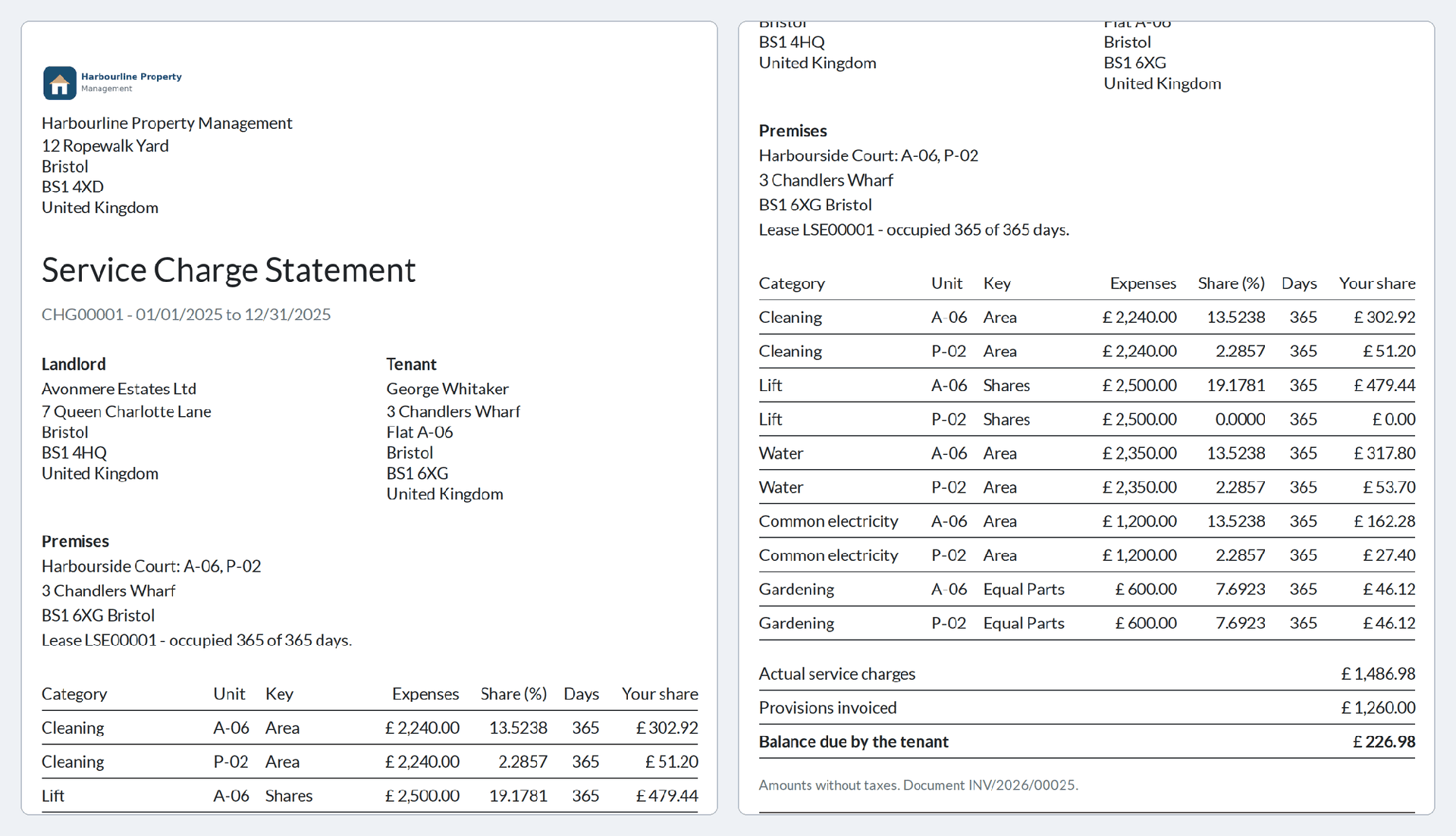
4. The statement for the tenant
The PDF of one tenant: premises, days occupied, each category with its key and share, provisions and balance.
Why install it
- A reconciliation that takes minutes, and that you can explain line by line.
- Each tenant pays for their own days, not for the vacancies of others.
- Honest limits: amounts are without tax (the balance is taxed with the taxes of the lease); each tenant's share of each expense is rounded down to the cent and the remainder stays with the owner.
- Country-neutral: your categories, your keys, your rules.
Part of the OdooSkills Property Management family
Property Management is the base and the other modules plug into it, some with a prerequisite: the timeline needs Gantt View (sold separately), the tenant portal needs the Odoo Portal, the listings need the Odoo Website app. Some also work together: the works charged to the owner show on the owner statement, and a tenant can report a problem from the portal once Maintenance is installed:
- 🏢 Property Management — $89: buildings, units and leases; rent invoiced every period; rent receipts; unpaid rent and rent roll.
- 💰 Property — Deposits — $39: ask for the deposit, hold it, record the deductions at exit and settle it with a statement.
- 📈 Property — Rent Review — $29: rent review by index or fixed percentage: a proposal to validate, then a notice for the tenant.
- 📋 Property — Inspections — $39: entry and exit condition reports, room by room, with photos, signatures and a comparison at exit.
- 🛠️ Property — Maintenance — $39: maintenance requests and works per unit: vendor, quote, cost, who pays, re-invoicing the tenant.
- 🤝 Property — Owners — $59: manage units for their owners: mandates, fees and an owner statement for each period.
- 🌐 Property — Tenant Portal — $29: tenants see their leases, rent periods and receipts, and report a problem, from their portal.
- 📅 Property — Timeline — $29: every unit and every lease on one twelve-month timeline, vacancies included (needs Gantt View, sold separately).
- 🏷️ Property — Listings — $39: publish your vacant units on your website with photos, filters and a visit request form.
📦 Need it all? The Property Management Suite installs the ten modules for $249 instead of $430. The timeline and the suite also require Gantt View ($89), sold separately.
Compatibility and license
Odoo 18, 19 and 20, developed and tested on Community. OPL-1 license. Requires Property Management (oski_property, $89). Interface available in English and French. A specific need? The “Request a change” button on this page sends it to us. Support: apps@odooskills.com.
Discussion
Sign in to join the discussion.