
Property — Inspections
Premium Launch −30%Entry and exit condition reports on the screen: photos, signatures, and the items that got worse at exit flagged.
| Technical name | oski_property_inspection |
|---|---|
| License | OPL-1 |
| Author | OdooSkills |
$ 39.00
$ 27.30
Launch price — 30% off until December 31, 2026
A ready-to-use Odoo database with demo data, deleted after 1 hour. Odoo 20, 19, 18.
Missing a feature or found a bug?
Request a change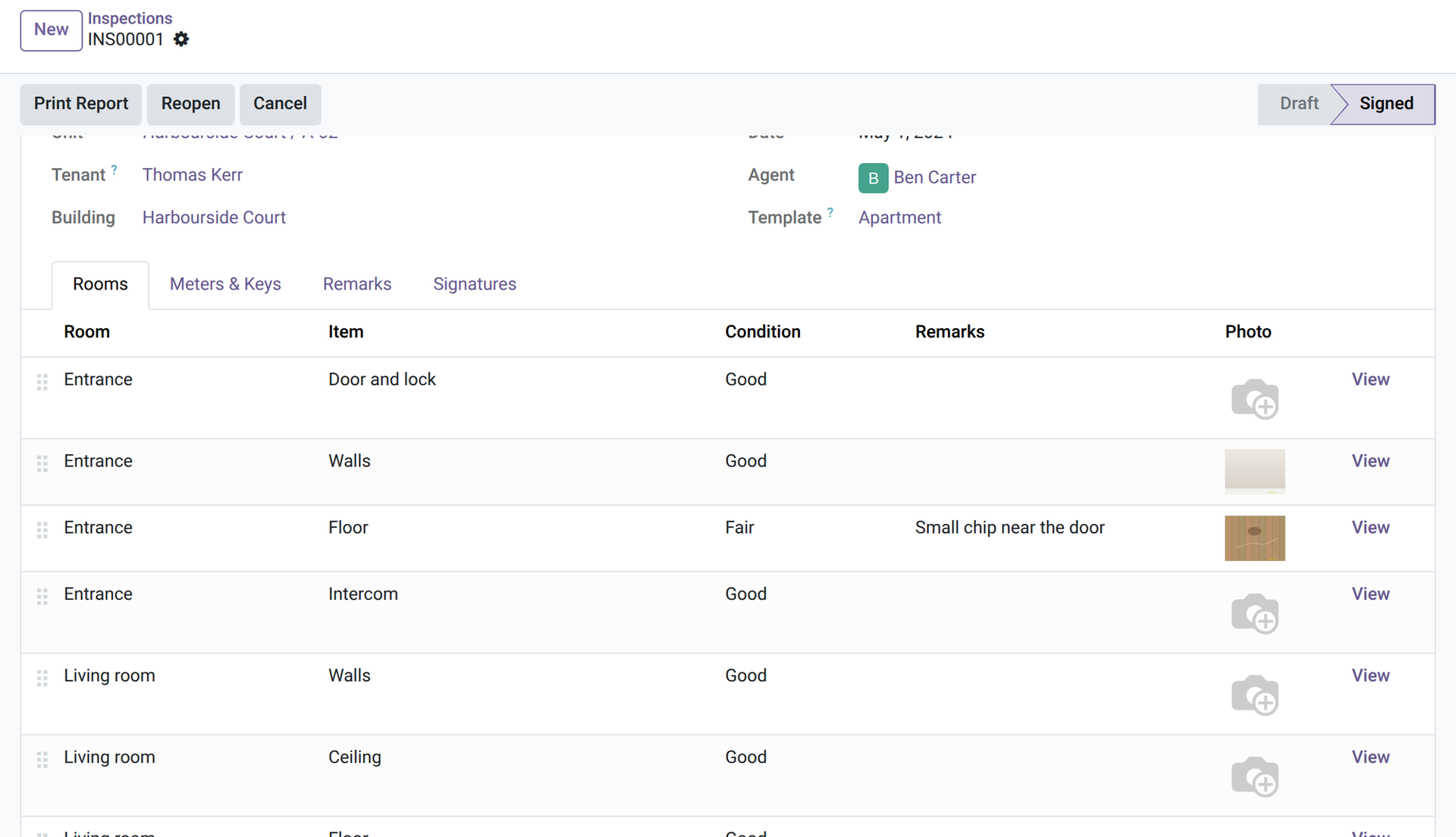
Property — Inspections
Entry and exit condition reports on the screen: photos, signatures, and the items that got worse at exit flagged.
The condition report is the document everybody argues about when the tenant leaves: a paper form, photos in a phone, a signature on a copy nobody can find. This module keeps the entry report and the exit report in the lease, room by room, signed on the screen, and shows what got worse.
What it does
- 🧩 Templates — pick a template on the report (Apartment and Commercial premises are supplied, tagged with the unit types they suit; a manager edits them or adds others): its rooms and items fill the report.
- 🏠 Room by room — each item has its condition (new, good, fair, poor or not applicable), a remark and a photo.
- 🔢 Meters and keys — meter readings with their number and unit, the number of keys handed over and a free text.
- 🔍 The exit compared with the entry — an exit report picks up the signed entry report of the same lease and unit; “Copy from Entry” brings its items and their entry condition beside the exit one (done again at signature, and an exit missing an entry item cannot be signed). An item that got worse is flagged and counted, and a filter lists the reports with degraded items.
- ✍️ Signed on the screen — “Sign & Close”: the tenant types their name and signs (drawn, generated from the name, or loaded as an image), the agent can sign too. Once signed, the report is frozen; a manager can reopen it, which erases the signatures (an entry already compared with a signed exit stays closed).
- 🗄️ A copy that stays — at signature a PDF copy is attached to the report (when the server can print PDFs; otherwise you are asked to print it and keep it); that copy can be neither deleted nor edited.
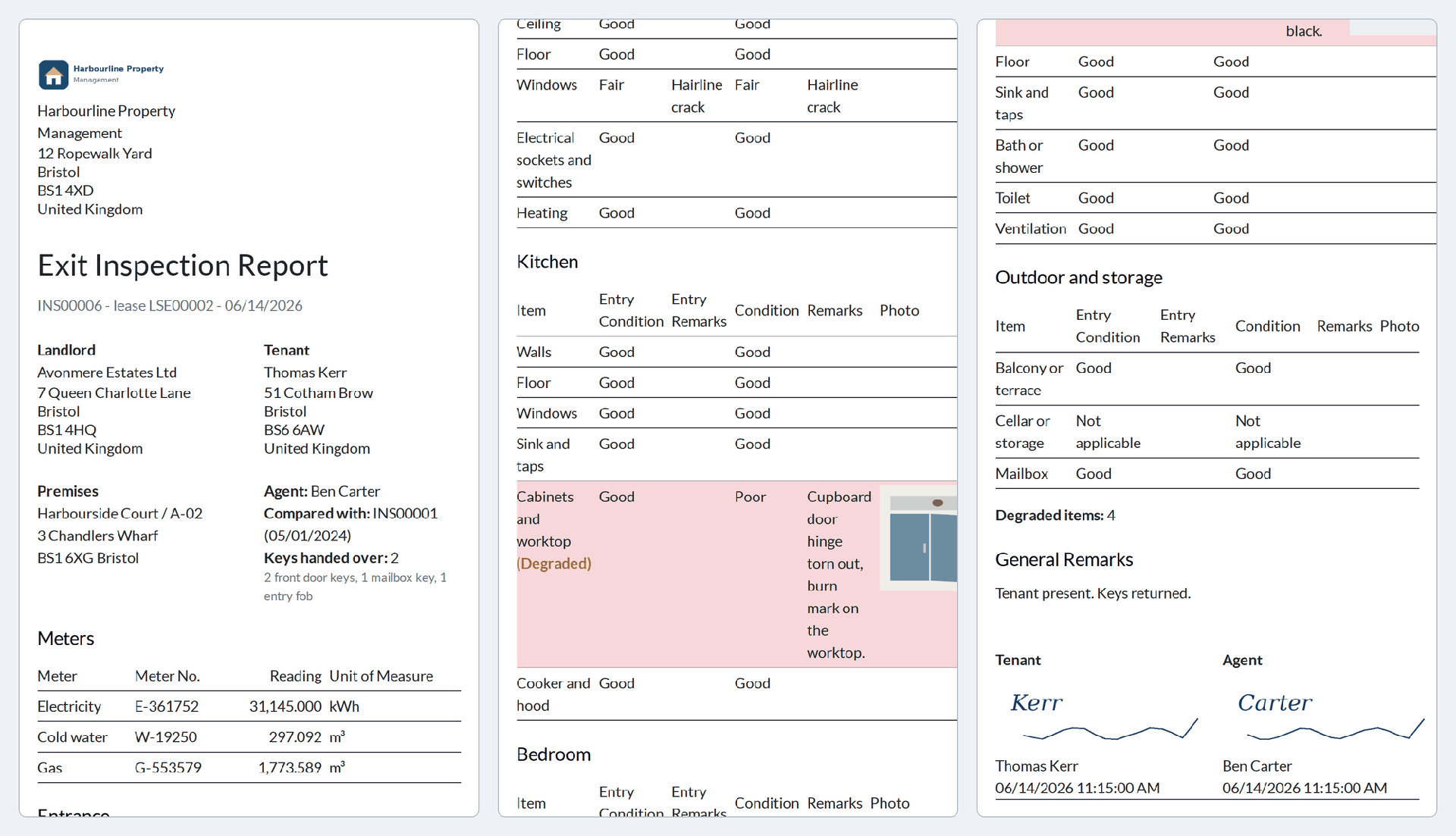
- 🖨️ The PDF, in the tenant's language — the entry or exit report with the premises, the keys, the meters, each room with its conditions and photos, the degraded items and both signatures.
- 📱 On a phone or a tablet — it is a standard Odoo form: the photo is uploaded from the device (most phones offer the camera) and the tenant can draw the signature with a finger (Draw).
- 🔒 Guard rails — a lease with a signed report keeps its tenant and its units; there is only one live report per lease, unit and type.
In screenshots
1. Room by room
A signed entry report: each item with its condition, remark and photo.
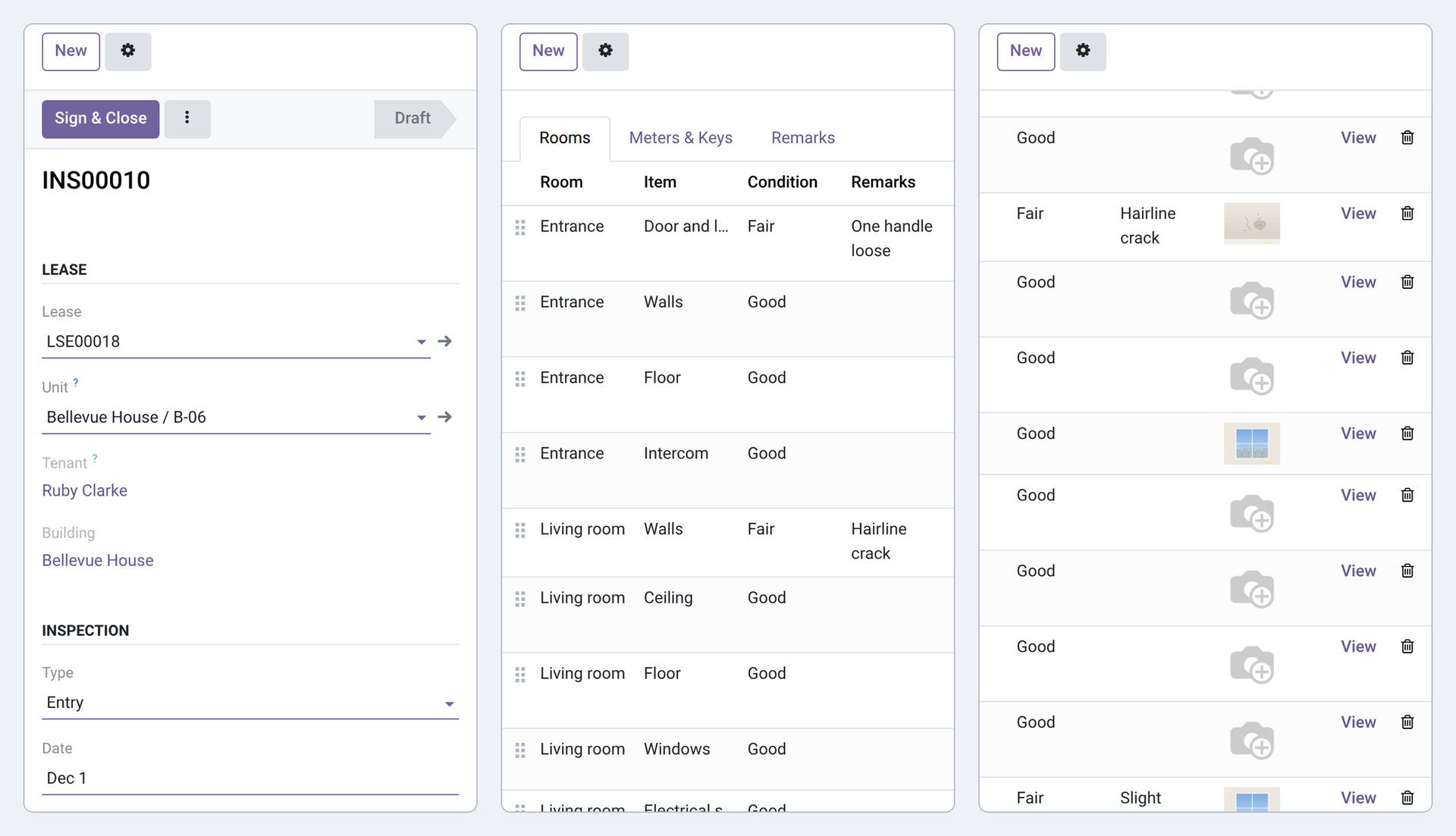
2. On a phone
An item opened on a phone: its condition, a remark and the photo.
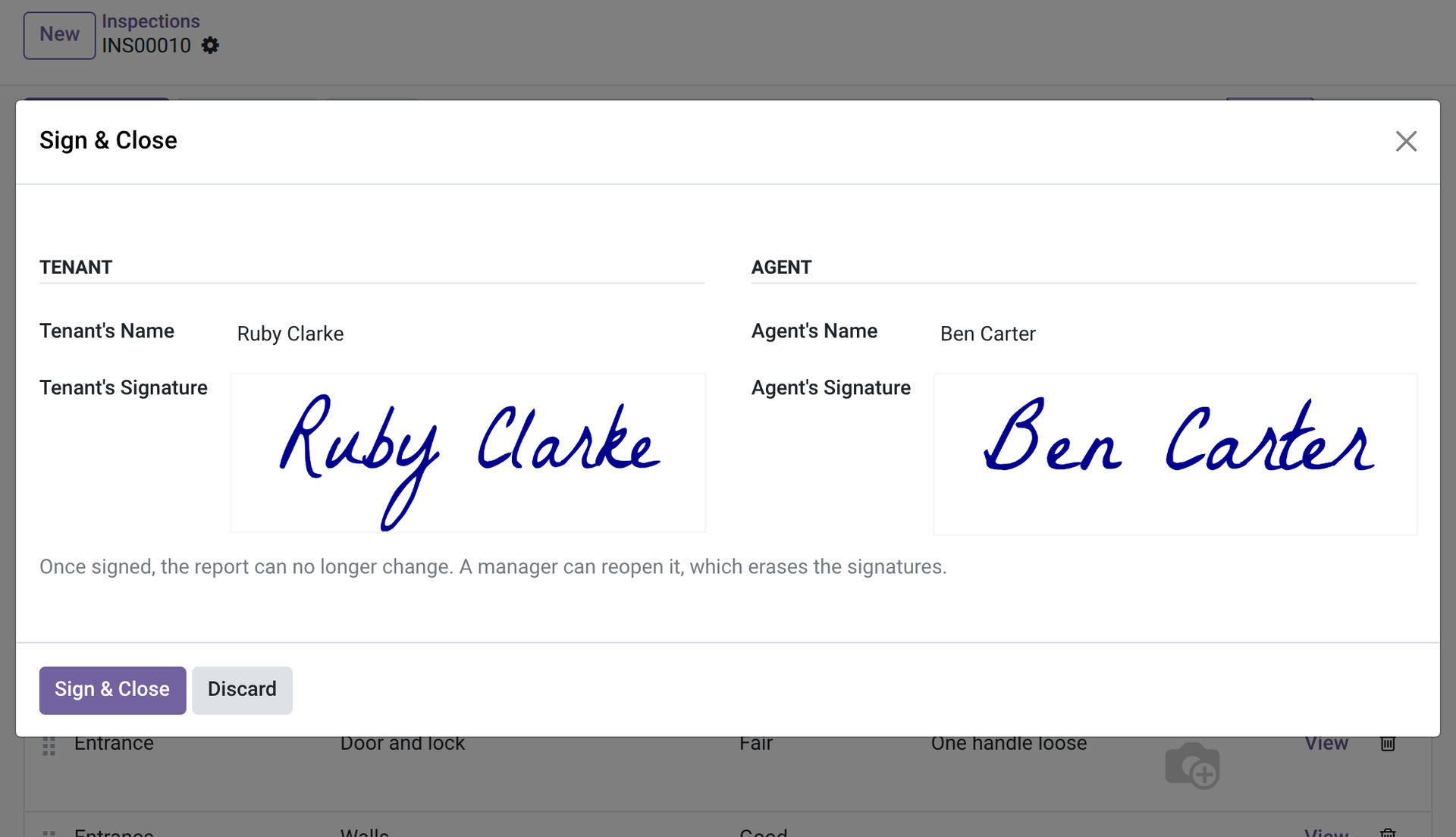
3. Signed on the screen
The Sign & Close dialog: the tenant's name and signature, then the agent's.
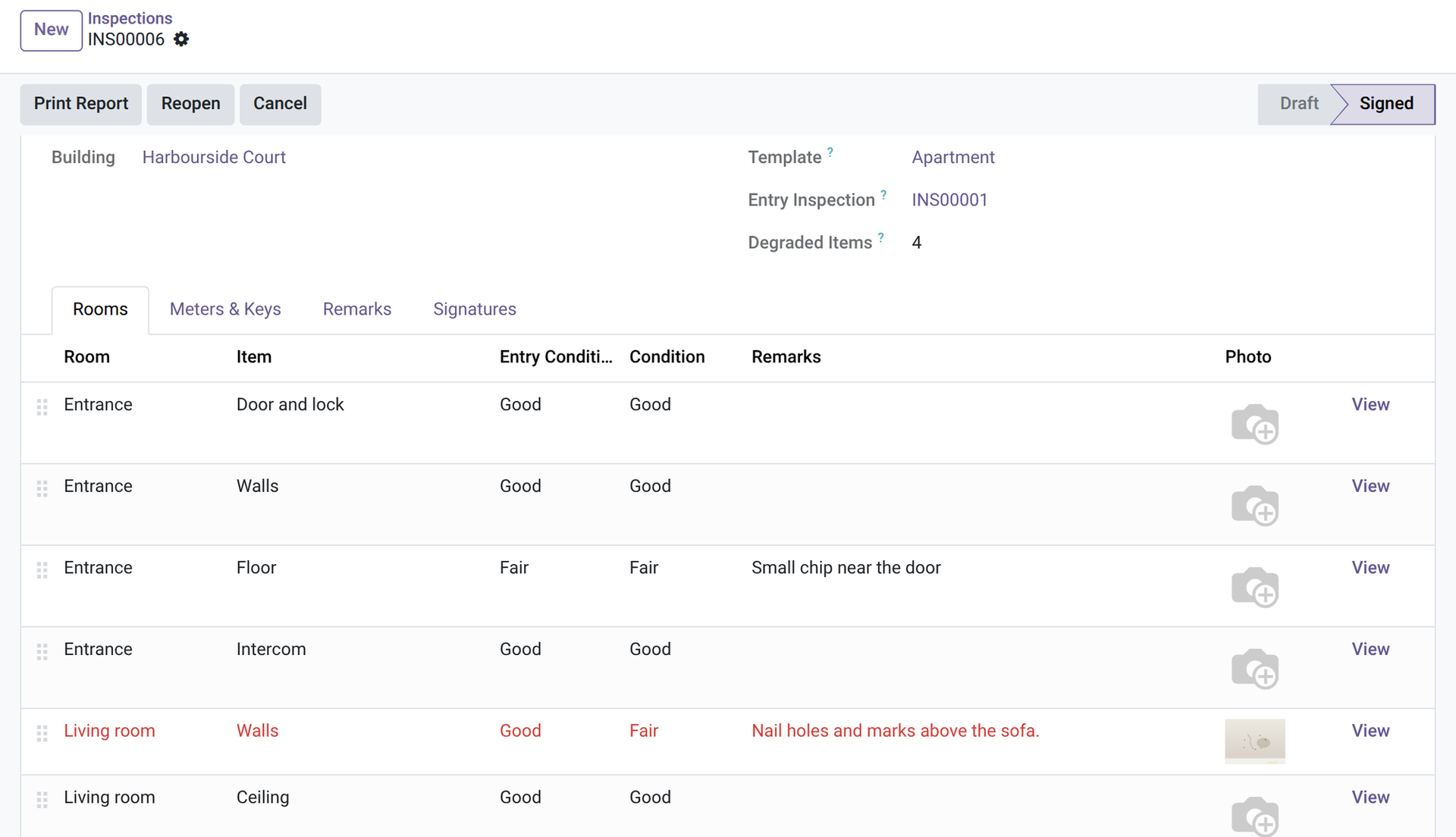
4. The exit, next to the entry
An exit report: the entry condition beside the exit one, and the degraded items in red.
5. The signed exit report
The PDF with entry and exit conditions, the degraded items marked, a photo and both signatures.
Why install it
- A dispute at exit is settled with two signed documents, not with memories.
- The photos stay with the lease.
- Nothing is retyped between entry and exit: the exit starts from the entry.
- Honest limits: one photo per item; the module shows the difference but never decides who pays; legal wear-and-tear rules are yours to apply.
Part of the OdooSkills Property Management family
Property Management is the base and the other modules plug into it, some with a prerequisite: the timeline needs Gantt View (sold separately), the tenant portal needs the Odoo Portal, the listings need the Odoo Website app. Some also work together: the works charged to the owner show on the owner statement, and a tenant can report a problem from the portal once Maintenance is installed:
- 🏢 Property Management — $89: buildings, units and leases; rent invoiced every period; rent receipts; unpaid rent and rent roll.
- 💰 Property — Deposits — $39: ask for the deposit, hold it, record the deductions at exit and settle it with a statement.
- 📈 Property — Rent Review — $29: rent review by index or fixed percentage: a proposal to validate, then a notice for the tenant.
- 🧮 Property — Charges — $39: building expenses, allocation keys and the reconciliation of service charges against the provisions.
- 🛠️ Property — Maintenance — $39: maintenance requests and works per unit: vendor, quote, cost, who pays, re-invoicing the tenant.
- 🤝 Property — Owners — $59: manage units for their owners: mandates, fees and an owner statement for each period.
- 🌐 Property — Tenant Portal — $29: tenants see their leases, rent periods and receipts, and report a problem, from their portal.
- 📅 Property — Timeline — $29: every unit and every lease on one twelve-month timeline, vacancies included (needs Gantt View, sold separately).
- 🏷️ Property — Listings — $39: publish your vacant units on your website with photos, filters and a visit request form.
📦 Need it all? The Property Management Suite installs the ten modules for $249 instead of $430. The timeline and the suite also require Gantt View ($89), sold separately.
Compatibility and license
Odoo 18, 19 and 20, developed and tested on Community. OPL-1 license. Requires Property Management (oski_property, $89). Interface available in English and French. A specific need? The “Request a change” button on this page sends it to us. Support: apps@odooskills.com.
Discussion
Sign in to join the discussion.