
Barcode Lots & Serials
Premium Launch −30%Lots & serial numbers layer for the Stock Barcode app: lot scanning, expiration dates, serial generation and pasting, PDF labels
| Technical name | oski_stock_barcode_lot |
|---|---|
| License | OPL-1 |
| Author | OdooSkills |
$ 29.00
$ 20.30
Launch price — 30% off until December 31, 2026
A ready-to-use Odoo database with demo data, deleted after 1 hour. Odoo 20, 19, 18.
Missing a feature or found a bug?
Request a change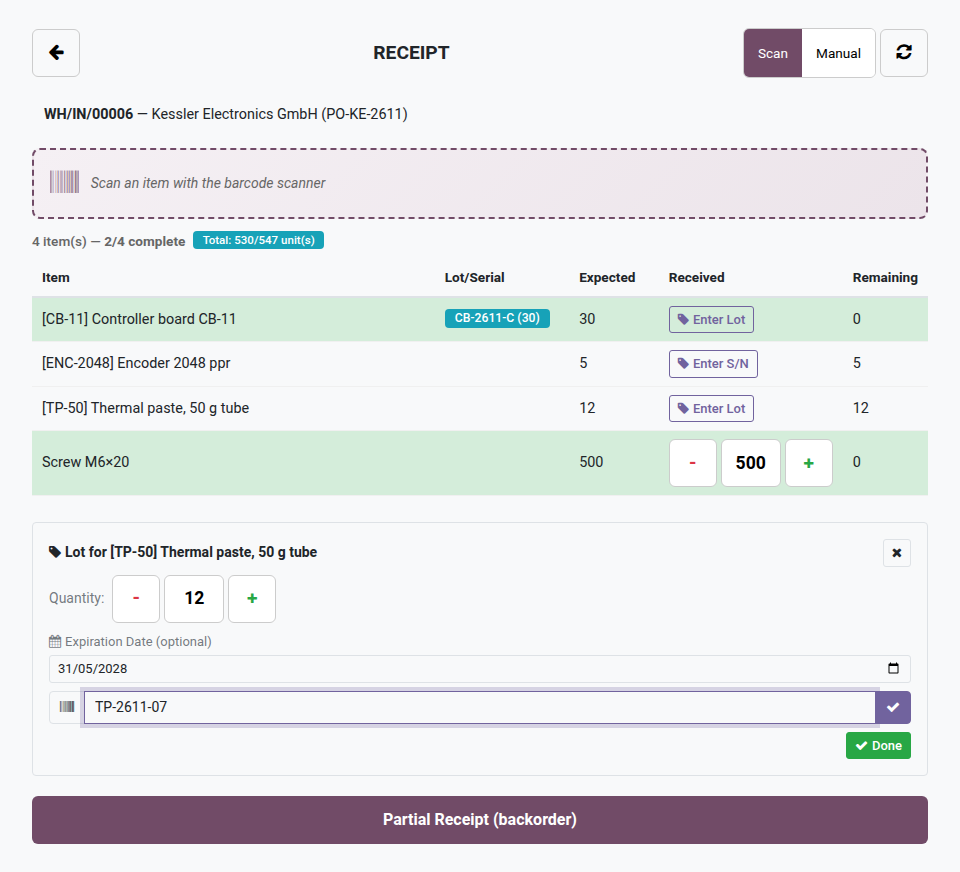
Stock Barcode — Lots & Serials
Lot and serial number traceability by scan, right inside the Stock Barcode app: expiration, generation and pasting of serials, scan-to-pick and PDF labels.
As soon as a product is tracked by lot or serial number, scanning is no longer enough: you have to enter the right lot, respect expiration dates, generate serials on the fly and paste entire lists without mistakes. Native stock screens force these steps through the keyboard, standing still. In the field, this breaks the scanning rhythm and multiplies traceability errors.
What the extension adds
- 🏷️ Lot/serial entry by scan — every screen (receipt, delivery, inventory count, transfer, lookup) recognizes and records the scanned or typed lot.
- 📅 Expiration dates — via
product_expiry: expiry computed automatically, "expired" badge in lookup. - 🔢 Automatic serial number generation — prefix + bounded counter, existing serials are skipped.
- 📋 Pasting a list of serials — paste a block of numbers in one go; automatic deduplication, on receipts only.
- 🎯 Scan-to-pick on delivery — scan a lot to pick the quantity available at the source directly.
- 🖨️ PDF labels per lot — A4 Code128 sheets generated from the lot, ready to print and stick back on.
In pictures
1. Enter the lot at reception
For a product tracked by lot, the panel asks for the quantity, the lot and, if the product expires, its expiry date. Lots already received show in the Lot/Serial column.
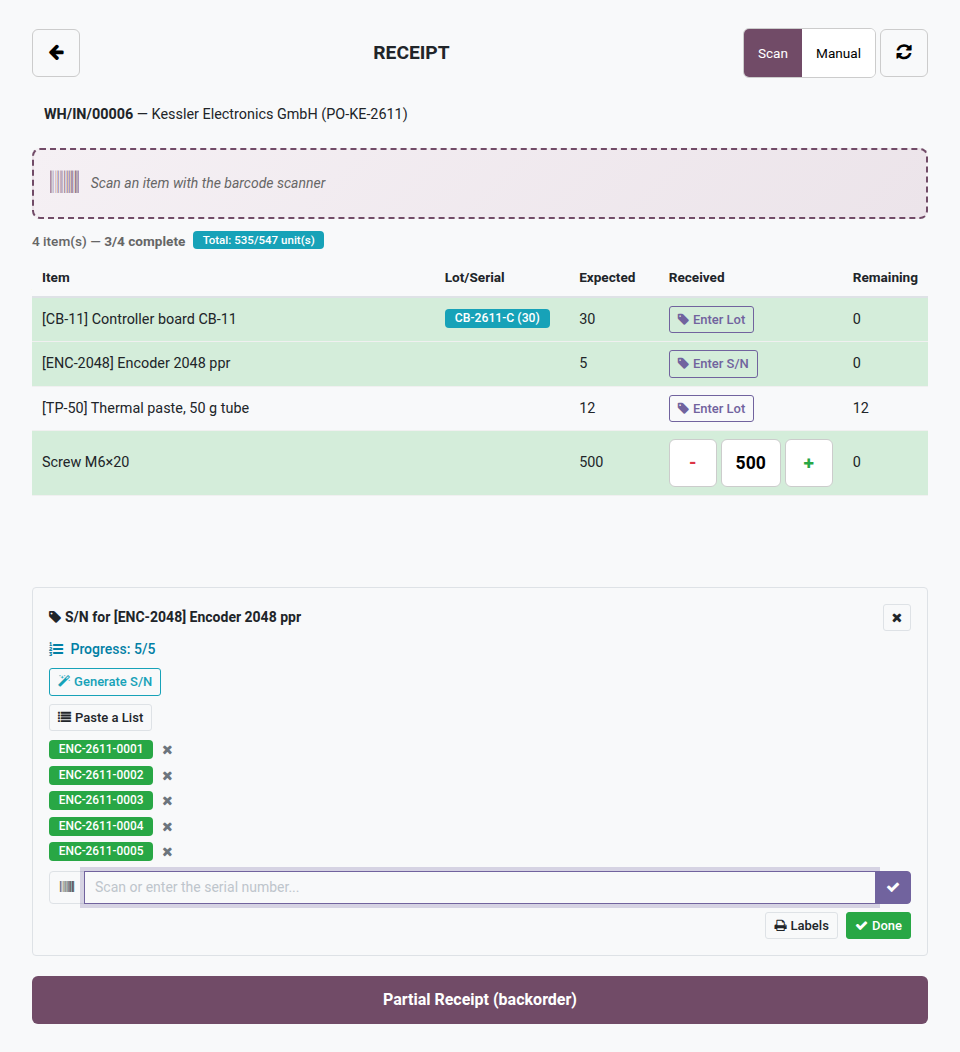
2. Generate a run of serial numbers
Prefix plus counter: five serial numbers created in one go for the five encoders received. A list can also be pasted from the supplier's file.
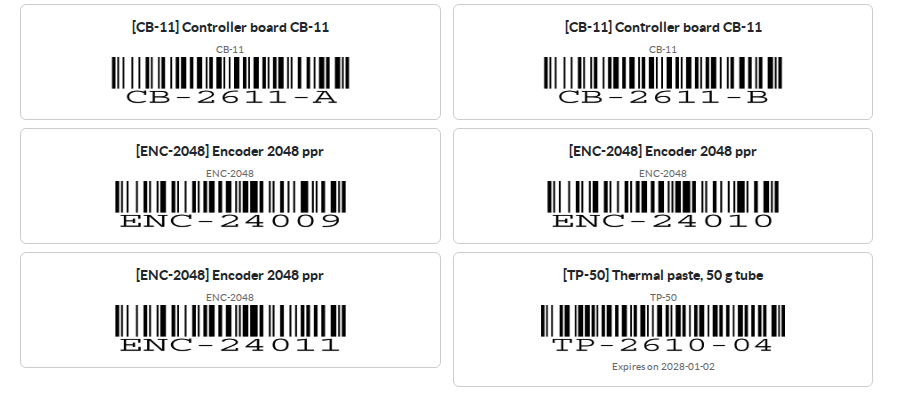
3. Code 128 labels per lot
One label per lot or serial number, with the product, its reference and the expiry date when there is one. Printed from the lot list or the receipt.
Why adopt it
- Lot/serial traceability by scan without going through Odoo Enterprise or a third-party WMS.
- Built-in expiration management — the "expired" badge prevents shipping an out-of-date lot.
- Real time savings when receiving serialized products: generation + pasting in a few seconds.
- Installs on top of the open-source module without reconfiguring the existing screens.
The foundation is open source
This extension requires the open-source Stock Barcode module (the five touch screens for receipt, delivery, inventory count, transfer and lookup). Install it first; this layer then adds lots and serial numbers on top of it.
OPL-1 license — compatible with Odoo 19.0. Requires "Stock Barcode" (open source) and the Odoo product_expiry module. Support: apps@odooskills.com.
Discussion
Sign in to join the discussion.