
Shop Floor Quality
Premium Launch −30%Run quality checks directly on the shop floor tablet, at the work order level.
| Technical name | oski_shop_floor_quality |
|---|---|
| License | OPL-1 |
| Author | OdooSkills |
$ 49.00
$ 34.30
Launch price — 30% off until December 31, 2026
A ready-to-use Odoo database with demo data, deleted after 1 hour. Odoo 20, 19, 18.
Missing a feature or found a bug?
Request a change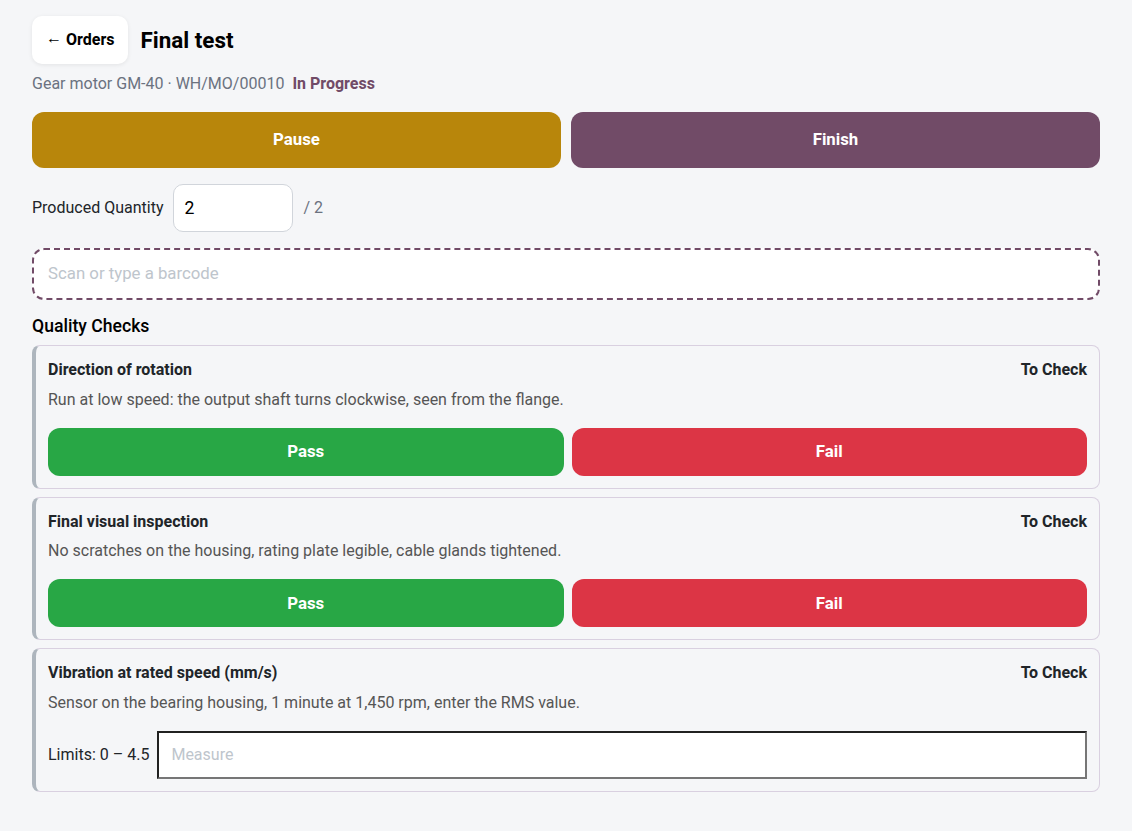
Shop Floor — Quality Control
Enterprise-style quality control on the shop floor tablet, in Community — the operator validates each check before being able to finish the order.
Quality control points configured on a work order are useless if nobody looks at them at the right time. In Odoo Community's native MRP views, checks are handled from a separate screen, away from the work center — the operator on a tablet finishes their orders without ever being confronted with them. The result: orders closed without quality sign-off, non-conformities discovered too late, and a quality manager chasing checks that were never done. In Odoo Enterprise, quality is displayed directly on the work order in the touch client; in Community, nothing exists to close this gap.
What it brings
- 🧩 Quality panel built into the order screen — as soon as the operator starts their work order, the configured control points appear directly below the components, without changing screens.
- ✅ Pass/fail validation by touch — a Pass or Fail button per check, designed for a shop floor tablet, not for a desktop form.
- 📏 Measurement checks with visible limits — for numeric points (vibration, dimension, weight…), the standard limits are displayed next to the input field; conformity is computed automatically on validation.
- 🔒 Closing blocked while a check is pending — the order cannot be finished if a configured control point has not been processed; an explicit message states which one is missing.
- ⚠️ A failure does not block closing — a check that was performed but is non-conforming is recorded and raises a quality alert, without preventing the operator from continuing production.
In pictures
1. Quality checks on the work order
Starting the final test creates the checks set up for this work center. Each check shows its instruction, with Pass / Fail buttons or a measure field.
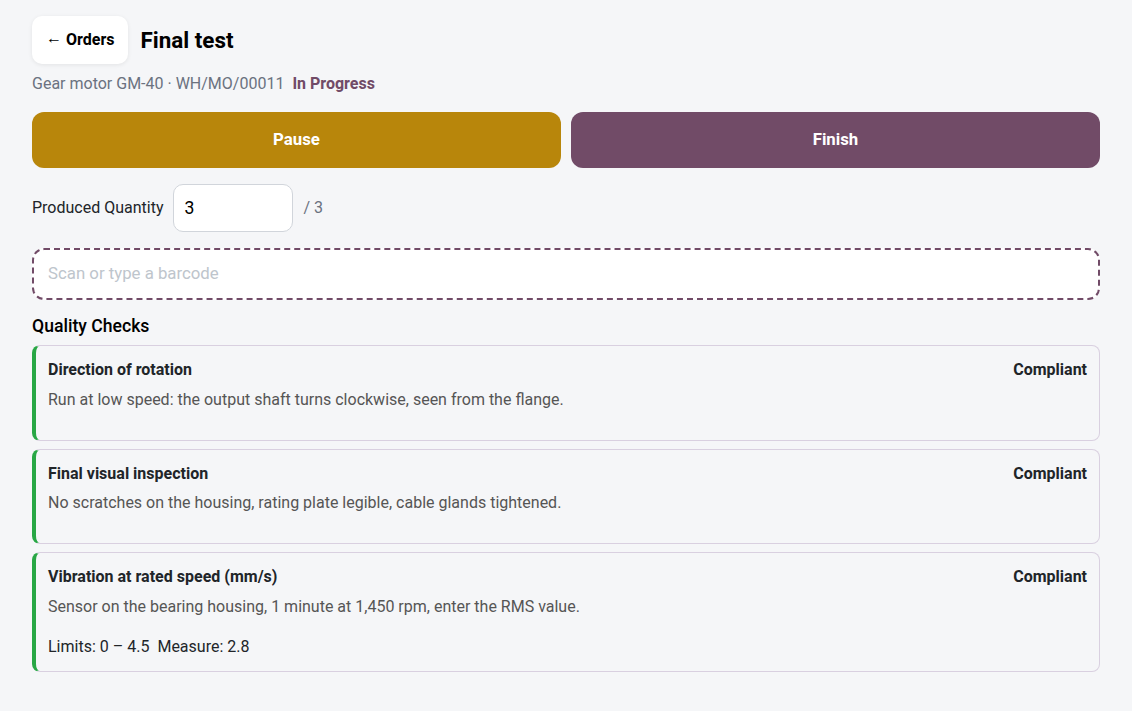
2. The result is recorded straight away
The measure is compared with the limits of the quality point: 2.8 mm/s for a maximum of 4.5, so the check is compliant. A failure creates a quality alert.
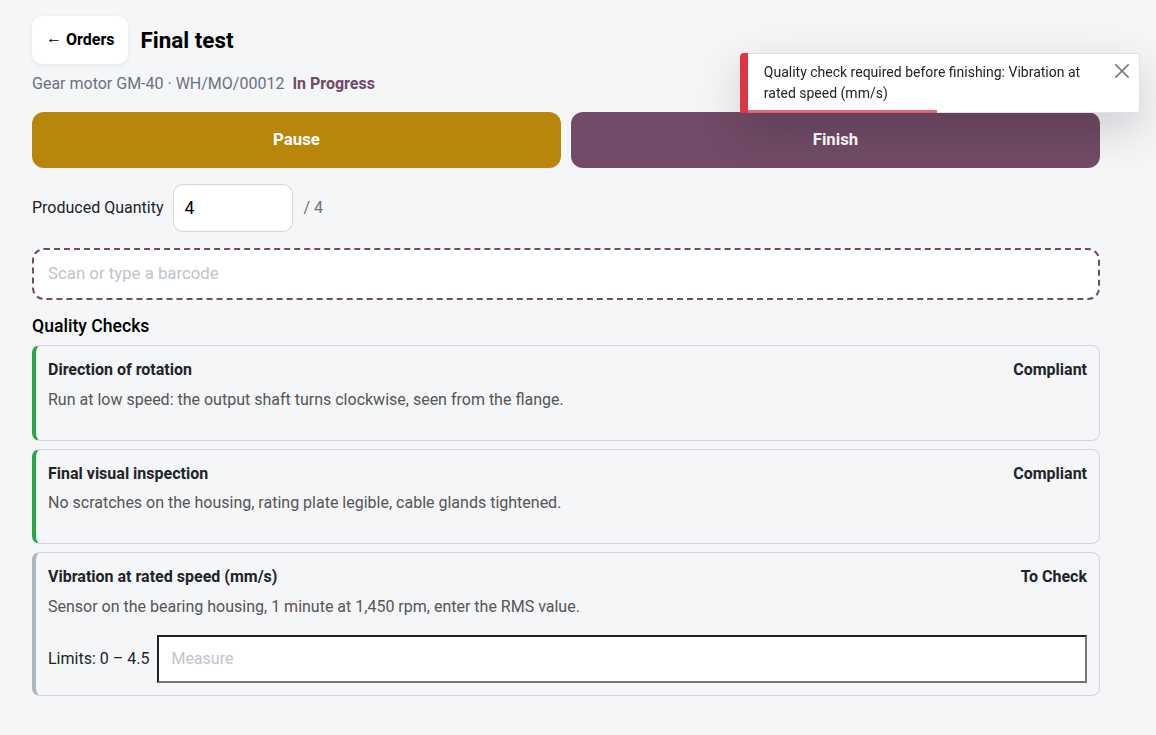
3. No finish while a check is pending
The vibration has not been measured: Finish is refused and the message names the missing check.
Why adopt it
- Quality on the work order, reserved for Odoo Enterprise, becomes available in Community — with no per-user subscription.
- Zero forgotten checks: closing an order guarantees that all configured points have been processed.
- No double entry — the bridge relies on the control points already configured in the OdooSkills Quality suite, without duplicating them.
- Immediate setup: no development, no additional technical data to manage (no new model, no new access rule).
The bridge between two OdooSkills suites
This module requires both oski_shop_floor (open-source core of the touch shop floor) and oski_quality (paid core of quality control) to be installed. Complete it with:
- oski_quality_mrp — automatically triggers checks when the manufacturing order is closed.
- oski_quality_block — blocks the validation of a document until all of its checks have passed.
A future Production Pack will bring Shop Floor and Quality together in a single offer. See the full suite on apps.odooskills.com.
OPL-1 license — compatible with Odoo 19.0. Requires the oski_shop_floor and oski_quality modules. Support: apps@odooskills.com.
Discussion
Sign in to join the discussion.