Shop Floor Lots & Serials
Premium Launch −30%Trace components and the finished product (lot/serial number) directly on the shop floor tablet, by scan.
| Technical name | oski_shop_floor_barcode |
|---|---|
| License | OPL-1 |
| Author | OdooSkills |
$ 49.00
$ 34.30
Launch price — 30% off until December 31, 2026
A ready-to-use Odoo database with demo data, deleted after 1 hour. Odoo 20, 19, 18.
Missing a feature or found a bug?
Request a change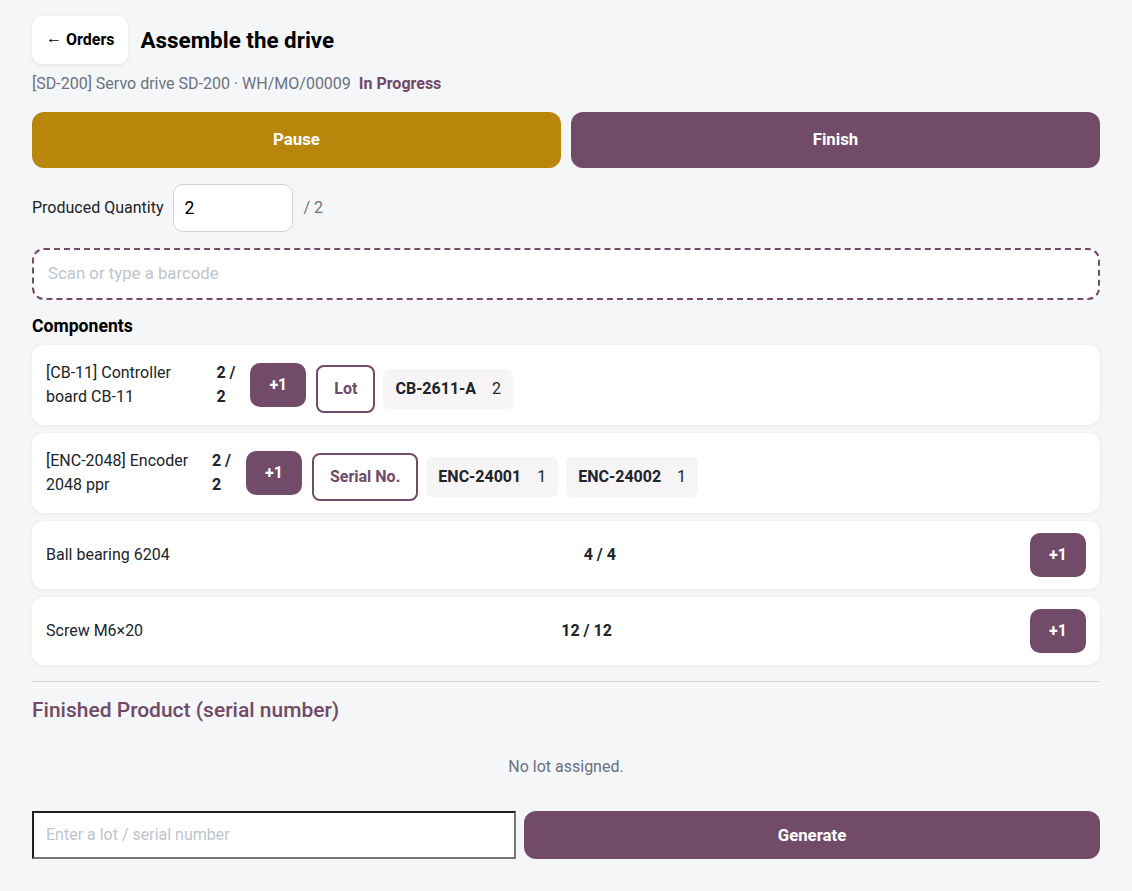
Shop Floor — Lots & Serials by Scan
Lot & serial number traceability at the work center: the operator scans the component, assigns the finished product's lot, and cannot close the order until traceability is complete.
A tracked component (lot or serial number) consumed on a Community shop floor tablet has nowhere to record its number: the touch view records a quantity, never a lot. Same problem on the finished product side — nothing forces the operator to assign a lot or serial number before closing the order. The result: orders finished without any traceability, a product recall that is impossible to contain, and a quality department that discovers the missing lot weeks later. In Odoo Enterprise, the Stock Barcode app shows this traceability on the work order; in Community, this module is missing entirely.
What it brings
- 🏷️ Lot / serial number recorded on every tracked component — under each lot- or serial-tracked component, a dedicated button activates the target, then the next scan (or manual entry) records the traceability line, without leaving the order screen.
- 🔢 Finished product lot / serial assigned or generated — a "Finished product" block lets you enter an existing lot/number or generate a new one, with the list of numbers already recorded visible at a glance.
- 🔒 Closing blocked until traceability is complete — the order cannot be finished if a production lot or serial numbers are missing (an explicit message states how many are missing).
- 📡 Smart scanning — the same scanner resolves the component to consume, automatically activates traceability for a tracked component, recognizes a lot name already in stock, or activates the finished product; tapping and keyboard entry always remain available as a fallback.
- 🧭 Zero double entry — the bridge relies on the product form (lot/serial tracking) and the lots already created in Inventory; no additional configuration needed.
In pictures
1. Scan the lot of each tracked component
On the tablet, the operator scans the component, then its lot or serial number. The lot and quantity appear next to the component, and the counter moves up.
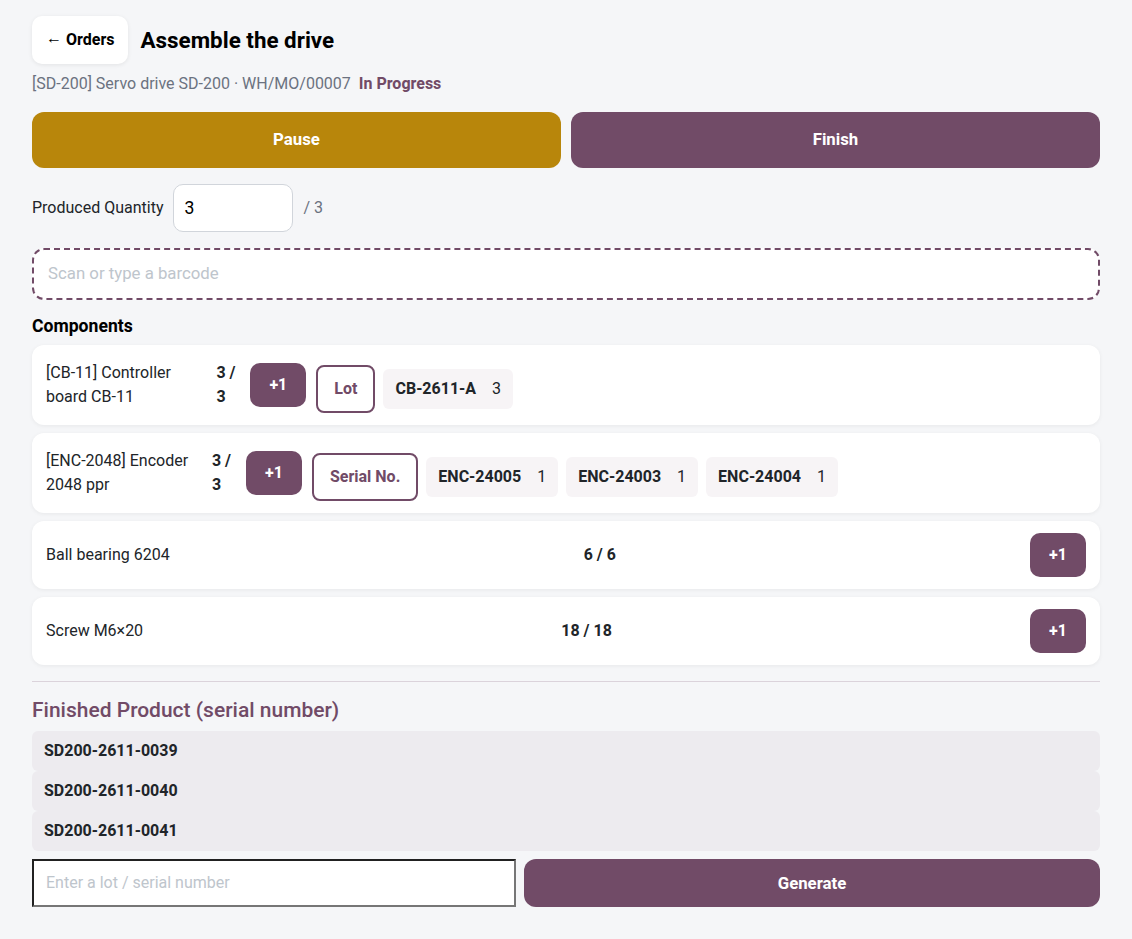
2. Serial numbers for the finished product
One tap on Generate creates the missing serial numbers for the quantity produced, from the product's sequence. They can also be scanned or typed.
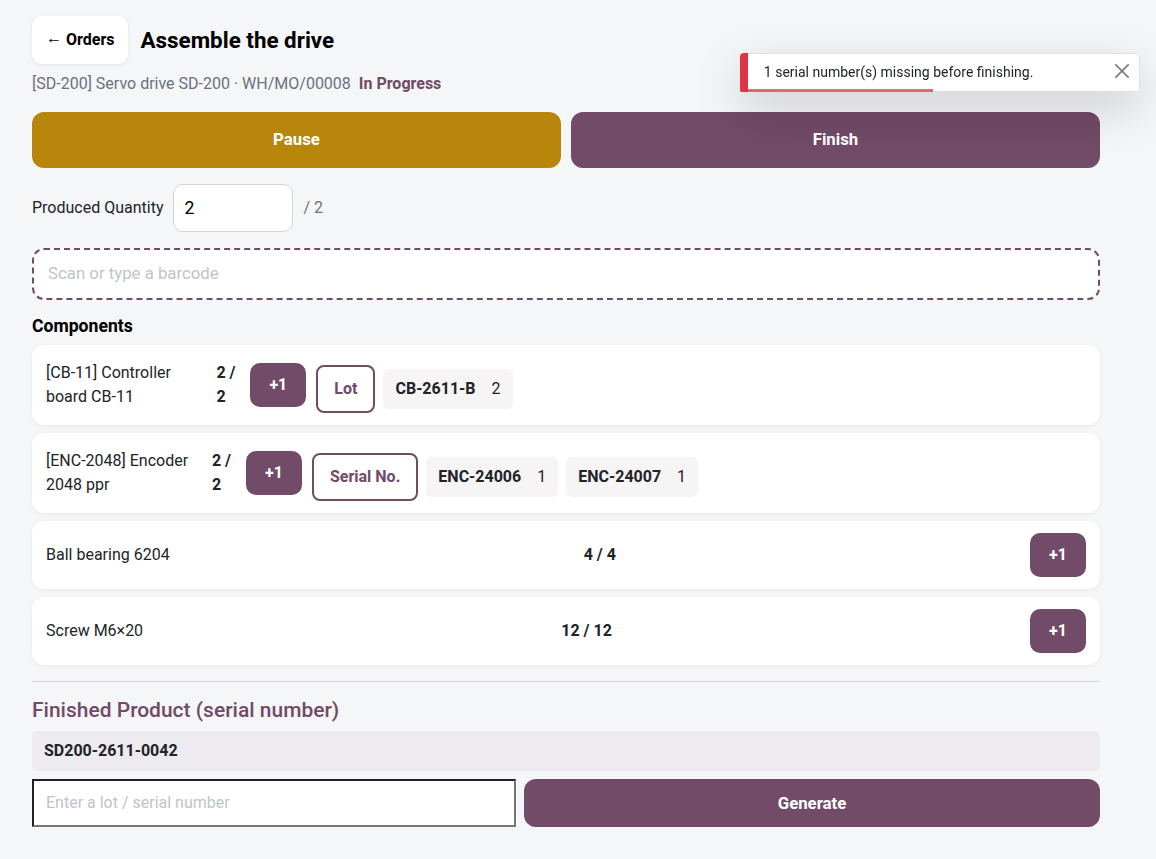
3. No finish without traceability
Two units produced, one serial number: the work order cannot be finished. The message says how many numbers are missing.
Requirements
This module is a bridge: it requires oski_shop_floor (the open-source core of the touch Shop Floor) to be installed first. It does not, however, depend on any other module — in particular, no dependency on the Stock Barcode app ("Barcode"): traceability is added directly in the work order screen, not in a separate scanning module.
Why adopt it
- Lot/serial traceability on the work order, reserved for Odoo Enterprise, becomes available in Community — with no per-user subscription.
- Zero orders closed without traceability: closing guarantees that the production lot or all the required serial numbers have been recorded.
- A product recall or a customer complaint can be traced precisely back to the lots of the consumed components, work center by work center.
- Immediate setup: no additional technical data, the bridge relies on the product form and the inventory already in place.
What this module does not do
- Component lots must already exist in Inventory: the module never creates a component lot, it only assigns lots found in stock (no risk of creating a phantom lot through a typing error).
- No management of expiration dates — traceability covers the lot/serial number, not expiry; use Odoo's native expiration date features alongside it if needed.
- No dependency on the Stock Barcode app (
oski_stock_barcode): this bridge is standalone, it works with theoski_shop_floormodule alone.
OPL-1 license — compatible with Odoo 19.0. Requires the oski_shop_floor module. Support: apps@odooskills.com.
Discussion
Sign in to join the discussion.