
Subcontracting Purchases
Open sourceLink a purchase to a subcontracted intervention: its amount is added to the contractor's validated statements.
| Technical name | oski_maintenance_subcontracting_purchase |
|---|---|
| License | LGPL-3 |
| Author | OdooSkills |
Subcontracting Purchases
The part ordered elsewhere goes into the cost of the intervention it serves.
An outsourced intervention is not always paid in a single step. The contractor invoices their labor; the circuit board, on the other hand, is ordered from the manufacturer. Those 420 € of purchases really are a cost of the intervention — but they live in Purchase, and the intervention ignores them. The cost per piece of equipment is then wrong, and the "repair or replace" decision is made on an incomplete figure. This bridge adds an Intervention column on the purchase order line: as soon as the order is confirmed, its amount is added to the intervention's external cost.
What it adds
- 🛒 A column on the purchase line — hidden by default, shown in one click: only a minority of lines relate to an intervention. Only subcontracted interventions are offered.
- ✅ Nothing counts before confirmation — a request for quotation, a draft or a cancelled order weighs on no cost. Same rule as the contractor's statements: commitment first, cost second.
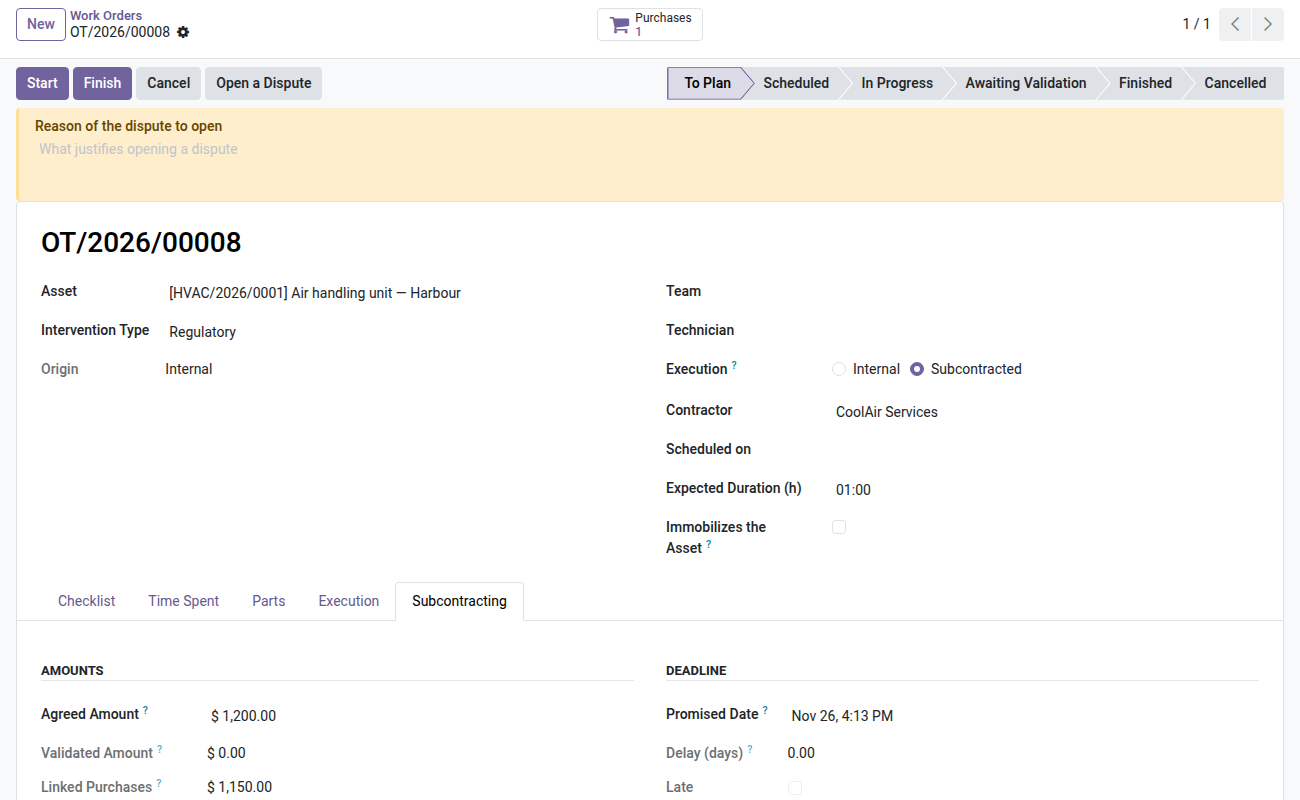
- 🔍 The three amounts side by side — what the contractor had validated, what the purchases add, and the resulting total. They are deliberately displayed together, on the same page.
- 🧾 A "Purchases" button on the intervention opens all linked orders, requests for quotation included — so including those that do not count yet.
- ⚠️ The amounts ADD UP, and that is intentional: a purchase from a third party is not what the contractor reported. So do not link here the purchase order that pays for an already validated statement — the expense would be counted twice. The page puts them side by side precisely so that the mistake is visible.
Screenshots
1. Agreed, validated, ordered
The purchase order linked to the intervention adds the third amount.
Why adopt it
- The cost of an intervention becomes complete: external labor and parts bought elsewhere.
- The repair/replace decision is finally made on the true figure per piece of equipment.
- No purchasing process to change: one column to show on the line, nothing else.
- A cancelled purchase drops out of the cost on its own, with no manual action.
The Assets & Maintenance suite
This bridge is open source and installs itself as soon as its two neighbors are present:
- 🤝 Subcontracted Maintenance (
oski_maintenance_subcontracting) — $69: required. The contractor's extranet, their statements and the validated cost. - 🛒 Purchase (
purchase) — standard Odoo module: required. - 📦 Parts on Consignment (
oski_maintenance_subcontracting_stock) — open source: the other side of the cost, the parts you lend.
The Assets & Maintenance suite — seven paid modules and two open-source bridges — is $199 instead of $343. Details on apps.odooskills.com.
📦 Need it all? The Asset & Maintenance suite installs all ten modules at once for $299 instead of $460.
License LGPL-3 — compatible with Odoo 19.0 Community and Enterprise. Open source module, installed automatically when oski_maintenance_subcontracting and purchase are both present. Good to know before installing: if the purchase order is in a different currency from the intervention's, the amount is added as is, without conversion. Interface in French. Support: apps@odooskills.com.
Discussion
Sign in to join the discussion.