
Subcontracted Maintenance
Premium Launch −30%Hand an intervention to a contractor: they follow it in their own space, report their work, and you validate what it costs.
| Technical name | oski_maintenance_subcontracting |
|---|---|
| License | OPL-1 |
| Author | OdooSkills |
$ 69.00
$ 48.30
Launch price — 30% off until December 31, 2026
A ready-to-use Odoo database with demo data, deleted after 1 hour. Odoo 20, 19, 18.
Missing a feature or found a bug?
Request a change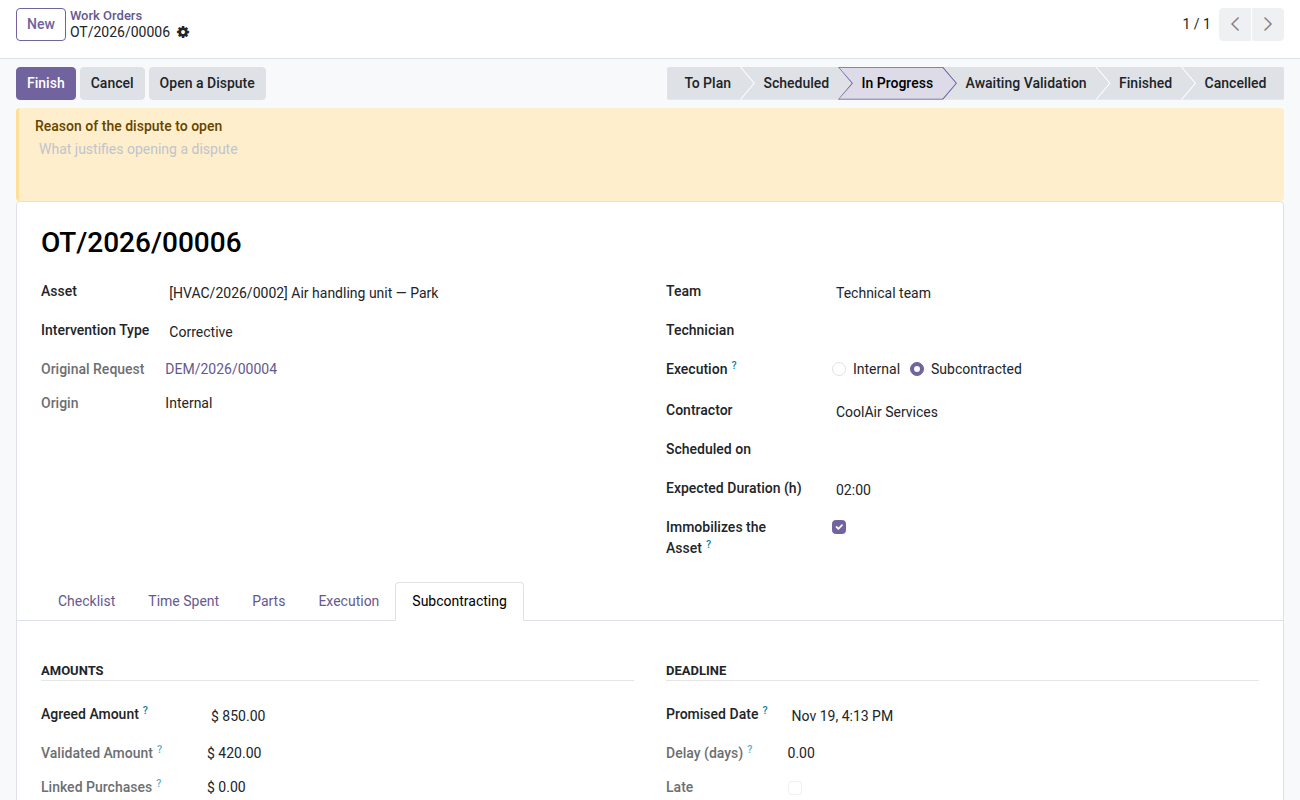
Subcontracted Maintenance
Hand an intervention to an outside contractor, and know what it costs before the invoice arrives.
The refrigeration technician comes on Tuesday, the elevator company on Thursday. Nobody in the company knows how far along either of them is: you call back, leave a message, wait. The real cost arrives a month later, on an invoice you no longer have the means to dispute — the quote was verbal, so was the promised date, and the technician's report stayed in their notebook. This module gives the contractor a space where they accept, start, report and finish on their own, and where every amount they announce must be validated internally before it counts. On the day of a disagreement, everything is dated and nothing could have been rewritten.
What it adds
- 🤝 An intervention is internal OR subcontracted — a single action sets the contractor, the agreed amount and the promised deadline, and sends them the email that brings them to their space. No parallel model to maintain: it is the same work order as the rest of the CMMS.
- 🔒 An extranet partitioned by access rights, not by screens — the contractor sees the interventions entrusted to them, and nothing else in the fleet. Not the equipment's acquisition value, not the original supplier (often their competitor), not the internal notes, not another contractor's interventions.
- 📝 They report, you validate — report, part supplied, amount, refusal: four kinds of statement. Once validated or rejected, a statement becomes immutable, even for an administrator. That is what makes it enforceable.
- 💶 Nothing counts before internal validation — the intervention's external cost only adds up validated statements. An amount that has merely been announced weighs on no dashboard.
- ⏱️ The promised deadline, separate from your planning — delay computed in days, on-time rate per contractor. You stop arguing "they were late" from memory.
- ⚖️ A dispute freezes the cost — while a disagreement is open, no statement can be validated. Once settled, the reason, the outcome and the contractor concerned stay on file: a closed dispute is not erased.
- 📊 A variance from the agreed amount must be explained — beyond a threshold you set, the intervention refuses to close without a written reason.
- 📄 Two documents — the intervention slip, which the technician hands to the contractor who shows up, and the contractor file, reserved for the manager: interventions, deadlines, refusals, disputes and cumulative costs on a single sheet.
Screenshots
1. Interventions entrusted to a contractor
Agreed amount, promised date, declarations and validated amount.
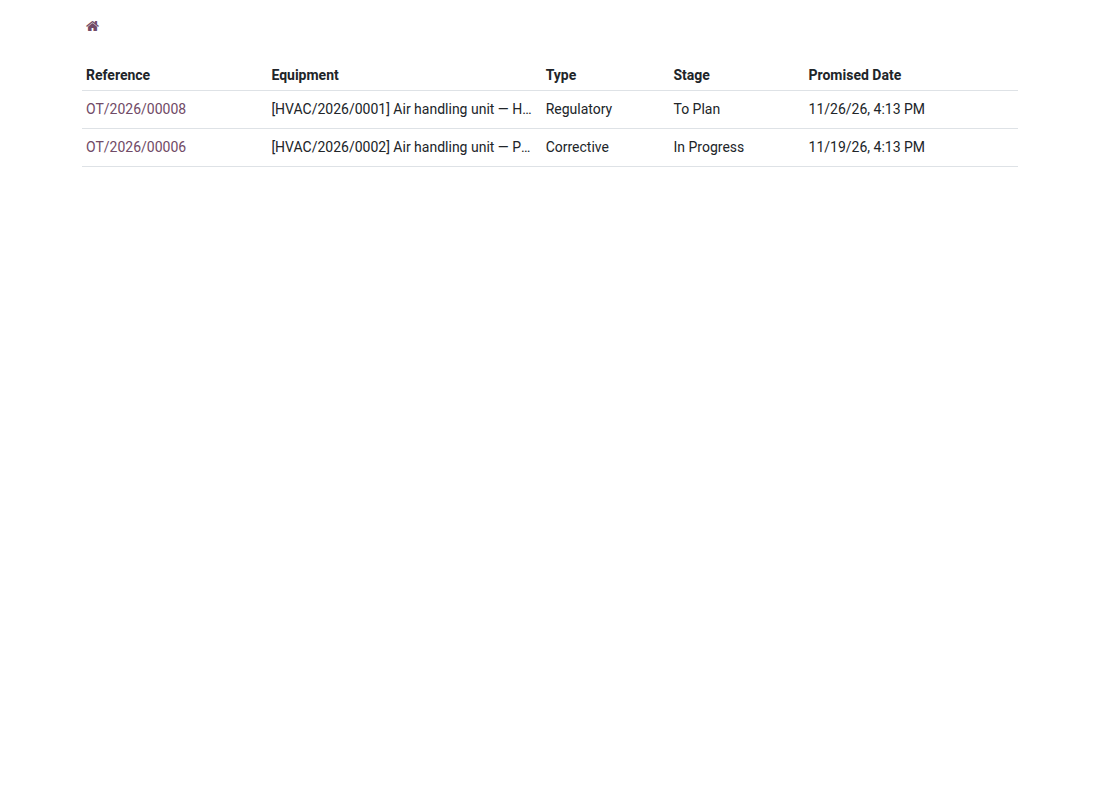
2. A contractor extranet
Contractors see only their own interventions, with stage and deadline.
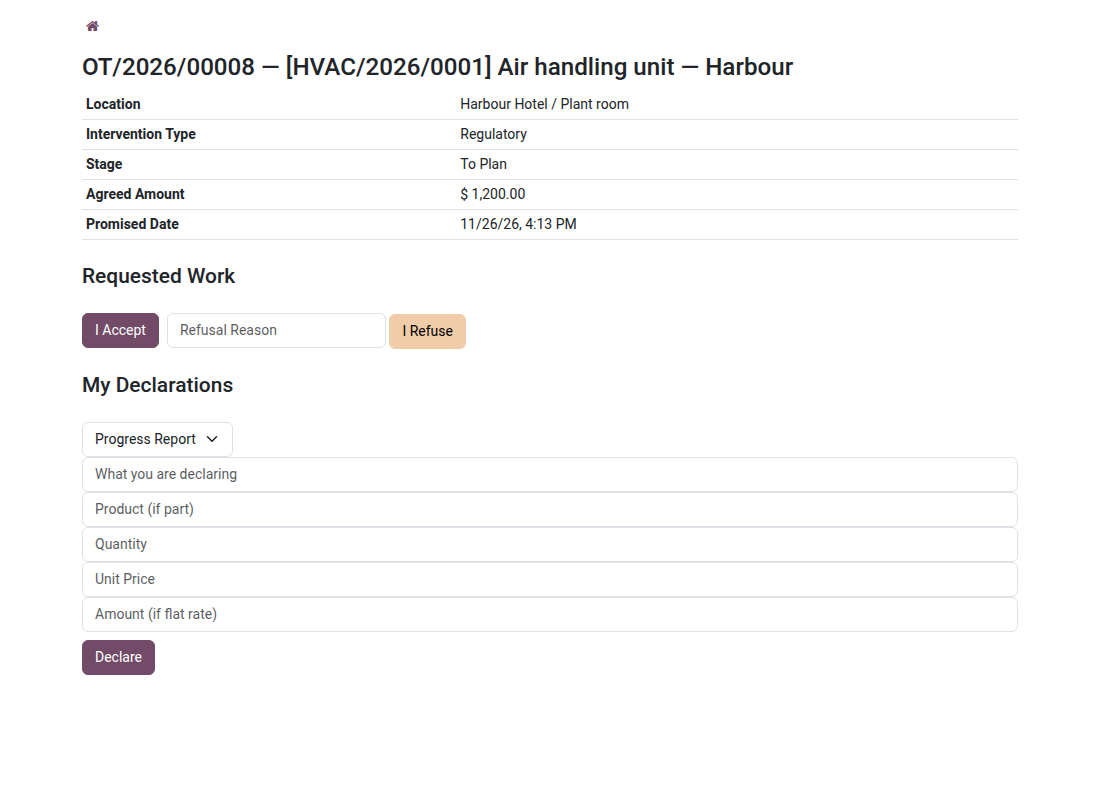
3. Accept, start, declare
The contractor accepts or refuses, then declares progress, parts and amounts.
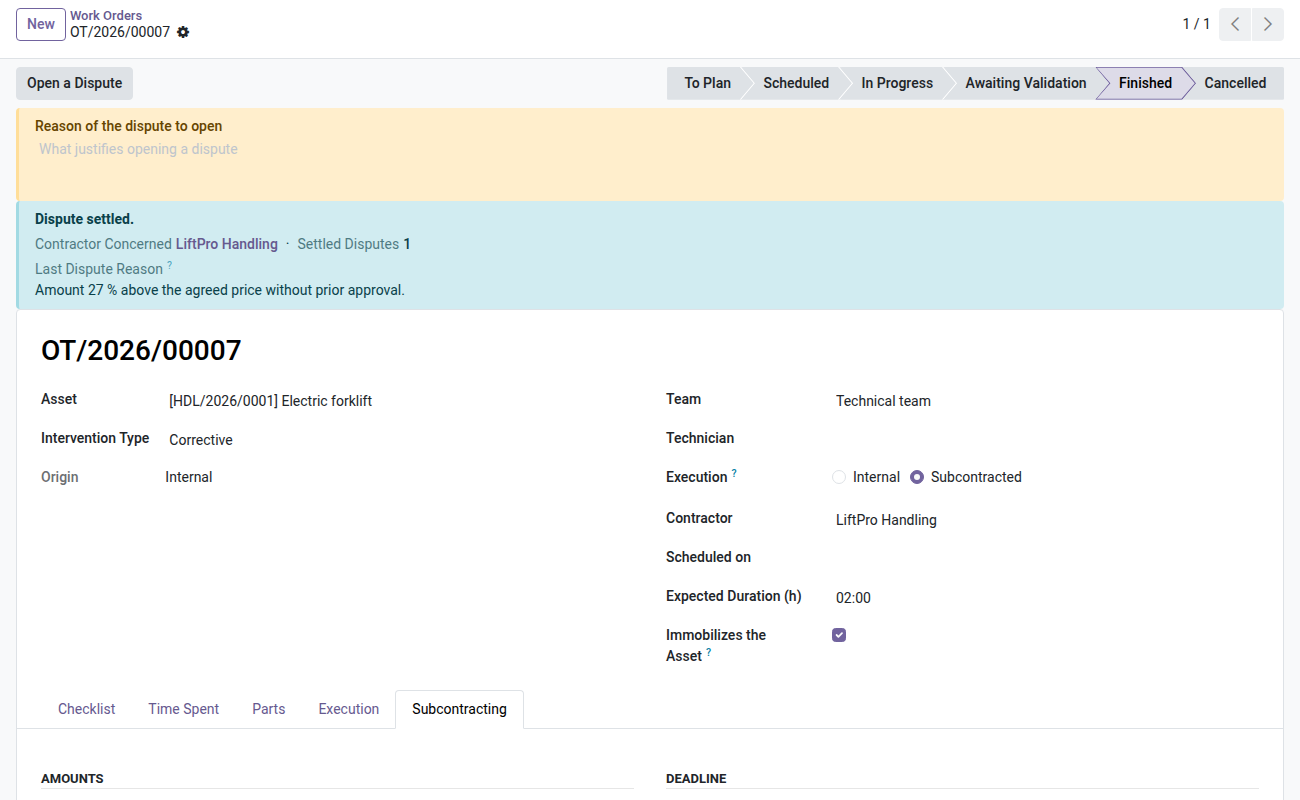
4. Delays and disputes on record
Late completion, variance reason and the dispute history stay on the order.
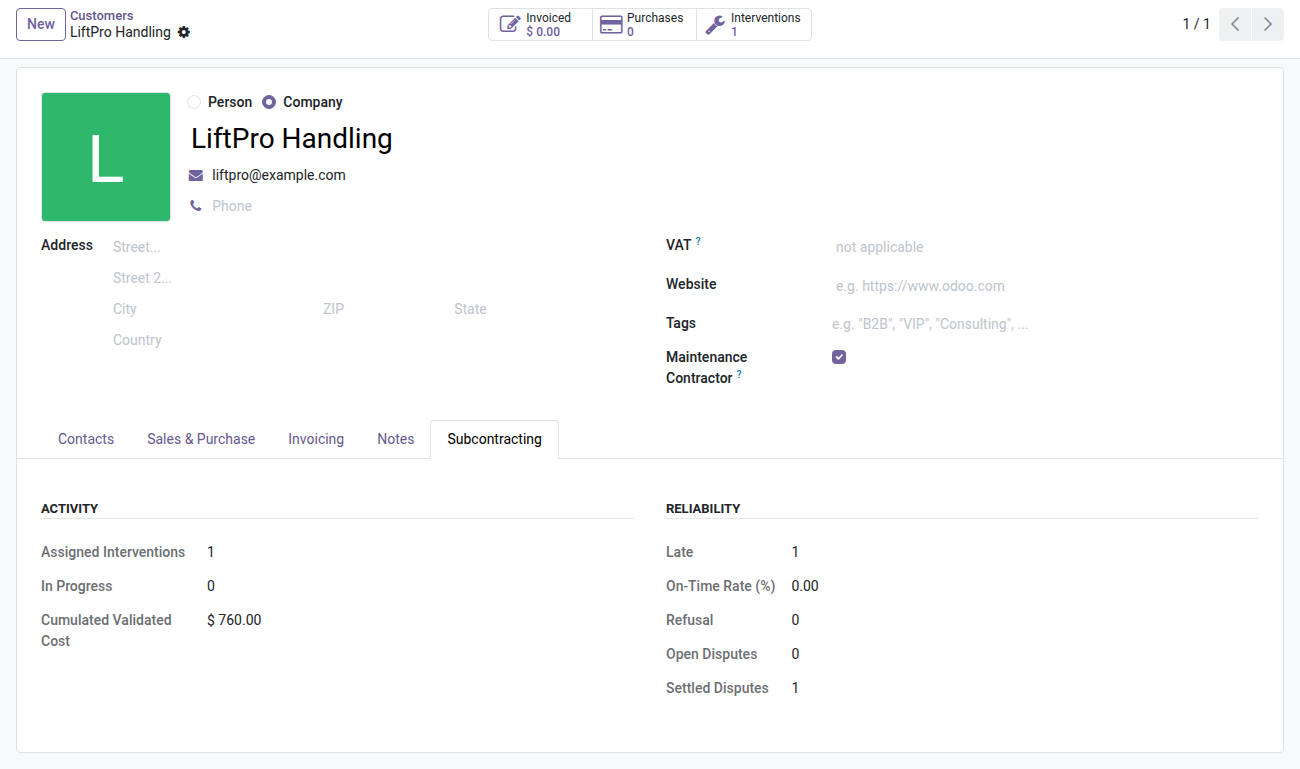
5. A file per contractor
Interventions, refusals, disputes and on-time rate.
Why adopt it
- The cost of an external intervention is known before the invoice, and it has been validated line by line.
- Follow-up stops going through the phone: the contractor records what they do, when they do it.
- A dated, non-rewritable file per contractor — deadlines met, refusals, settled disputes — changes a contract renegotiation.
- The extranet requires no extra license: the contractor is a portal user.
- A variance from the agreed amount can no longer go unnoticed: beyond the threshold, closing requires a written explanation.
The Assets & Maintenance suite
This module is a way of executing the work order: so it needs the CMMS engine and the fleet register.
- 🔧 Asset Maintenance (
oski_maintenance) — $89: required. Work orders, meter-based preventive maintenance, real cost per piece of equipment. - 🏢 Asset Management (
oski_asset) — $49: required. The fleet register and its equipment. - 📦 Parts on Consignment (
oski_maintenance_subcontracting_stock) — open source: lend your parts without taking them out of your stock. - 🛒 Subcontracting Purchases (
oski_maintenance_subcontracting_purchase) — open source: the confirmed order goes into the cost.
The Outsourced Maintenance bundle (CMMS engine + subcontracting + the two open-source bridges) is $129 instead of $158. The Assets & Maintenance suite — seven paid modules — is $199 instead of $343. Details on apps.odooskills.com.
📦 Need it all? The Asset & Maintenance suite installs all ten modules at once for $299 instead of $460.
License OPL-1 — compatible with Odoo 19.0 Community and Enterprise. Requires oski_maintenance and portal (a standard Odoo module). Good to know before installing: the contractor accesses their space with a portal account — grant them access from their contact record; the dedicated group is then assigned and removed automatically with the "Maintenance Contractor" checkbox. Interface in French. Support: apps@odooskills.com.
Discussion
Sign in to join the discussion.