
WhatsApp Connector
Premium Launch −30%Official WhatsApp Business Cloud API (Meta) for Odoo CE.
| Technical name | oski_whatsapp |
|---|---|
| License | OPL-1 |
| Author | OdooSkills |
$ 39.00
$ 27.30
Launch price — 30% off until December 31, 2026
A ready-to-use Odoo database with demo data, deleted after 1 hour. Odoo 20, 19, 18.
Missing a feature or found a bug?
Request a change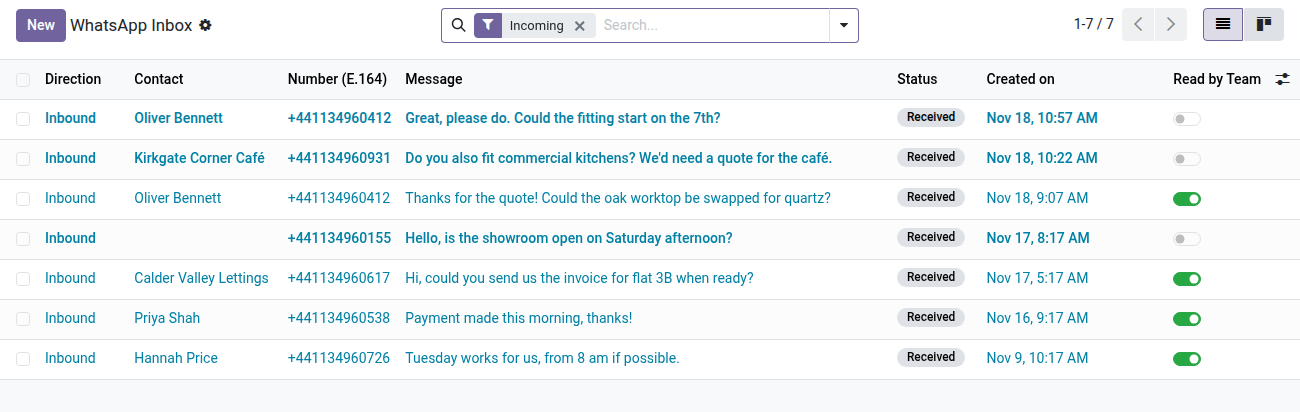
WhatsApp Business — Official Meta API for Odoo
Send your quotations and invoices over WhatsApp, receive replies in Odoo, and always see whether the next message will be free or billed — all through Meta's official Cloud API, with no makeshift gateway.
Your customers reply on WhatsApp much faster than by email — but Odoo Community has no official connector. The alternatives on the market often rely on an unofficial WhatsApp Web gateway: sessions that drop, a real risk of your business number being banned, and no guarantee of continuity. Meta's official Cloud API, by contrast, is reliable and stable, but integrating it from scratch (tokens, webhook signatures, the 24-hour window, approved templates) is a technical project in its own right. oski_whatsapp does that work once and for all, cleanly, with the real Meta API.
What it brings
- ✅ Official Meta Cloud API — direct connection to
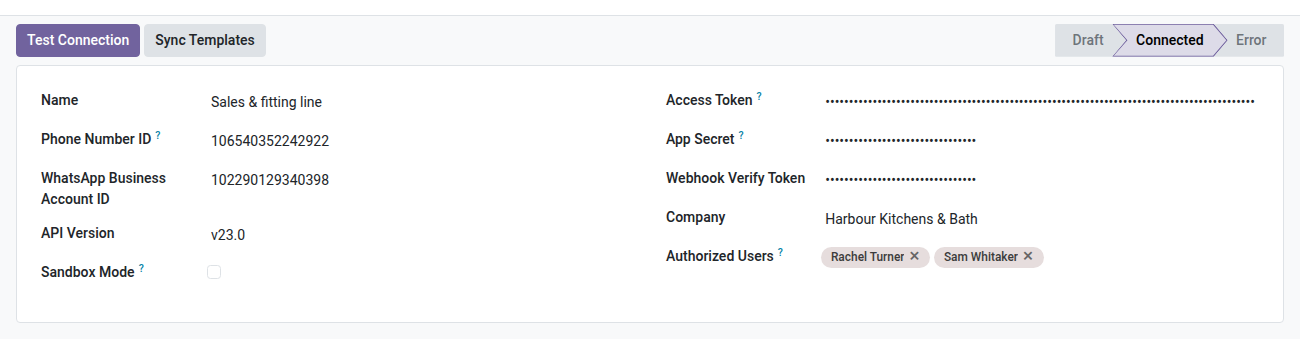
graph.facebook.comwith your own WhatsApp Business account, no third-party intermediary, no risk of a ban caused by an unofficial gateway. - 📇 Multi-number accounts — connect one or more WABA numbers, each with its own authorized users, connection status and sandbox mode to test without sending real messages.
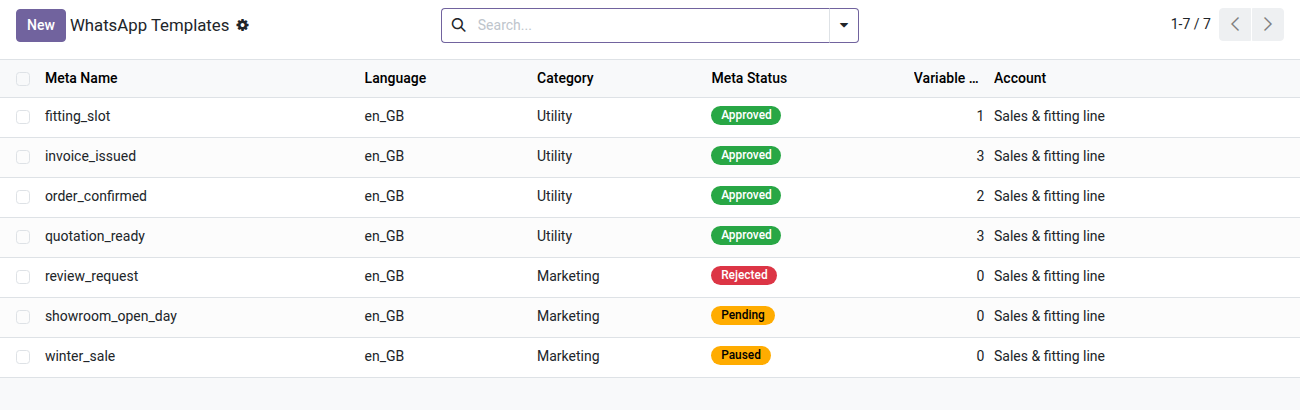
- 📄 Templates synced from Meta — one click on “Sync” pulls your approved templates (status, category, variables) straight into Odoo; no more digging through Meta Business Manager.
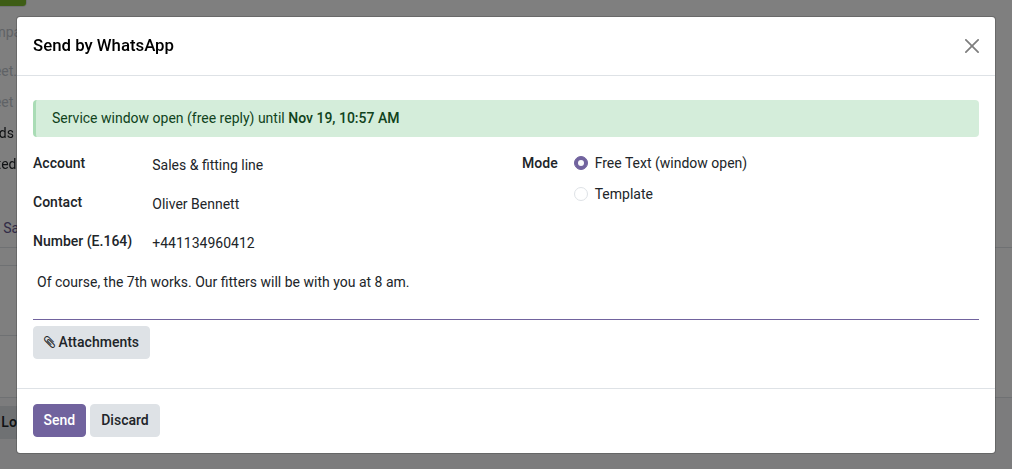
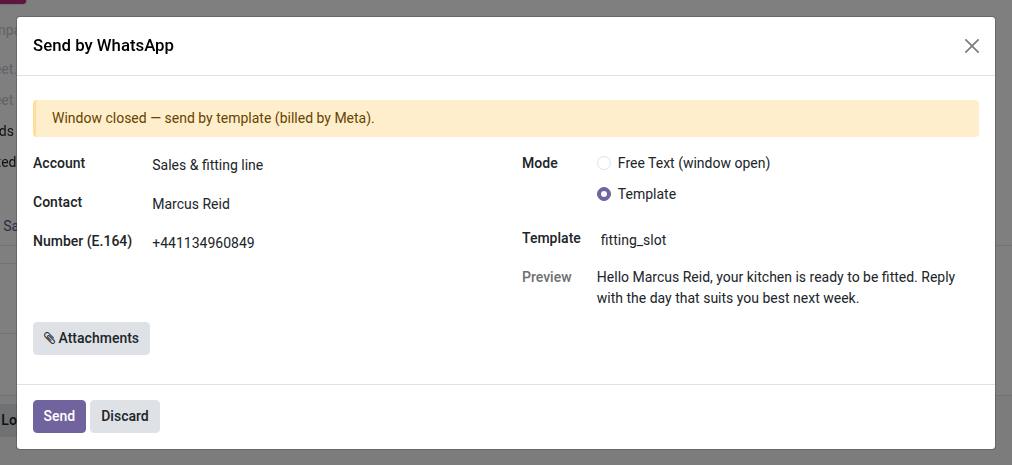
- ⏱️ 24-hour service window visible before sending — the composer clearly shows whether the reply is free (window open, the customer wrote in the last 24 hours) or requires a paid template (window closed). No more sending blind.
- 📥 Inbox inside Odoo — every incoming message is logged, linked to the contact and posted in its chatter, with Unread / Incoming / Failed filters for standard team follow-up.
- 🔒 Secure by design — mandatory HMAC signature on every incoming webhook (without it, the message is rejected), secrets (token, app secret) restricted to administrators, data read with the user's normal access rights.
In pictures
1. A shared WhatsApp inbox
Customer replies land in Odoo, matched to the contact by phone number. Unread messages stand out until someone marks them read.
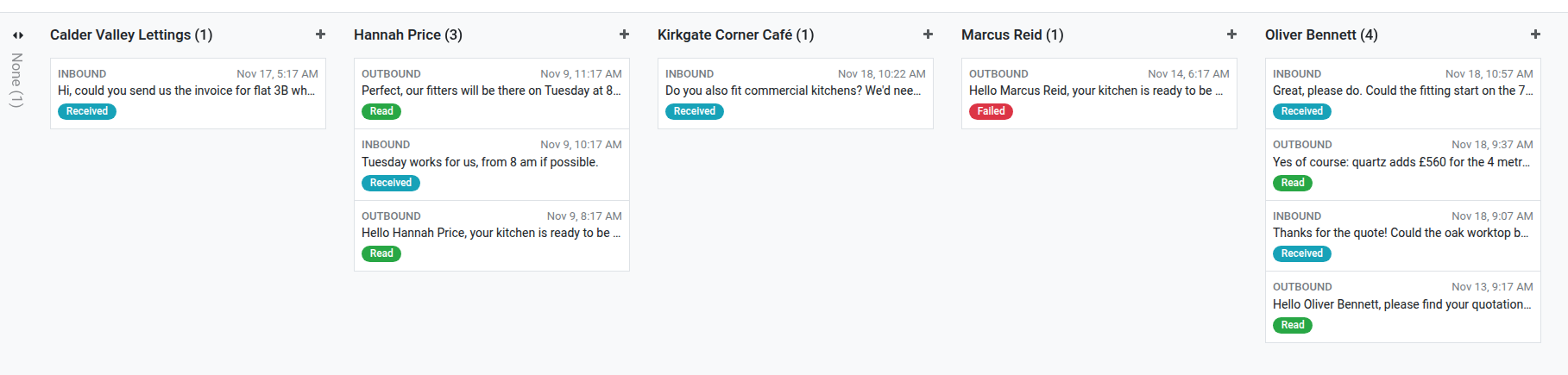
2. Every conversation at a glance
Messages grouped by contact, inbound and outbound, with the Meta delivery status: read, received, failed.
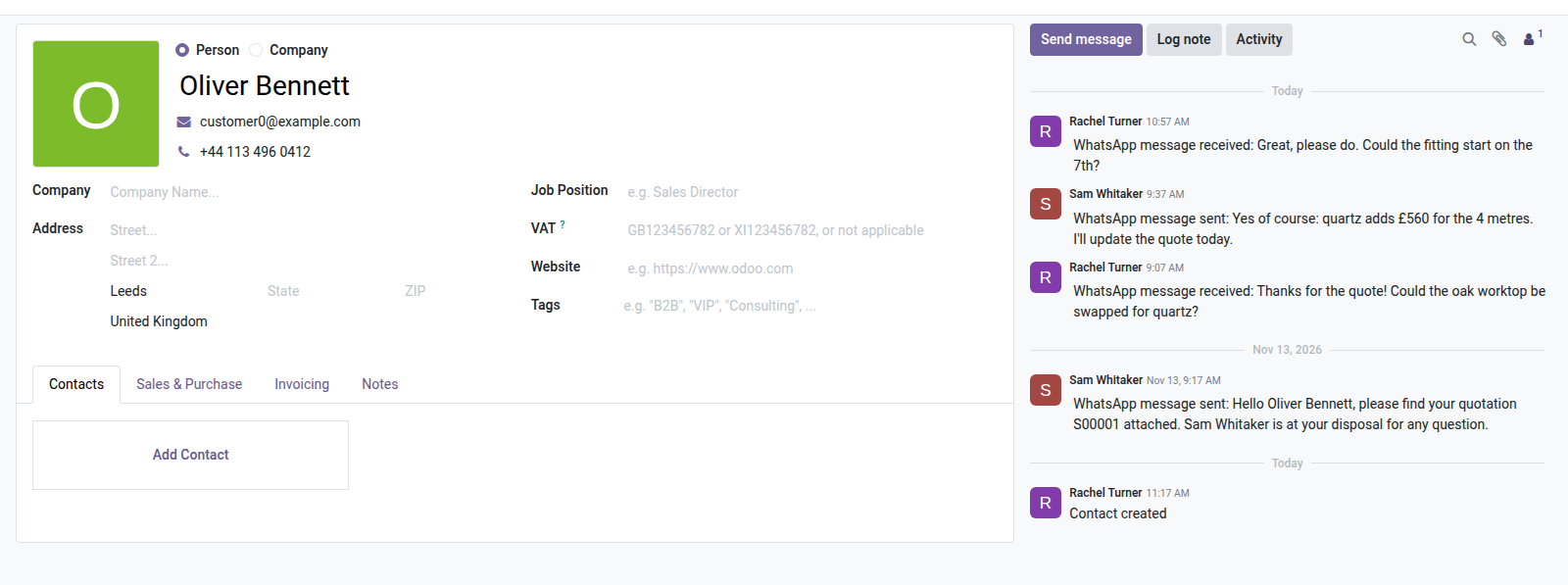
3. The conversation in the contact's chatter
Each message sent or received is noted on the contact, with a WhatsApp smart button and a Send by WhatsApp button.
4. Free replies inside the 24-hour window
When the customer wrote in the last 24 hours, the composer shows the window end and lets you reply in free text.
5. Approved templates when the window is closed
Outside the window the composer switches to an approved Meta template and previews it with the contact's data.
6. Templates synced from Meta
One click imports your templates with their category and Meta status: approved, pending, rejected or paused.
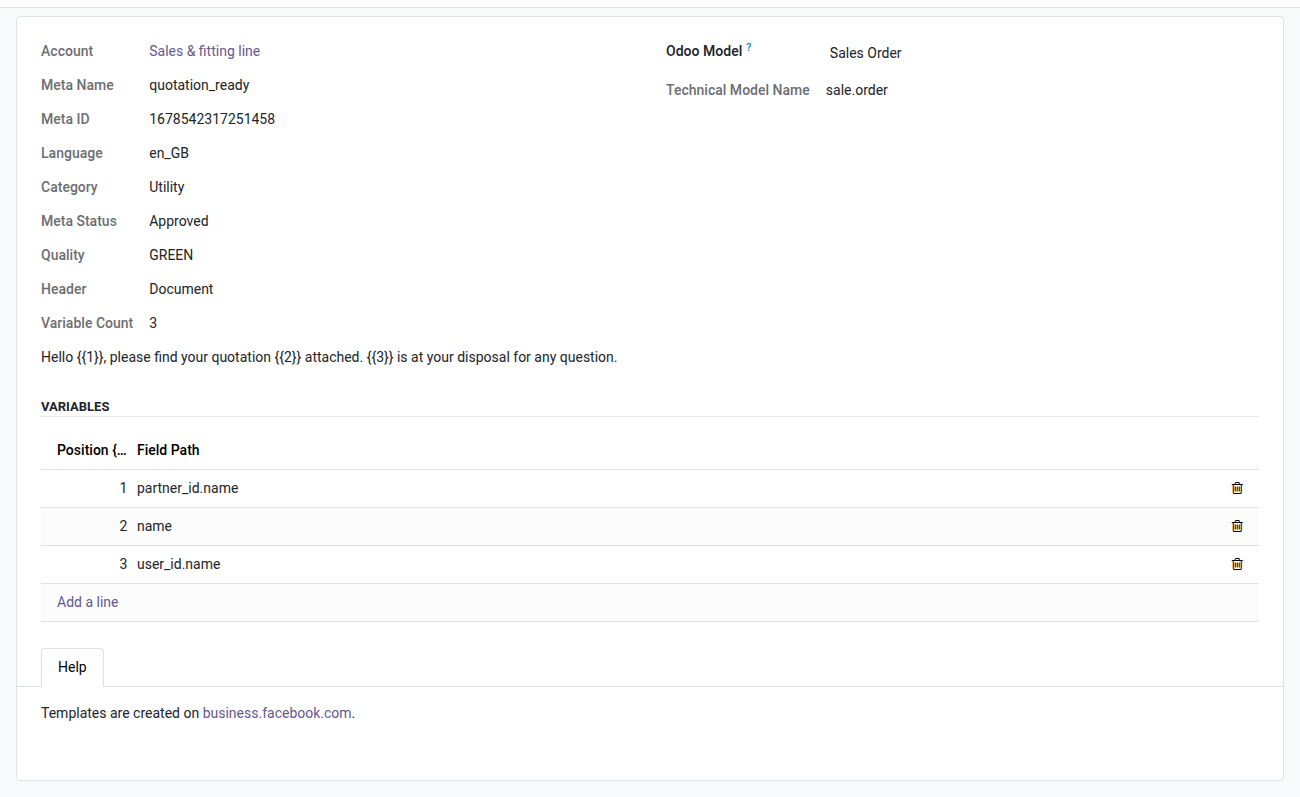
7. Template variables mapped to Odoo fields
Each {{n}} placeholder is filled from a field of the document: customer name, quotation number, salesperson.
8. Your own Meta account, no middleman
Connect the WhatsApp Business Cloud API with your Meta IDs and token. Restrict each number to the users allowed to send.
Why adopt it
- Controlled cost, paid by you — Meta bills per message across 3 categories: the service window (a reply within 24 hours of a customer message) is open source; utility templates (quotation or invoice confirmation…) cost a few cents; marketing templates are more expensive and deliberately out of scope for this v1 module. You pay Meta directly, at your country's rate — no hidden module markup on your messages.
- Zero risk of being banned — unlike unofficial WhatsApp Web bridges (a simulated browser session), the Cloud API is the channel Meta intends for businesses. Your number stays stable.
- Full traceability — every message sent and every reply is logged and linked to the contact, with the source document (quotation, invoice) when a bridge module is installed.
Meta getting-started guide (step by step)
Connecting to the official API requires some setup on the Meta side before you can send a single message. This module provides all the Odoo wiring; here are the Meta Business steps, in order:
- Create a Meta Business app on business.facebook.com and link a WhatsApp Business Account (WABA) to it.
- Add a dedicated phone number to this WABA (a number already used on regular WhatsApp cannot be reused as is).
- Generate a permanent access token through a Meta System User (Business Settings → System Users) — this is the token that goes into the “Access Token” field of the oski_whatsapp account.
- Enter the webhook URL (
https://your-domain/whatsapp/webhook) and the verify token (generated automatically by the module, shown on the account form) in the Meta app's webhook configuration. - Enter the Meta app's App Secret in the oski_whatsapp account — without it, incoming webhooks are rejected for security (mandatory HMAC signature).
- Click “Sync templates” to retrieve the templates already created and approved in Meta Business Manager (templates themselves are created at Meta; Odoo only reads and uses them).
Good to know before installing
- Requires a verified Meta Business account and a dedicated phone number — this module provides neither; it connects to them.
- Templates must be created and approved by Meta before use — this usually takes from a few hours to a few days, outside our control.
- Every message sent outside the service window is billed by Meta according to its rate card by country and category — invoices are issued directly by Meta, not by OdooSkills.
- Mass marketing (campaigns, high-volume marketing templates) is out of scope for this v1 — this module targets sending business documents and one-to-one customer relationships.
Part of the OdooSkills WhatsApp suite
Complete it with oski_whatsapp_sale (send-quotation button, open source) and oski_whatsapp_account (send-invoice button, open source) to cover the whole sales cycle without leaving the document. See the full suite on apps.odooskills.com.
OPL-1 license — compatible with Odoo 19.0. Support : apps@odooskills.com.
Discussion
Sign in to join the discussion.