
School Tuition Fees
Premium Launch −30%Fee structures per program, payment schedules, discounts and enrollment invoicing.
| Technical name | oski_school_fee |
|---|---|
| License | OPL-1 |
| Author | OdooSkills |
$ 79.00
$ 55.30
Launch price — 30% off until December 31, 2026
A ready-to-use Odoo database with demo data, deleted after 1 hour. Odoo 20, 19, 18.
Missing a feature or found a bug?
Request a change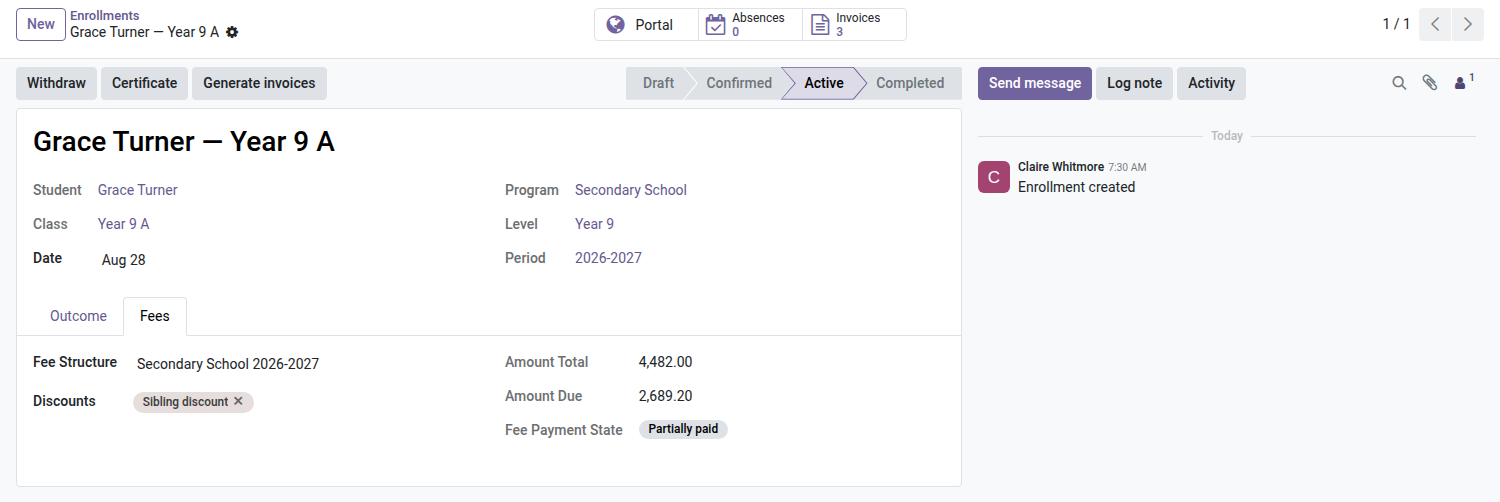

School — Tuition Fees
A fee structure per program, a payment schedule in three clicks, sibling and scholarship discounts, automatic reminders for late payments — and parents paying online from their own area.
Every new school year, the office redoes the same invoices by hand: tuition, registration, the third paid in the first term, the discount for the second child… And during the year, who remembers to chase the family whose January installment is still unpaid? This module turns the school's fee schedule into Odoo invoices — generated in one click, followed up automatically.
What it brings
- 🧾 A fee structure per program — tuition, registration, materials, exam; refinable by level and by period, the most specific structure applies on its own to each enrollment.
- 📅 Percentage-based payment schedules — "3 × quarterly 40/30/30": one invoice per installment, dated automatically, generated in one click from the enrollment — and replayable without duplicates if an installment is cancelled.
- 🏷️ Discounts — sibling, scholarship, early enrollment or manual goodwill; as a percentage (stackable) or a fixed amount, targeted at specific fees or at everything.
- 🚦 A payment status per enrollment — not invoiced, invoiced, partial, paid, overdue: visible on the form, filterable in the "Unpaid fees" menu grouped by class.
- 🔔 Automatic reminders — once the grace period is over, the daily cron sends an email to the payer and creates an activity for the office — only once per invoice.
- ⛔ Blocking on debt (optional) — a new enrollment cannot be confirmed if the payer still has an overdue unpaid balance from a previous year; the rule applies to everyone, management included.
- 💳 Online payment for parents — the "Invoices" tab of the family area lists the child's invoices with a "View & pay" button leading to Odoo's secure payment page.
In pictures
1. Fees on every enrollment
The fee structure is found from the program and level; discounts apply, and the amount billed, amount due and payment status are always up to date.
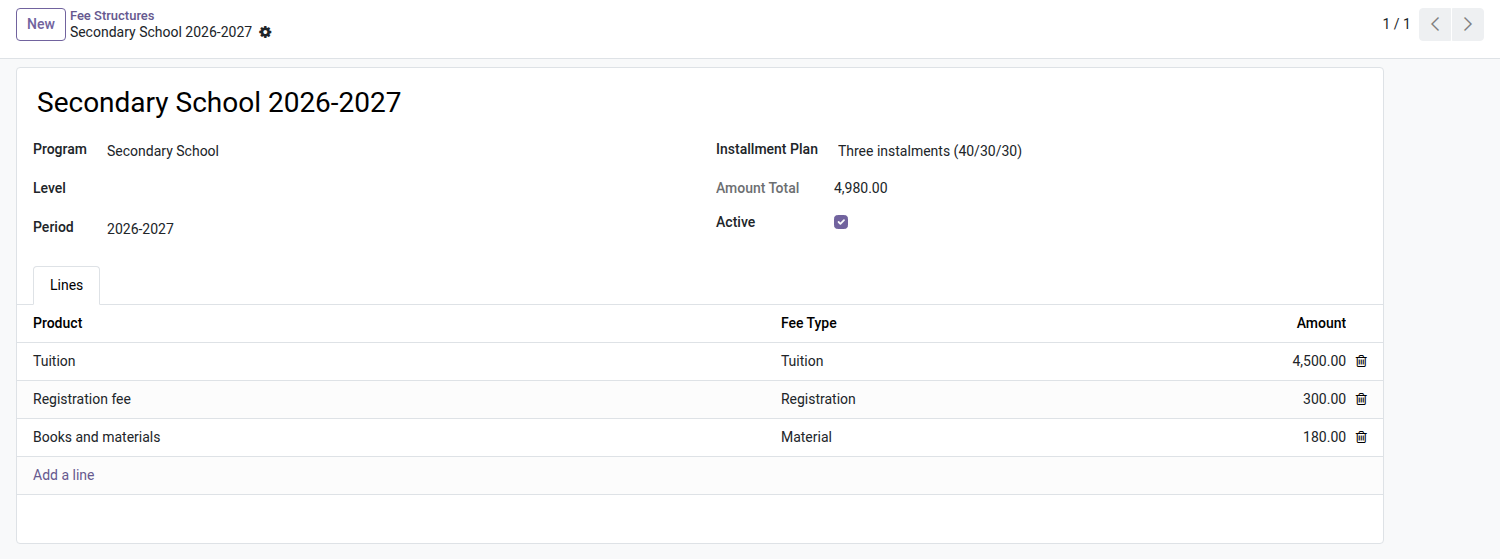
2. Fee structures and instalments
Tuition, registration and materials per program, with an instalment plan (here 40/30/30) that sets the invoice due dates.
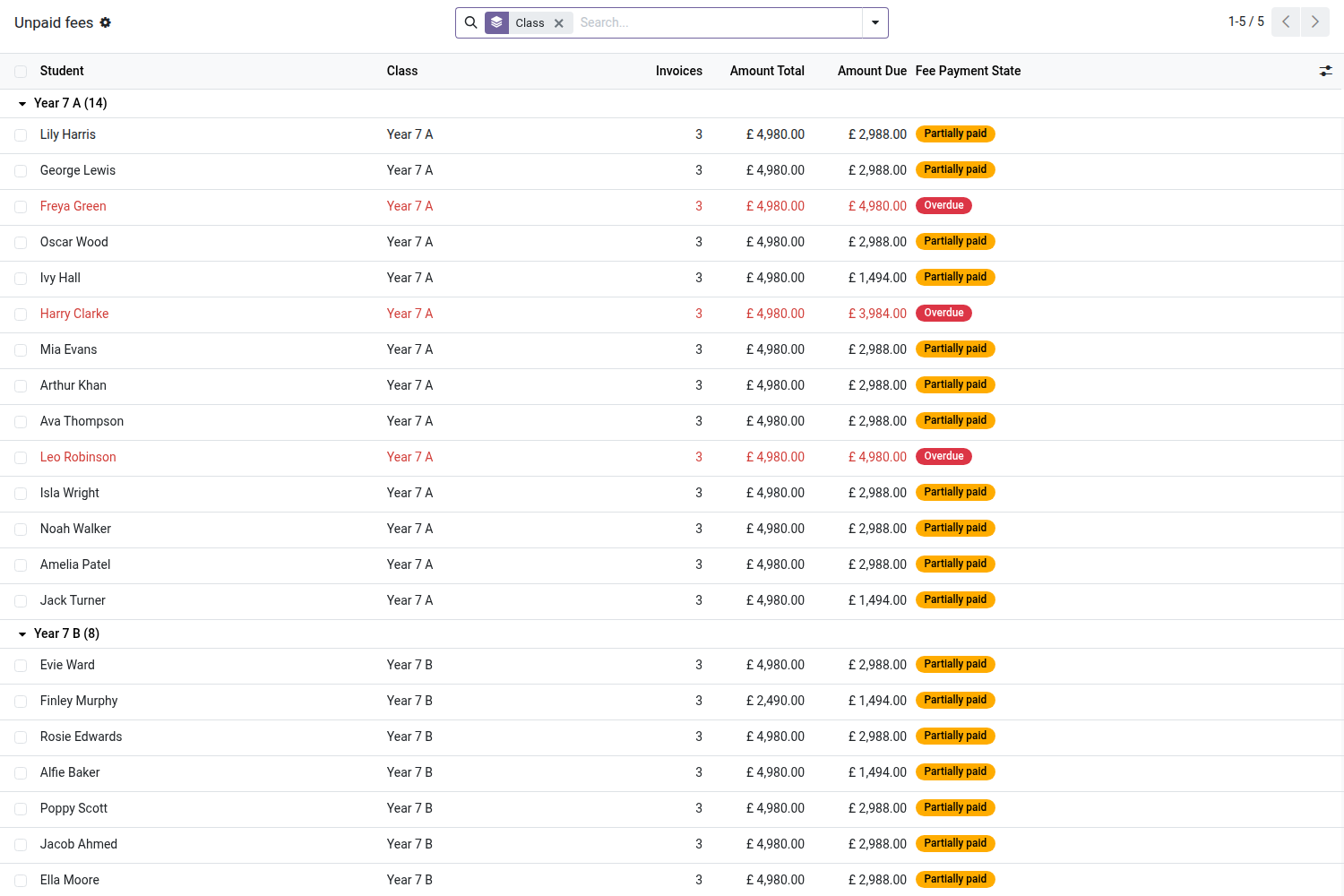
3. Unpaid fees, class by class
Amount billed, amount due and payment status for each student; overdue ones stand out.
4. Families pay online
Each instalment invoice is on the portal with its due date and status, and can be paid online.
Why adopt it
- Back-to-school invoicing goes from several days of data entry to one click per enrollment — with real Odoo invoices, posted as usual.
- No more forgotten late payments: the reminder goes out on its own, the office keeps a record, and the school can make re-enrollment conditional on settling debts.
- Parents pay online with no accounting account and no attachment: the secure link in their area is enough.
Note: to generate and validate invoices, the school officer must be given Odoo's "Invoicing" right (account.group_account_invoice) — the module does not grant it by default.
Part of the School suite
Builds on the open-source core School Management — students, classes, enrollments and on the Parent Portal (required, for online payment). Add Admissions (application pipeline and one-click conversion). Full suite on apps.odooskills.com.
OPL-1 license — compatible with Odoo 19.0 Community. Requires the open-source School module (core), the Student & Parent Portal, and the standard Invoicing and Payment modules. Support: apps@odooskills.com.
Discussion
Sign in to join the discussion.