
School Admissions
Premium Launch −30%Kanban pipeline for applications: required documents, interview, decision, waiting list, and one-click conversion into an enrolled student.
| Technical name | oski_school_admission |
|---|---|
| License | OPL-1 |
| Author | OdooSkills |
$ 49.00
$ 34.30
Launch price — 30% off until December 31, 2026
A ready-to-use Odoo database with demo data, deleted after 1 hour. Odoo 20, 19, 18.
Missing a feature or found a bug?
Request a change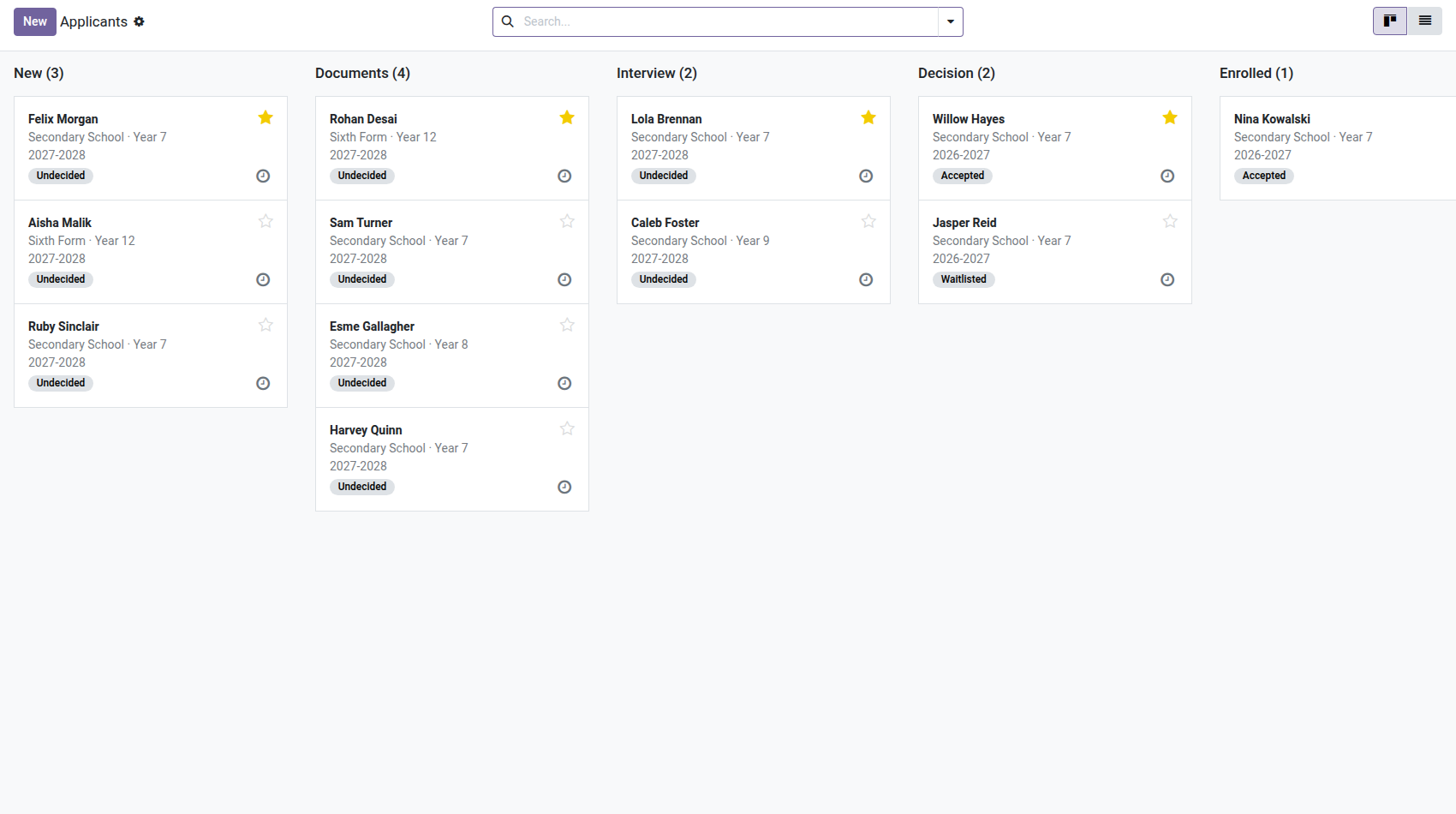
School — Admissions
A kanban pipeline for applications: documents to provide, interview, decision, waiting list — and one click to turn the accepted applicant into an enrolled student, with their contact, guardian and enrollment created all at once.
Every new school year, applications come in by phone, by email and at the front desk. Who has handed in their birth certificate? Who has been waiting two weeks for an answer? How many seats are left in Grade 6? And when the family says yes, everything is typed in again: the contact, the student, the guardian, the enrollment. This module keeps the queue — and removes the retyping.
What it brings
- 📋 A visual pipeline — new, documents, interview, decision, enrolled: each application moves forward by drag and drop, with its activities and discussion thread.
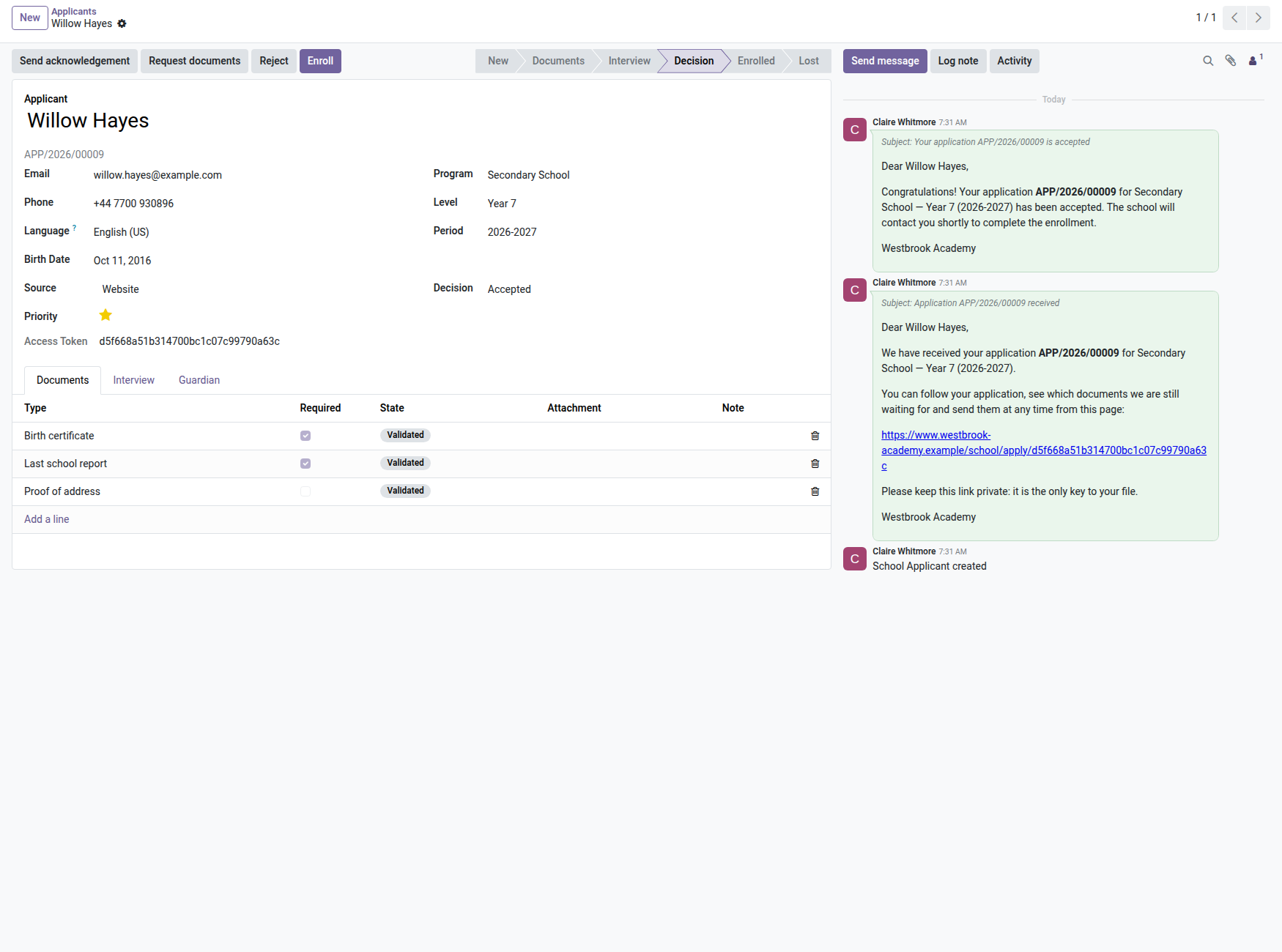
- 🗂️ Document checklist per program — required, received, validated; the "Request documents" button sends the list of what is missing; conversion is refused as long as a required document is not validated (management can override).
- ⚖️ Traceable decision — accepted (automatic email), refused (reason required + email), or waiting list with rank per level: when a seat opens up, the first in line is promoted.
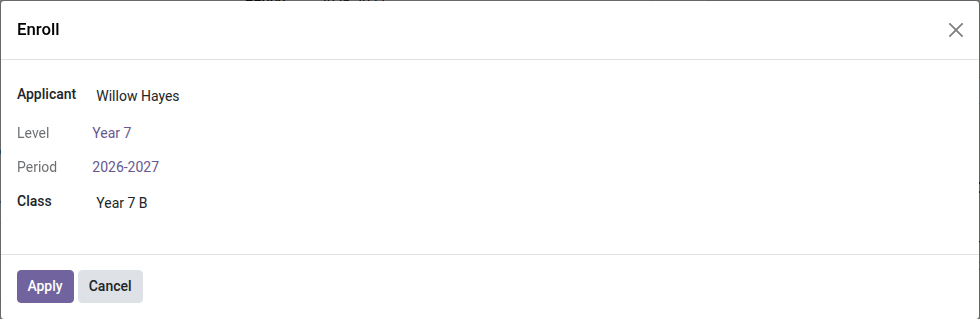
- 🎯 One-click conversion — the "Enroll" button creates or reuses the contact (lookup by email), creates the student, the paying guardian, and the draft enrollment in the chosen class — while respecting available seats.
- ✉️ Four ready-made emails — acknowledgment of receipt (automatic for web applications), acceptance, refusal, request for documents.
- 🔒 Partitioned — the administrative office manages applications, teachers see none of them; each school in a group stays on its own side (conversion even refuses a contact who is already a student at another school).
In pictures
1. Admissions from first contact to enrollment
Applicants move through New, Documents, Interview, Decision and Enrolled; priority and decision show on each card.
2. Documents checked, family informed
Required documents are listed per program and validated one by one; acknowledgement and acceptance e-mails are logged on the file.
3. Accepted? Enrolled in two clicks
Pick the class: the student, the guardian and the enrollment are created from the application.
Why adopt it
- Zero retyping between application and enrollment: contact, student, guardian and enrollment are born from the same click.
- The waiting list stops being a spreadsheet: automatic ranks, promotion with one button, decision always justified.
- Ready for online enrollment: the Website module (V2) will drop its applications directly into this pipeline.
Part of the School suite
Builds on the open-source core School Management — students, classes, enrollments. Add the Parent Portal, Tuition Fees (payment schedules and online payment) and School Website (applications from your website). Full suite on apps.odooskills.com.
OPL-1 license — compatible with Odoo 19.0 Community. Requires the open-source School module (core). Support: apps@odooskills.com.
Discussion
Sign in to join the discussion.