
Sales Team Access Control
Premium Launch −30%Partition quotations, orders and customer invoices by sales team in Community — two access levels, by user or by group, without touching existing Odoo roles.
| Technical name | oski_sale_team_security |
|---|---|
| License | OPL-1 |
| Author | OdooSkills |
$ 29.00
$ 20.30
Launch price — 30% off until December 31, 2026
A ready-to-use Odoo database with demo data, deleted after 1 hour. Odoo 20, 19, 18.
Missing a feature or found a bug?
Request a change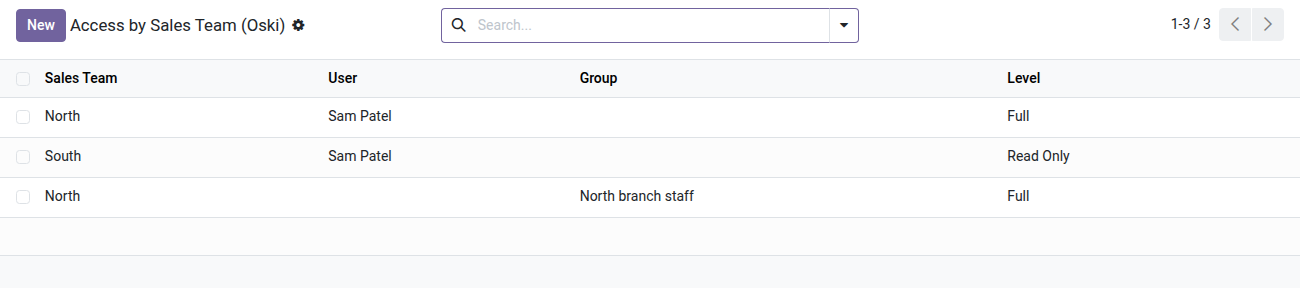
Sales Team Access Control
Each salesperson sees only their team's quotations, orders and invoices — without touching existing Odoo roles.
In Odoo Community, every salesperson has access by default to all quotations and orders, whatever the team involved. There is no native way to restrict a user to a single team without changing their global rights — nor to go further than the managers' "See all orders" flag. The result: sensitive data exposed across teams, competing figures visible, and manual record rules that are impossible to maintain at scale.
What it brings
- 🔒 Automatic partitioning — quotations, orders, order lines, analysis reports and customer invoices/credit notes filtered by the authorized teams, with no manual rule to write.
- ⚡ Two separate access levels — grant read-only access (view the figures) or full access (create, edit, delete) per team, independently of each other.
- 👥 Assignment by user or by group — a dedicated tab on the user form and on the group form lets you configure the authorized teams in a few clicks, available to managers only.
- ✅ Zero regression for unrestricted users — managers without restriction keep seeing every team; the rules apply only to users placed in the "Restricted access" group.
- 🛡️ Built-in safeguard — Odoo refuses to add a user to the restricted group if no team is assigned to them, so they never end up with an empty order list.
In pictures
1. Who sees which sales team, at which level
One line per user or group: Full lets them act, Read Only lets them look. Lines can also be set from the user or group form.
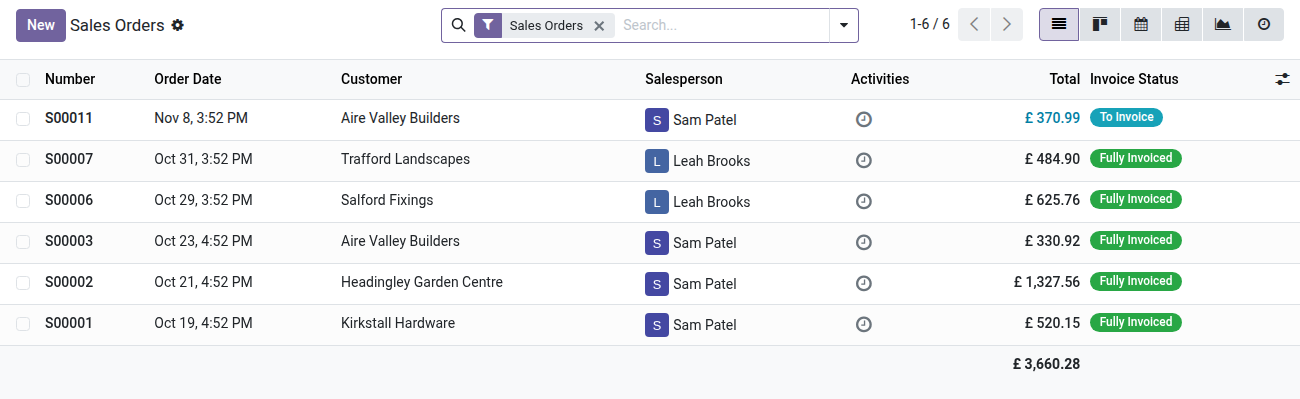
2. The salesperson's real view
The North rep sees the North team's orders and, read only, the South team's. Key Accounts orders do not appear at all.
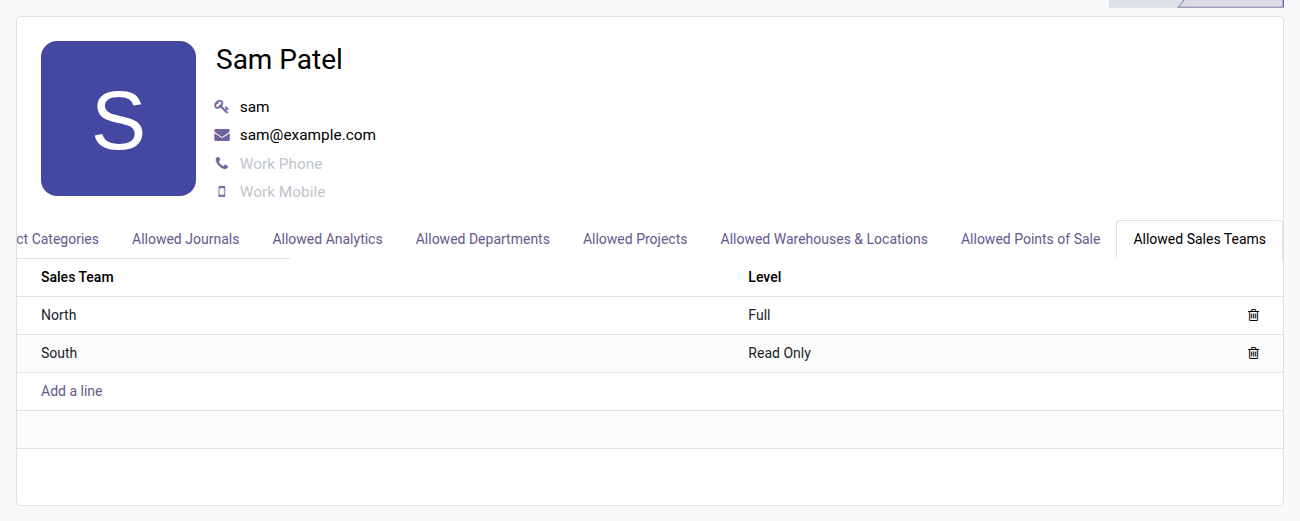
3. Set it from the user form
The Allowed Sales Teams tab on the rep's form lists what they can see and do, line by line.
Why adopt it
- Get in Community a sales partitioning that even Odoo Enterprise does not offer natively at this level of granularity (team + invoices at the same time).
- Protect the confidentiality of sales pipelines between teams — essential as soon as the company manages several regions, brands or business units in a single Odoo database.
- Administer in 2 minutes from a tab on the user form — no record rules to code, no domains to maintain with every org chart change.
- Integrates without conflict with Odoo's base rules (combined with AND): the existing permissions of the Sales roles are not replaced, they are refined.
Part of the Dimension Security Suite
This module relies on oski_access_core (open source) — the engine shared by the whole suite. Add oski_sale_team_security_crm to extend the partitioning to CRM opportunities, or oski_project_security, oski_account_journal_security and the other dimensions for consistent multi-axis access control. See the full suite on apps.odooskills.com.
OPL-1 license — compatible with Odoo 19.0 Community. Requires oski_access_core (open source) and the Odoo Sales module. Support: apps@odooskills.com.
Discussion
Sign in to join the discussion.