Sales Commissions
Premium Launch −30%Salesperson and agent commissions on order, invoice or payment, settled as vendor bills.
| Technical name | oski_sale_commission |
|---|---|
| License | OPL-1 |
| Author | OdooSkills |
$ 49.00
$ 34.30
Launch price — 30% off until December 31, 2026
A ready-to-use Odoo database with demo data, deleted after 1 hour. Odoo 20, 19, 18.
Missing a feature or found a bug?
Request a change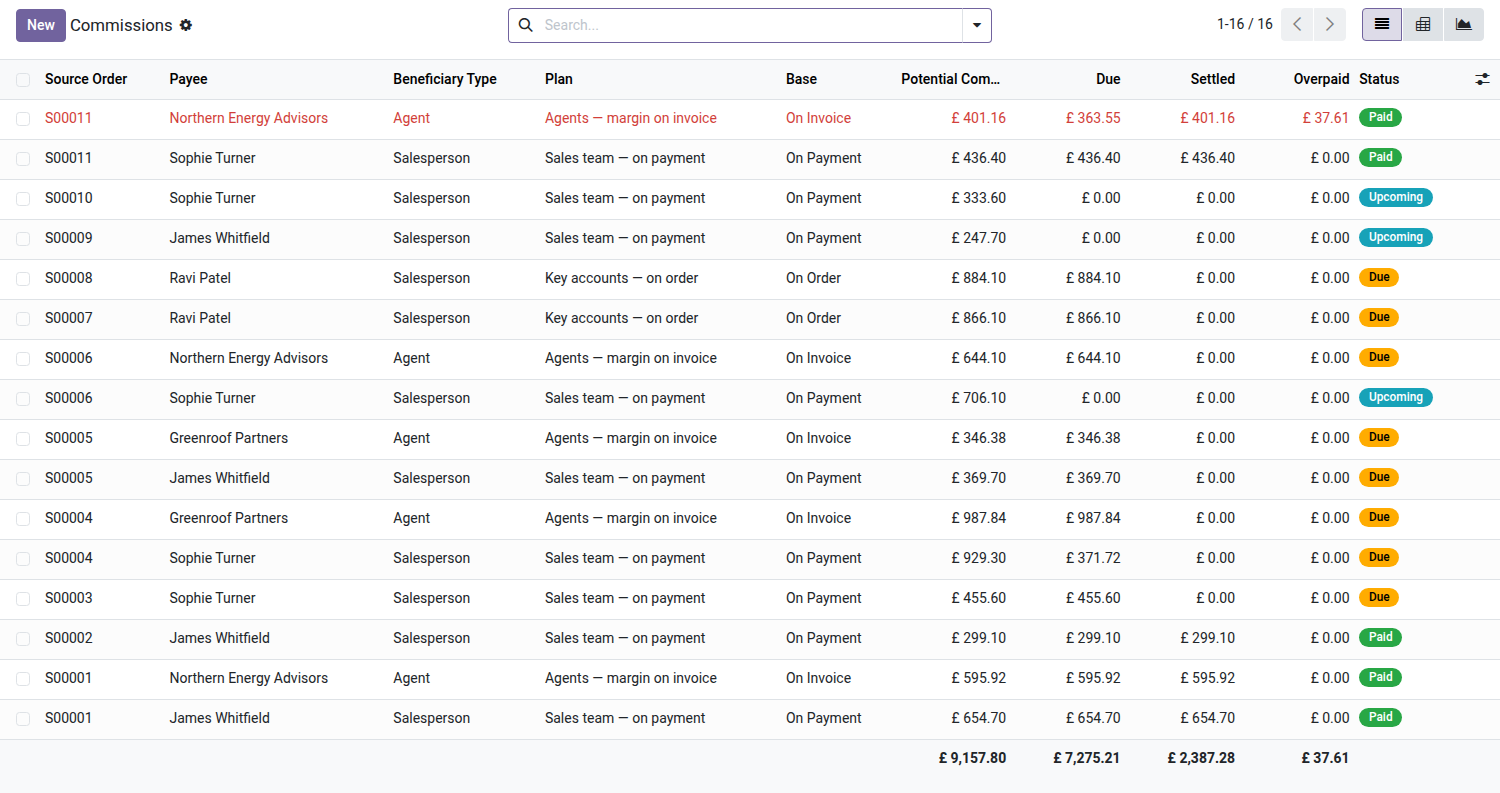
Sales Commissions
Pay commissions to your salespeople and to your referral agents, with the calculation basis of your choice — on order, on invoice or on payment — and settlement recorded as a vendor bill.
Odoo Community calculates no commissions at all. Companies that pay their sales reps or referral agents keep separate spreadsheets: rates retyped by hand, the calculation basis argued over at every closing (invoiced revenue? cash collected?), and no link between the commission owed and an accounting entry. When a customer is refunded, the commission already paid becomes an overpayment that nobody recovers. The Commissions app exists only in Odoo Enterprise; in Community, everything happens outside the system.
What it brings
- 🎯 Calculation basis set per plan — each commission plan picks its trigger: on order (as soon as it is confirmed), on invoice (in proportion to the amount invoiced) or on payment (in proportion to the cash actually collected). The "on payment" mode is recalculated automatically with every payment received.
- 👥 Internal salesperson AND external agent — the salesperson on the order earns their commission, and the referral agent (linked to the customer, carried over to the quotation) earns theirs. A single sale can generate two separate commissions.
- 📊 Rules by product or category — a plan lists its rules (5% on furniture, 2% on everything else, a fixed amount on one product…) with a default rate. The rate is looked up sales line by sales line.
- 💶 Untaxed amount or margin — apply the rate to the untaxed amount or to the margin ("don't pay commission on a loss"), as the plan chooses, falling back to the untaxed amount when the product cost is not filled in.
- 🧾 Settlement as a vendor bill — a wizard generates, per beneficiary, a draft vendor bill grouping their payable commissions. The manager reviews and posts it: the commission is linked to an accounting entry, no more spreadsheets.
- ↩️ Overpayments and clawback handled — a customer credit note lowers the commission; if it was already settled, the overpayment is automatically offset against the beneficiary's next commissions, or generates a vendor credit note. A dedicated view lists the overpayments to process.
In pictures
1. Every commission, with totals
Order, payee, plan and basis; potential, due, settled and overpaid amounts add up at the bottom of the list.
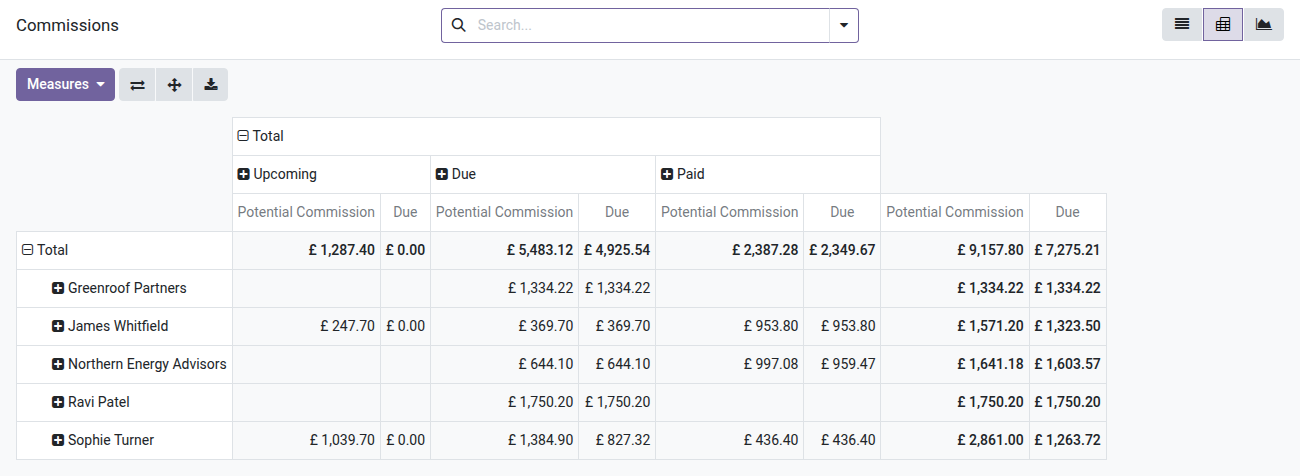
2. Who is owed what
Pivot by payee and status: what is still to come, what is due now and what has been paid.
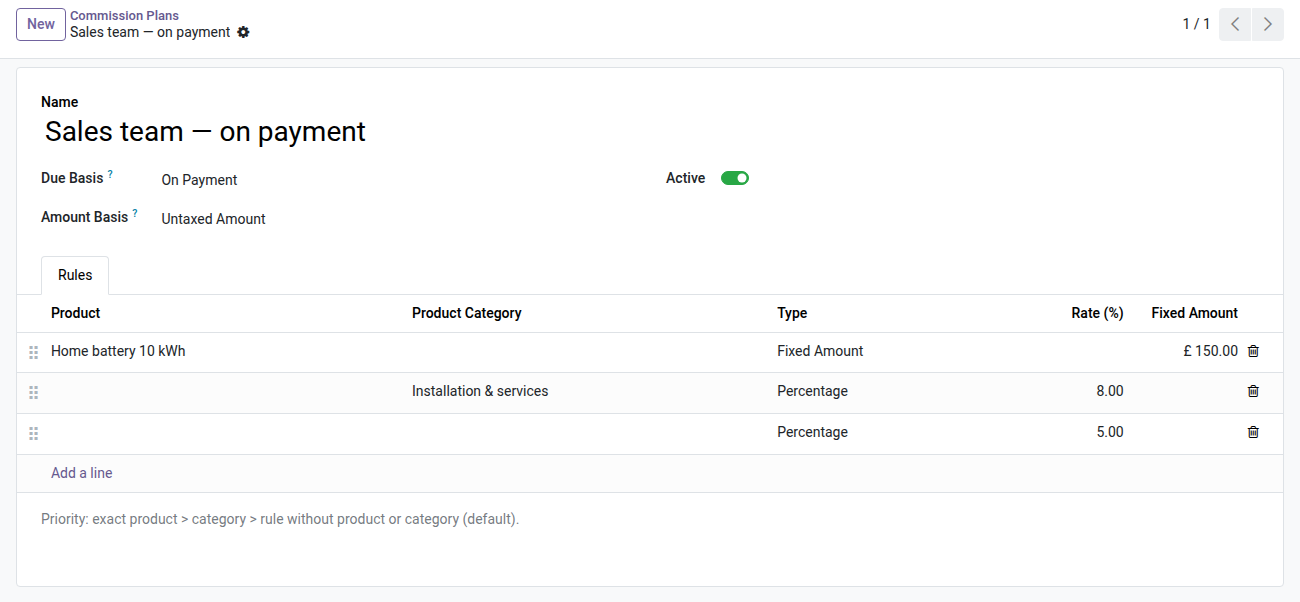
3. Plans with prioritised rules
Due on order, invoice or payment, on the untaxed amount or the margin; a fixed amount for one product, a rate per category, a default rate.
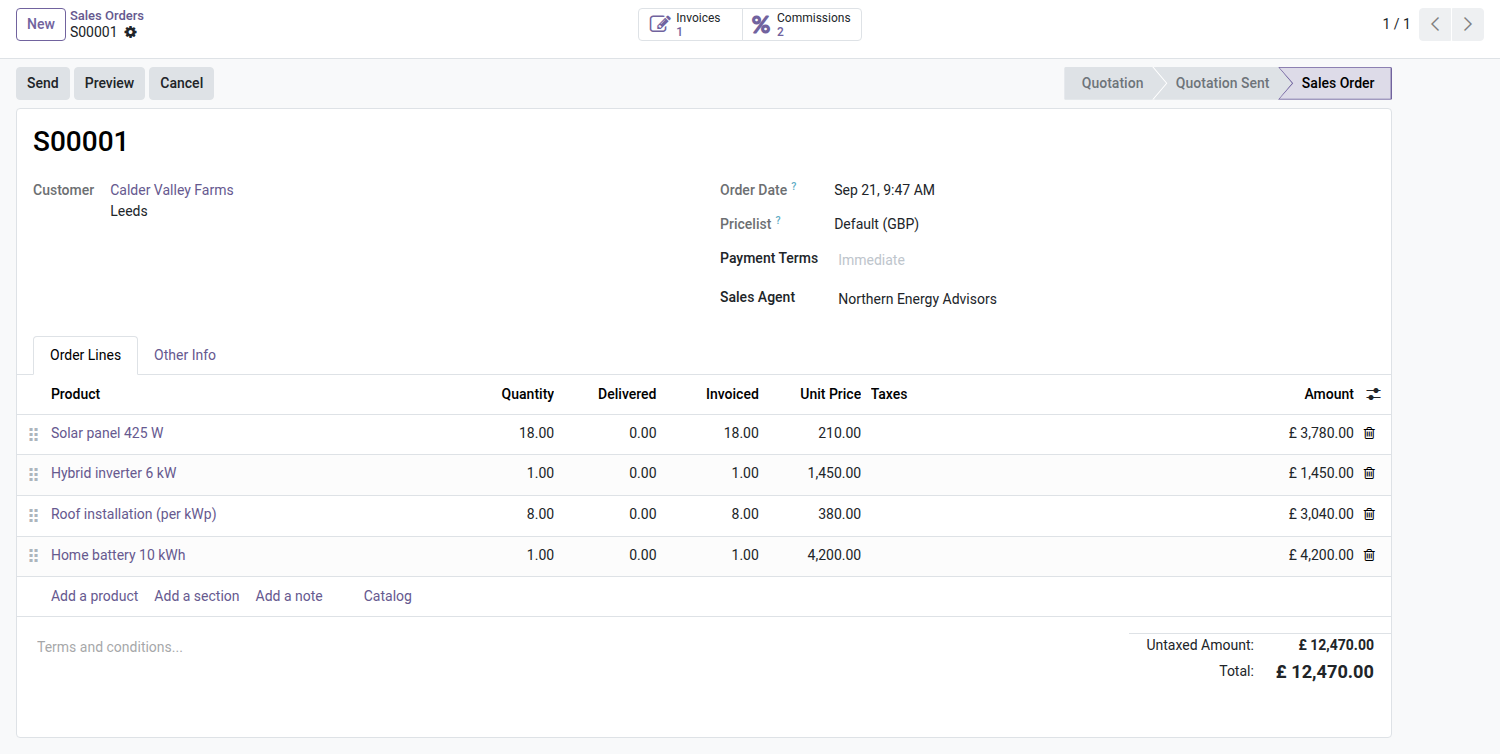
4. Salesperson and agent on the order
The sales agent comes from the customer and sits with the order details; the Commissions button opens this order's lines only.
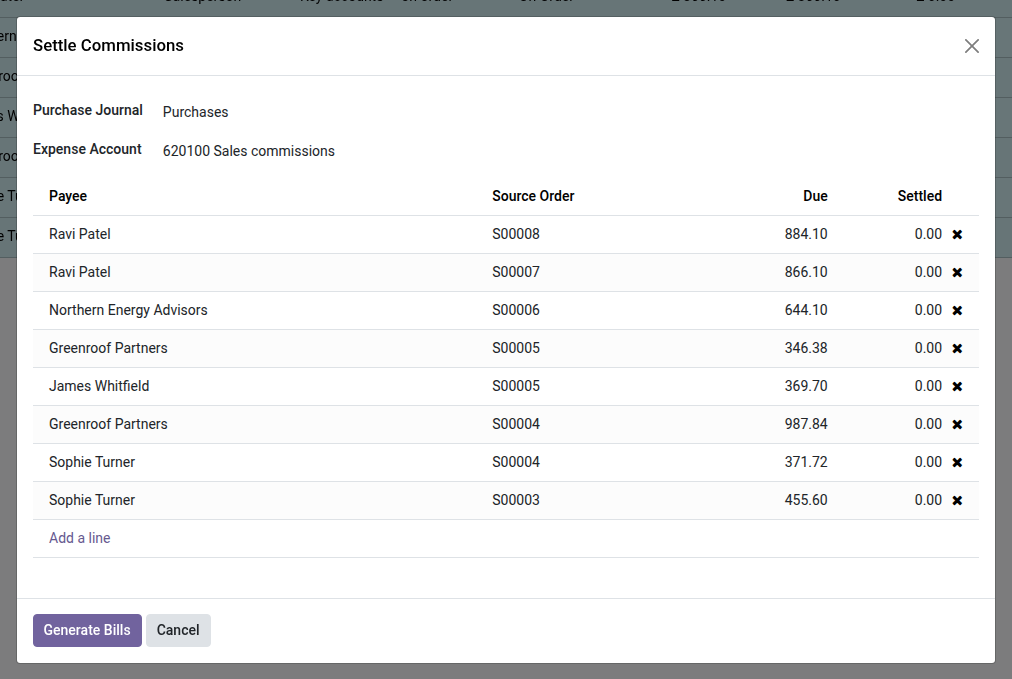
5. Settle in one go
Select the due commissions: one vendor bill per payee, on the commission expense account and purchase journal.
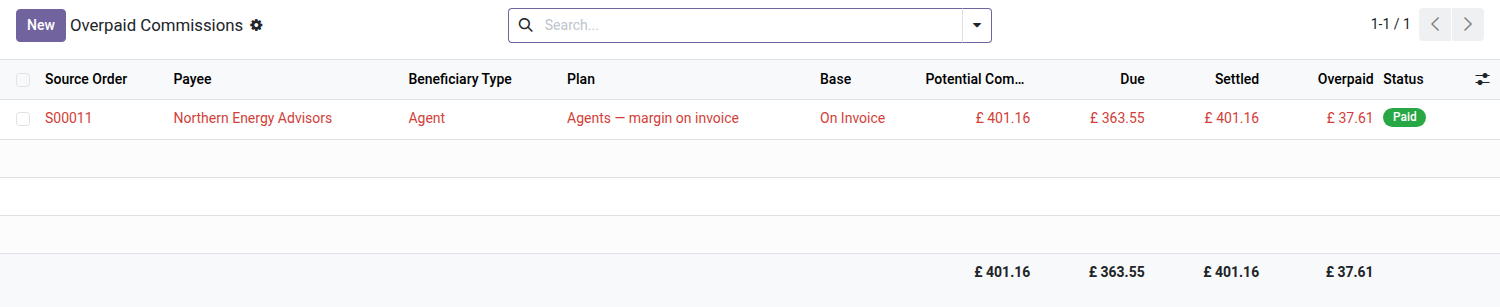
6. Overpaid commissions to recover
A credit note after settlement lowers what was earned: the difference shows up as overpaid, ready to be deducted.
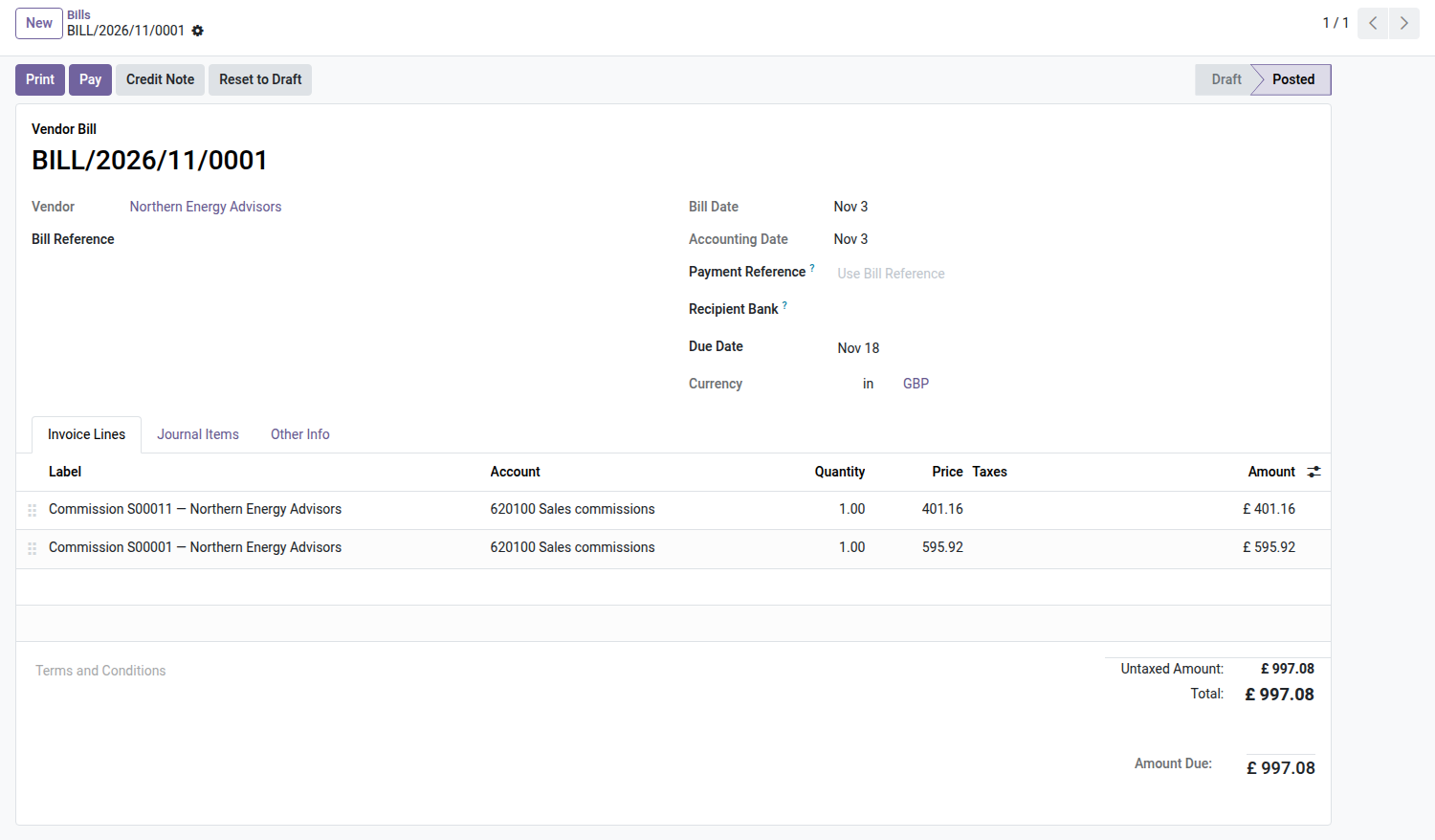
7. A real vendor bill
Each settled commission becomes a bill line with its order and payee, posted in accounting like any purchase.
Requirements
The module builds on the Sales and Accounting/Invoicing apps, already installed. It adds no external dependency. Commissions apply to sales orders; settlement goes through a purchase journal and an expense account that you set in the configuration.
Why adopt it
- Commission management, reserved for Odoo Enterprise, becomes available in Community — with no per-user subscription.
- The "on payment" basis ties pay to the cash actually collected, not to invoiced revenue that may never come in.
- Every commission paid is linked to a vendor bill: the expense is recorded, auditable and reconcilable.
- Salaried salespeople and external agents are handled in the same flow, with a net settlement per beneficiary.
What this module does not do
- Commissions apply to sales orders only — not to Point of Sale tickets, subscriptions, or invoices created without a quotation. These scopes will be covered by separate bridges.
- This is not a sales targets or forecast module: the calculation is transactional, deal by deal, not based on periodic targets like the Enterprise incentive feature.
- Settlement generates a vendor bill left in draft: the manager reviews and posts it themselves. No journal entry is posted automatically.
- A single referral agent per sale (the customer's, editable on the quotation): splitting between several agents on the same line is not supported.
OPL-1 license — compatible with Odoo 19.0. Requires the Sales and Invoicing apps. Support: apps@odooskills.com.
Discussion
Sign in to join the discussion.