
Product Category Access
Premium Launch −30%Each user sees and edits only the products in their own categories — no Enterprise needed.
| Technical name | oski_product_category_security |
|---|---|
| License | OPL-1 |
| Author | OdooSkills |
$ 29.00
$ 20.30
Launch price — 30% off until December 31, 2026
A ready-to-use Odoo database with demo data, deleted after 1 hour. Odoo 20, 19, 18.
Missing a feature or found a bug?
Request a change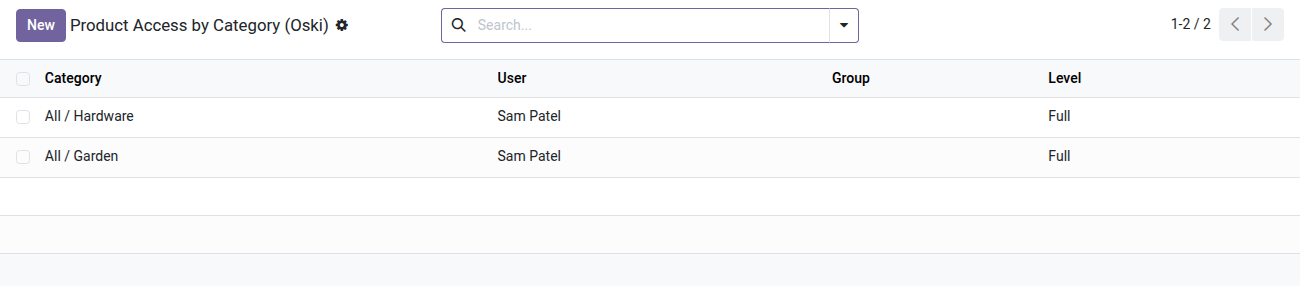
Product Category Access Control
Each user sees and edits only the products in their own categories — no Enterprise needed.
In Odoo Community, as soon as a user has access to the catalog, they can see and edit every product without exception. For a company with several product lines, brands or departments, that is an internal data leak and a source of errors: a sales rep should not reach manufacturing items, and the manager of one department should not edit the items of another. Without a dedicated module, the only alternatives are duplicating databases or giving up on granular rights.
What it adds
- 🔒 Per-category partitioning — members of the "Restricted Product Access" group only see the categories, products and variants explicitly allowed for them.
- 👤 Per-user or per-group assignment — set rights at the granularity that suits you: directly on the user form or on the group form.
- 📂 Subcategories included automatically — assigning a parent category covers all its descendants; no extra setup required.
- ⚡ Two access levels — read-only (view without editing) or full (create, edit, delete), which can be combined across different categories.
- ✅ Anti-lockout safeguard — Odoo refuses to remove a restricted user's last category: they can never be locked out of the catalog by accident.
- 🔁 Full catalog coverage — the rules apply at the same time to categories (product.category), products (product.template) and variants (product.product).
Real screenshots
1. Who sees which product category, at which level
One line per user or group: Full lets them act, Read Only lets them look. Lines can also be set from the user or group form.
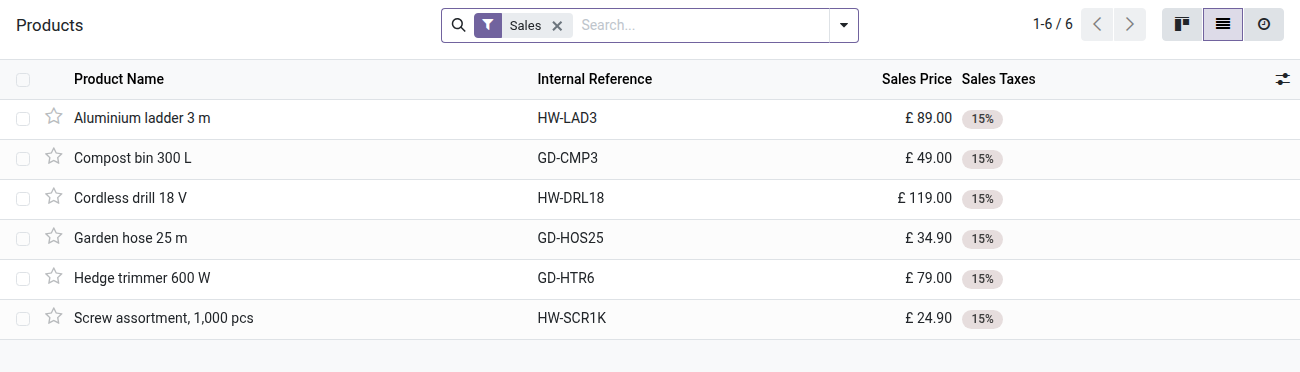
2. A catalogue cut to their range
The rep sees Hardware and Garden products; the Industrial range is hidden from search, lists and quotations.
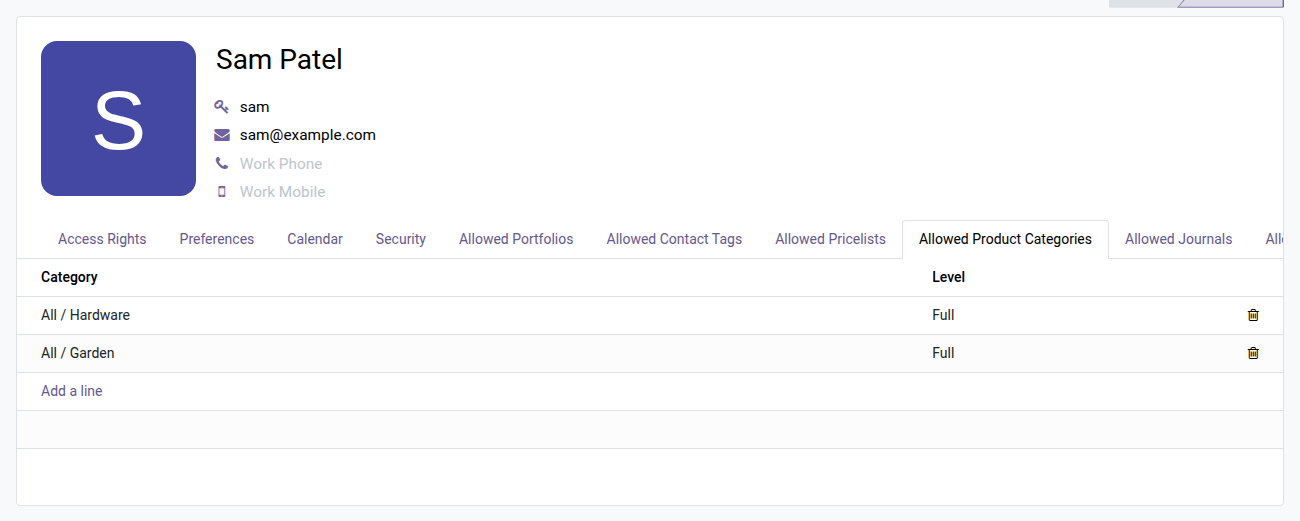
3. Set it from the user form
The Allowed Product Categories tab on the rep's form lists what they can see and do, line by line.
Why install it
- Restriction by product category is missing from Odoo Community — this module fills the gap without moving to Enterprise or building custom code.
- Configuration is built right into the user and group forms: no separate interface to explain to administrators.
- Odoo domain rules guarantee the restriction applies everywhere (list, form, searches, reports) — not just on display.
- Ideal for multi-line businesses, distribution with several departments, or any setting where teams must stay within their own product scope.
Part of the Dimension Security suite
This module is built on oski_access_core (open-source core) and pairs with other restriction dimensions:
- oski_partner_category_security — restrict contact visibility by tag.
- oski_account_journal_security — limit access to accounting journals per user or group.
- oski_sale_team_security — partition sales teams and their data.
See the full suite on apps.odooskills.com.
License OPL-1 — compatible with Odoo 19.0. Requires the open-source module oski_access_core. Support: apps@odooskills.com.
Discussion
Sign in to join the discussion.