
Customer Portfolio Access
Premium Launch −30%Partition contacts by salesperson: each user only sees and manages their own customer portfolio, with no development.
| Technical name | oski_partner_portfolio_security |
|---|---|
| License | OPL-1 |
| Author | OdooSkills |
$ 29.00
$ 20.30
Launch price — 30% off until December 31, 2026
A ready-to-use Odoo database with demo data, deleted after 1 hour. Odoo 20, 19, 18.
Missing a feature or found a bug?
Request a change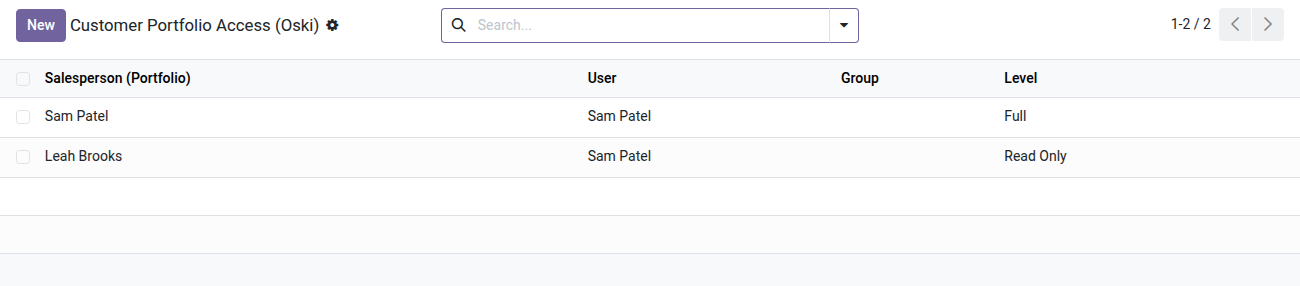
Access Restriction by Customer Portfolio
Each salesperson only sees and manages their own customers — without a single line of code.
In Odoo Community, every user sees all partners by default. For a sales force with several salespeople, that is a real confidentiality issue: a salesperson can view — or edit — a colleague's portfolio, call customers who are not theirs, and leak sensitive data. Without a native restriction, the only option is Enterprise or custom development.
What it adds
- 🔒 Visibility limited to the salesperson's portfolio — a restricted user only sees in Odoo the partners whose salesperson belongs to their allowed portfolios.
- ⚡ Two distinct access levels — "read-only" (view without editing) or "full" (create, edit, delete); configurable portfolio by portfolio.
- 👥 Assignment per user or per group — grant several portfolios to an individual salesperson, or to a whole Odoo group to cover an entire team with a single setting.
- 📋 Partners without a salesperson always shared — vendors, parent companies or generic contacts (with no salesperson in charge) remain visible to everyone, never creating blind spots; a contact without a salesperson follows its company.
- ✅ Built-in anti-lockout safeguard — if you put a user in the restricted group without assigning them a salesperson, Odoo refuses to save with an explicit message: no risk of leaving a salesperson with no visible customer at all.
Real screenshots
1. Who sees which salesperson's portfolio, at which level
One line per user or group: Full lets them act, Read Only lets them look. Lines can also be set from the user or group form.
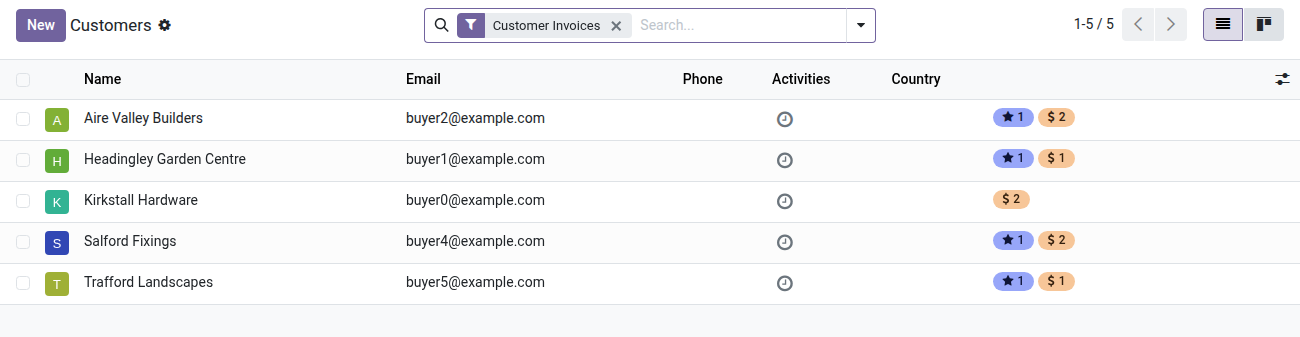
2. Only the customers of their portfolio
The rep sees their own customers and, read only, those of a colleague. Key accounts managed by the director are hidden.
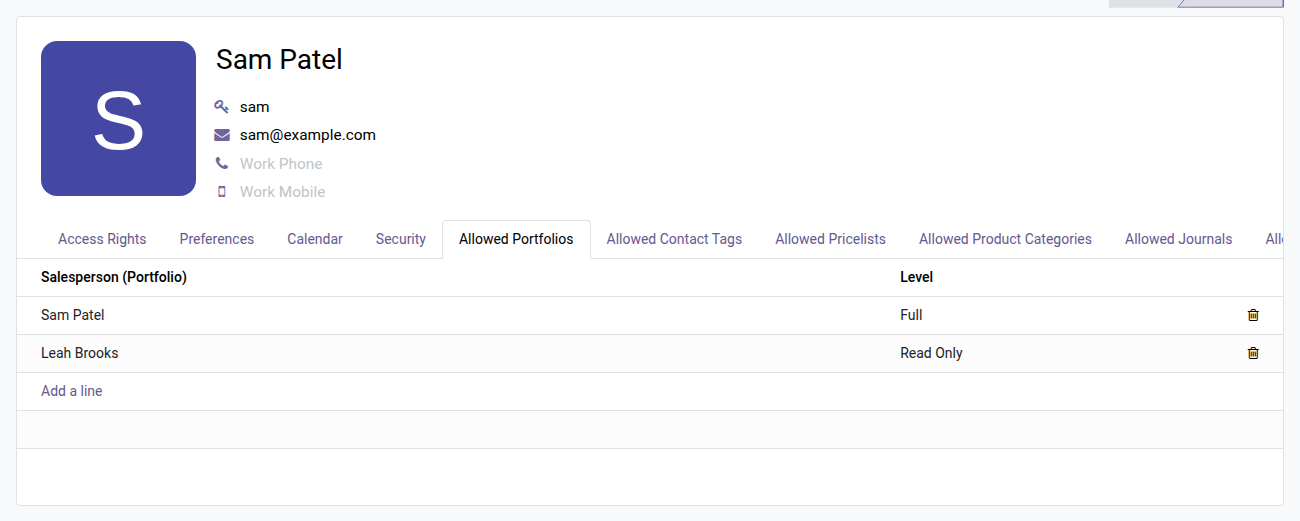
3. Set it from the user form
The Allowed Portfolios tab on the rep's form lists what they can see and do, line by line.
Why install it
- A partitioning feature usually reserved for Enterprise solutions or custom development — available here in Community, with no customization.
- Configuration 100% in the Odoo interface: a dedicated tab on each user form and each group, without touching code or technical access rules.
- Works natively on
res.partner: every view that displays partners (Contacts, CRM, Sales, Invoicing) automatically respects the restrictions. - Extensible: built on oski_access_core (the open-source core of the OdooSkills Security suite), compatible with the other restriction dimensions (sales team, category, project…).
Part of the OdooSkills Security by Dimension suite
This module relies on oski_access_core (open source), the engine shared by the whole suite. Combine it with other dimensions for a complete security policy:
- oski_sale_team_security — restriction by sales team (ideal for partitioning regions or business units)
- oski_partner_category_security — restriction by contact category (VIP Customers, Prospects, etc.)
- oski_account_journal_security — restriction by accounting journal
See the full suite and the "Security" bundle on apps.odooskills.com.
OPL-1 license — compatible with Odoo 19.0 Community. Support: apps@odooskills.com.
Discussion
Sign in to join the discussion.