
Balance Forecast
Premium Launch −30%What comes in and what goes out, by due date, and the resulting cash position.
| Technical name | oski_partner_balance_forecast |
|---|---|
| License | OPL-1 |
| Author | OdooSkills |
$ 39.00
$ 27.30
Launch price — 30% off until December 31, 2026
A ready-to-use Odoo database with demo data, deleted after 1 hour. Odoo 20, 19, 18.
Missing a feature or found a bug?
Request a change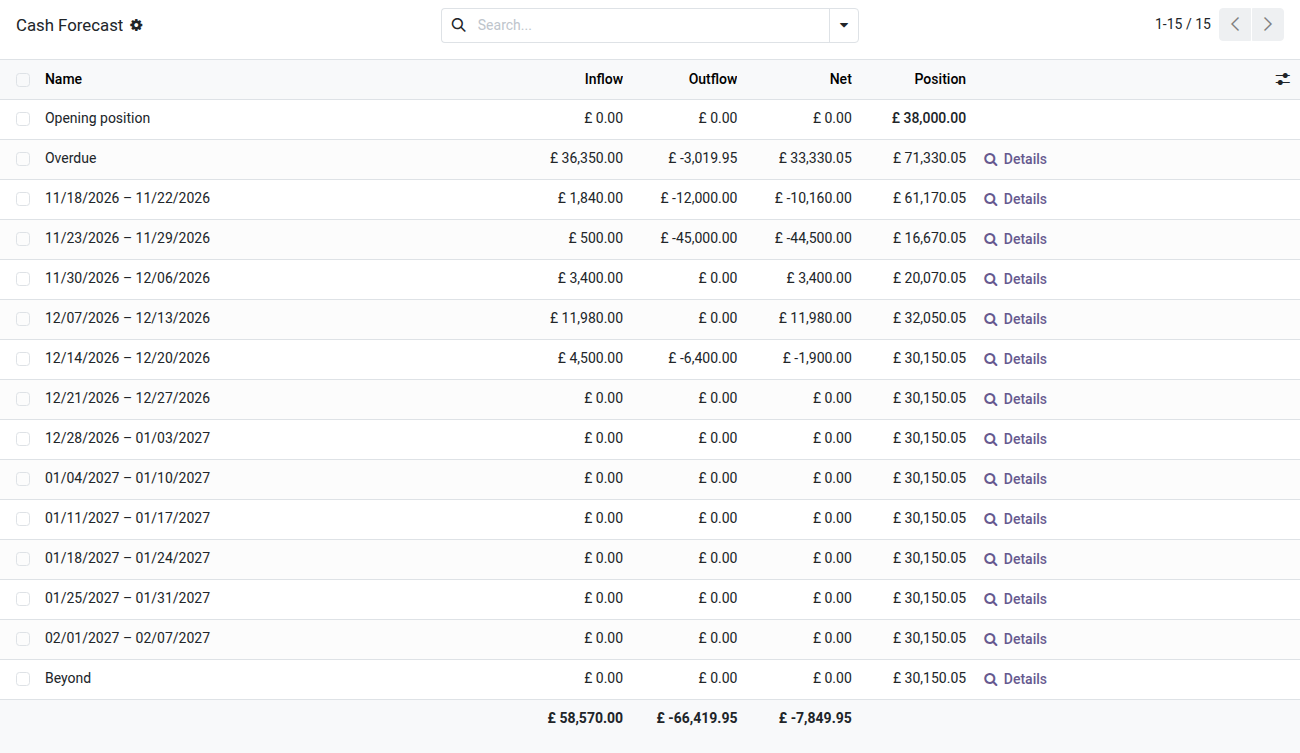
Balance Forecast
What comes in, what goes out, and the resulting cash position — week by week. The aged balance looks backward; this one looks ahead.
The aged balance answers collection's question: who owes, and since when. The treasurer asks the opposite question, and nobody answers it: how much is coming in, how much is going out, and does cash hold up until then? The due dates are all sitting in the ledger — on every customer invoice, every vendor bill. They just aren't readable anywhere in the order the money will actually move. In Community, the only answer lives in a spreadsheet, rebuilt by hand every Monday, wrong by Tuesday.
What it adds
- 📈 The projected cash position — inflows, outflows, net, and the running position from period to period, starting from the real balance of your bank and cash accounts. A negative position shows up in red before it happens.
- 🕗️ An "Overdue" column up front. A forecast that files the backlog into next week's bucket lies about when the money will arrive: a customer three weeks late does not pay tomorrow. The backlog is shown for what it is, kept apart.
- 🧮 A "Beyond" column at the tail — the total always reconciles with the partner balance. A screen that reconciles with nothing is a screen people stop opening.
- 📅 Weekly or monthly, an adjustable horizon up to twelve periods: a quarter in weeks, a fiscal year in months.
- 💧 What's still owed, never the original amount — a half-paid invoice only counts for its remainder. And it's the due date that sorts, never the accounting date: an August 1st invoice due in 30 days is not August's money.
- 👥 Detail by partner — the same matrix, line by line, and every partner opens on its statement. A figure is never a dead end.
- 🖨️ Landscape PDF of both tables, for Monday's meeting.
In screenshots
1. The position, week by week
38,000 in cash to start, the overdue items, then each week: 12,000 going out on the 18th, 45,000 the week after. The running position says whether the month holds.
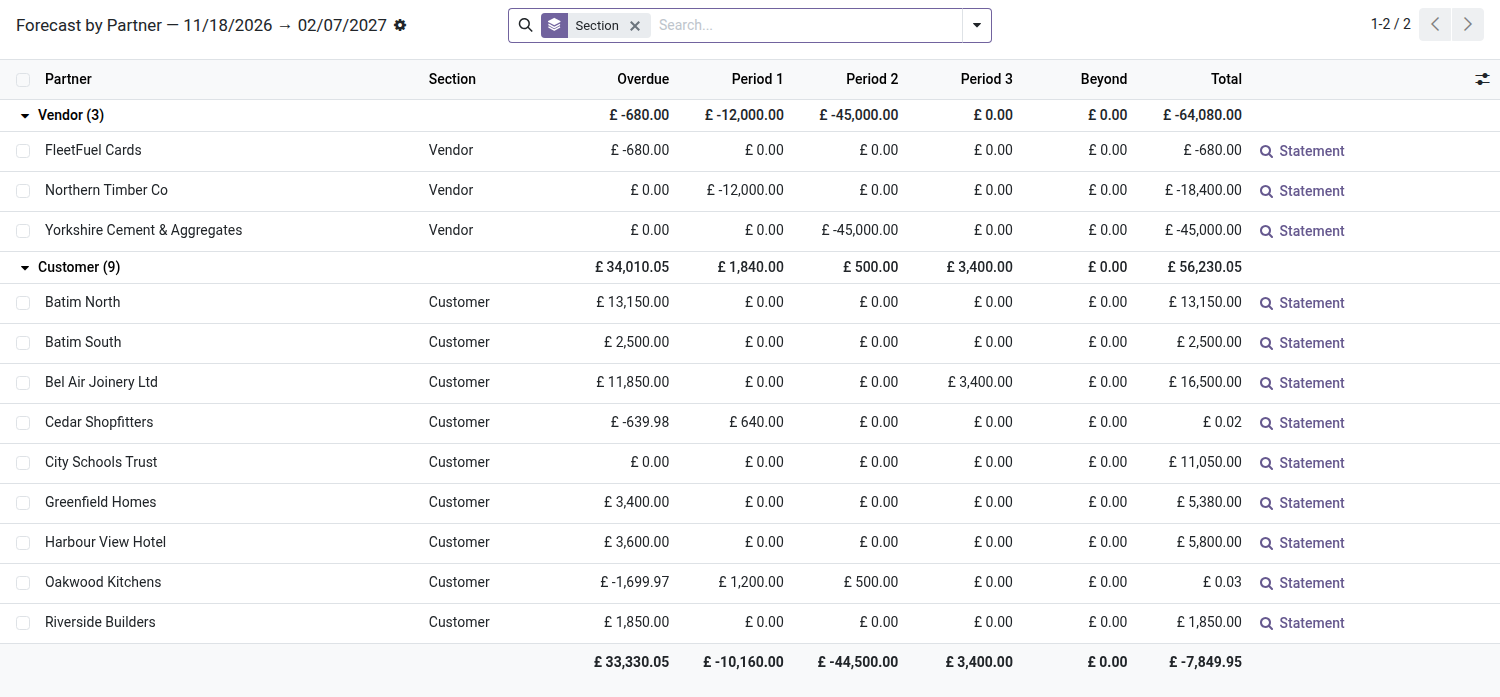
2. What makes up each period
The same forecast by partner, customers and vendors kept apart — adding a receivable and a payable into one total would mean nothing. "Statement" opens the detail.
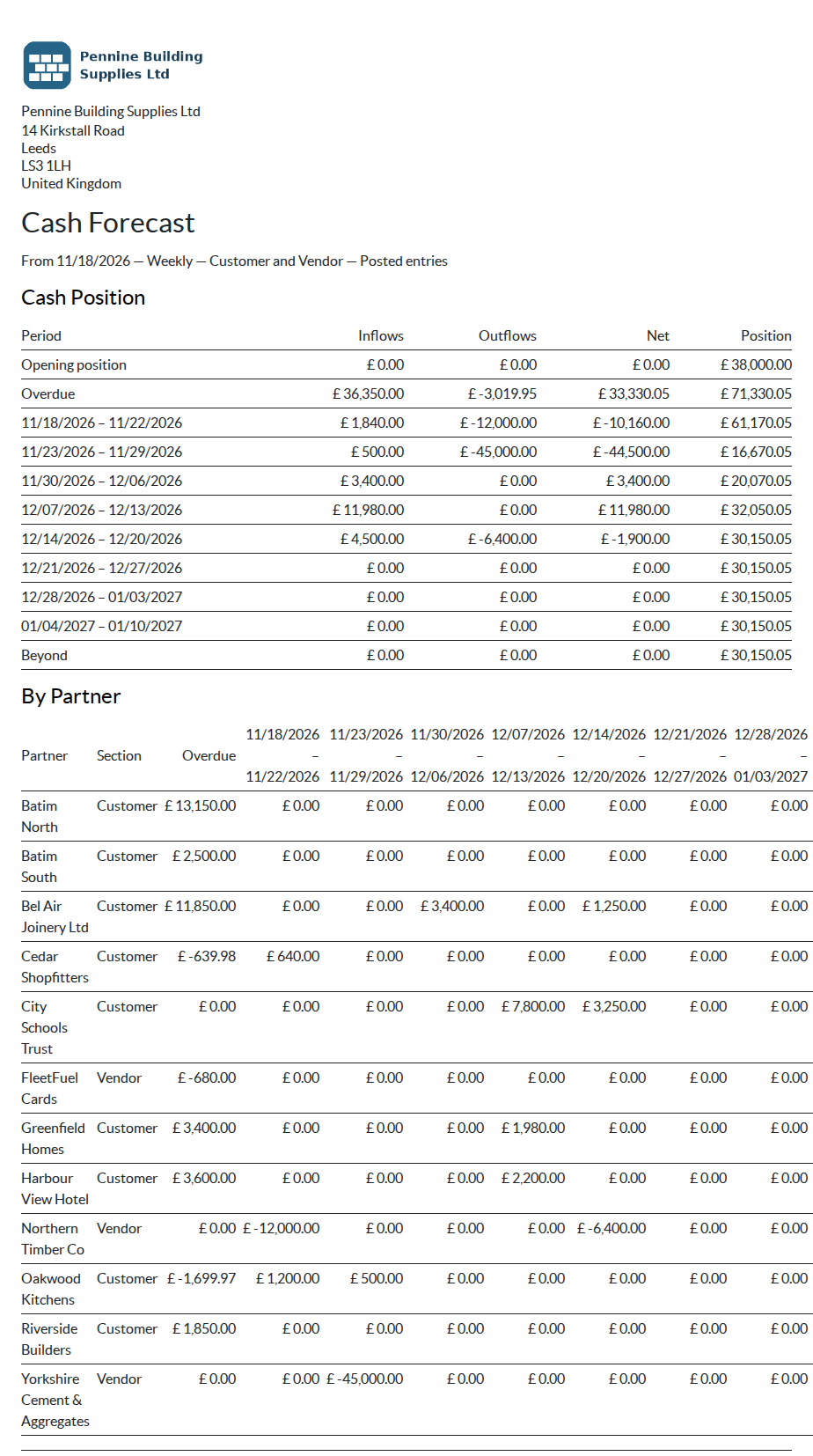
3. The board PDF
Both tables, periods named by their dates. The page that lands on the table on Monday morning.
Why install it
- A company doesn't die from a bad result, it dies from running dry of cash on a random Tuesday. The result is read after the fact; the position is read ahead of it.
- No manual entry: everything comes from the due dates already sitting on invoices. Nothing to maintain, nothing to re-key, nothing that goes stale.
- Credit card exposure weighs on the position the same way the bank does: ignore the card and you're reading a cash position you don't actually have.
- The same rules as the aged balance — same remaining amount, same due date. The two screens cannot contradict each other.
What this module does not do
It projects firm commitments: what's invoiced, on either side. Confirmed sales orders not yet invoiced, payroll, rent and loan instalments are not in it — that would be a full treasury plan, a different job. The figure means what it means because of that boundary: what's shown is owed, not hoped for.
Part of the Partner Balance suite
Requires the open-source Partner Balance core, and reuses its engine, filters and access rules. It plugs into the Treasury suite with nothing to install: the starting position follows the liquidity journals that suite feeds. Part of the Partner Balance suite — nine paid modules and two open-source add-ons, built on the open-source Partner Balance core. See it on apps.odooskills.com.
License OPL-1. Compatible with Odoo 19, 18, 17. Support: apps@odooskills.com.
Discussion
Sign in to join the discussion.