
Unified Email Inbox
Premium Launch −30%Centralized IMAP fetching, replies, drafts and sorting without leaving Odoo
| Technical name | oski_mail_inbox |
|---|---|
| License | OPL-1 |
| Author | ADICOPS |
$ 69.00
$ 48.30
Launch price — 30% off until December 31, 2026
A ready-to-use Odoo database with demo data, deleted after 1 hour. Odoo 20, 19, 18.
Missing a feature or found a bug?
Request a change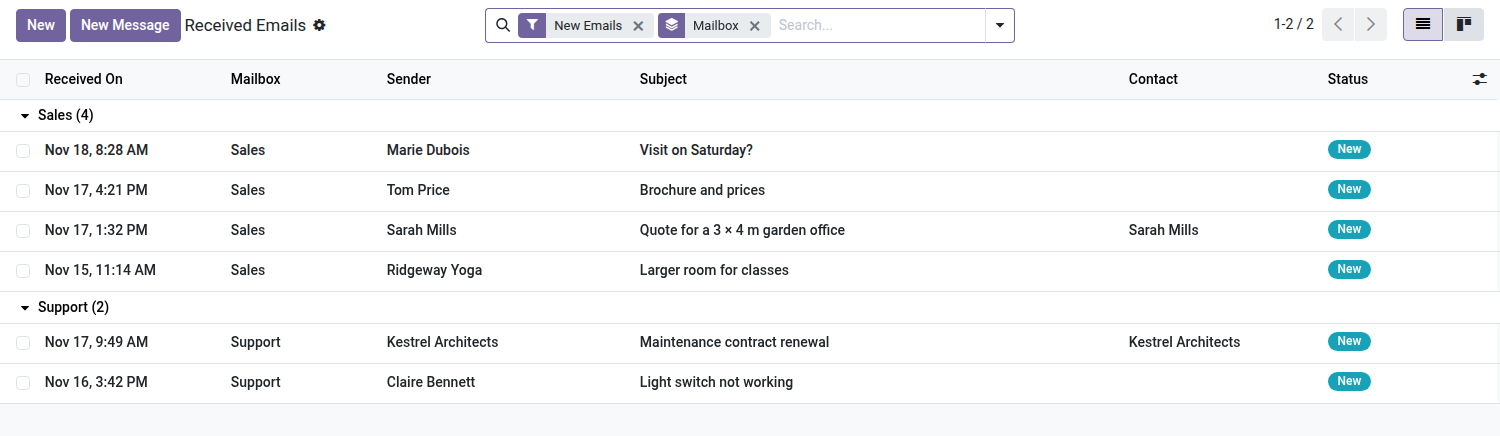

Mail — Unified Email Inbox
All the company's addresses fetched into Odoo: read, reply, file and delete without opening a webmail.
A customer complaint lands on support@, a quote request on sales@, a payment reminder on accounting@. These messages live in a webmail that no two people open together, with no link to the orders or invoices they concern. The day someone asks "who replied, and what", the answer is in someone else's mailbox — or nowhere.
What it adds
- 📥 As many mailboxes as addresses — each company address is fetched over IMAP and feeds a shared email queue, with its status: New, Replied, Closed, Spam.
- ✉️ Reply from the right address — the reply goes out from the mailbox that received the message, with its signature; the customer's answer comes back into the same queue, in the same thread.
- 📨 A copy wherever you are — each mailbox can forward a copy of what it receives to one or more addresses, attachments included; replying from the copy writes directly to the customer. Nothing is copied during the history import or for a blocked address.
- 📝 Drafts that survive — a message you started is still in "Drafts" the next day, attachments included, where a classic composer would have lost it on close.
- 🗑️ Delete and file all the way to the server — the email goes to the IMAP server's trash or junk folder, not just in Odoo. Nothing is destroyed: the record is archived, the message moved.
- 🚫 A blocklist that remembers — an address marked as spam once no longer comes back the next day; the block applies to the exact address, never to its domain, and stays reversible.
- 🔁 No action lost — if the IMAP server does not respond, the operation is queued and replayed by a scheduled action; meanwhile the record shows "sync pending".
- 📊 History import — messages already on the server are brought in from a chosen date, with a progress gauge moving before your eyes, without touching the server's "read" flags.
- 🔒 Two access levels — the User reads, replies and blocks; the Manager configures mailboxes, unblocks an address and replays the queue.
In screenshots
1. All your mailboxes in one list
New emails grouped by mailbox, sender by name, linked contact and status — the whole team sees the same inbox.
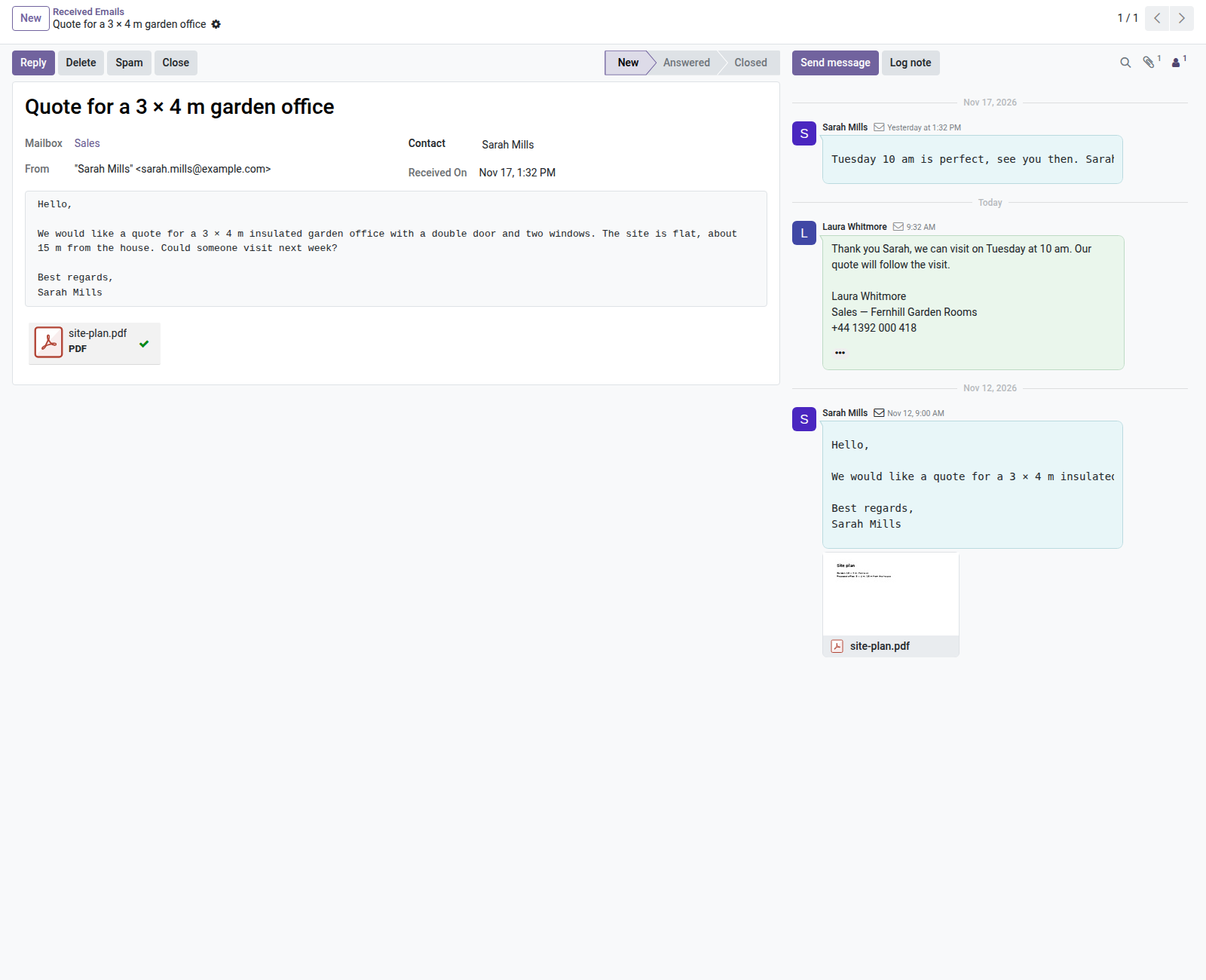
2. The whole conversation on one record
The email and its attachments, the reply sent from Odoo, then the customer's answer, which reopens the thread.
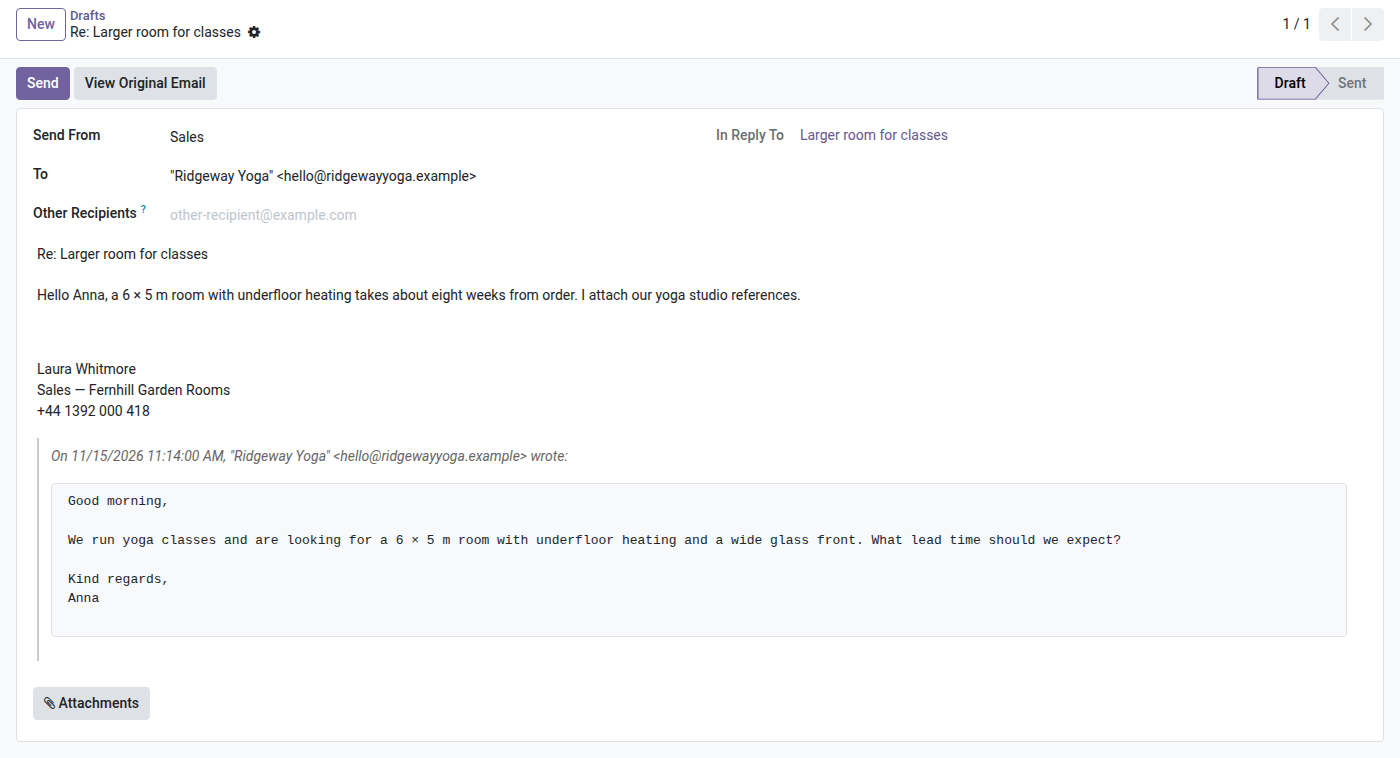
3. Reply from the right address
The draft is sent from the mailbox, with its signature and the original quoted; other recipients and attachments can be added.
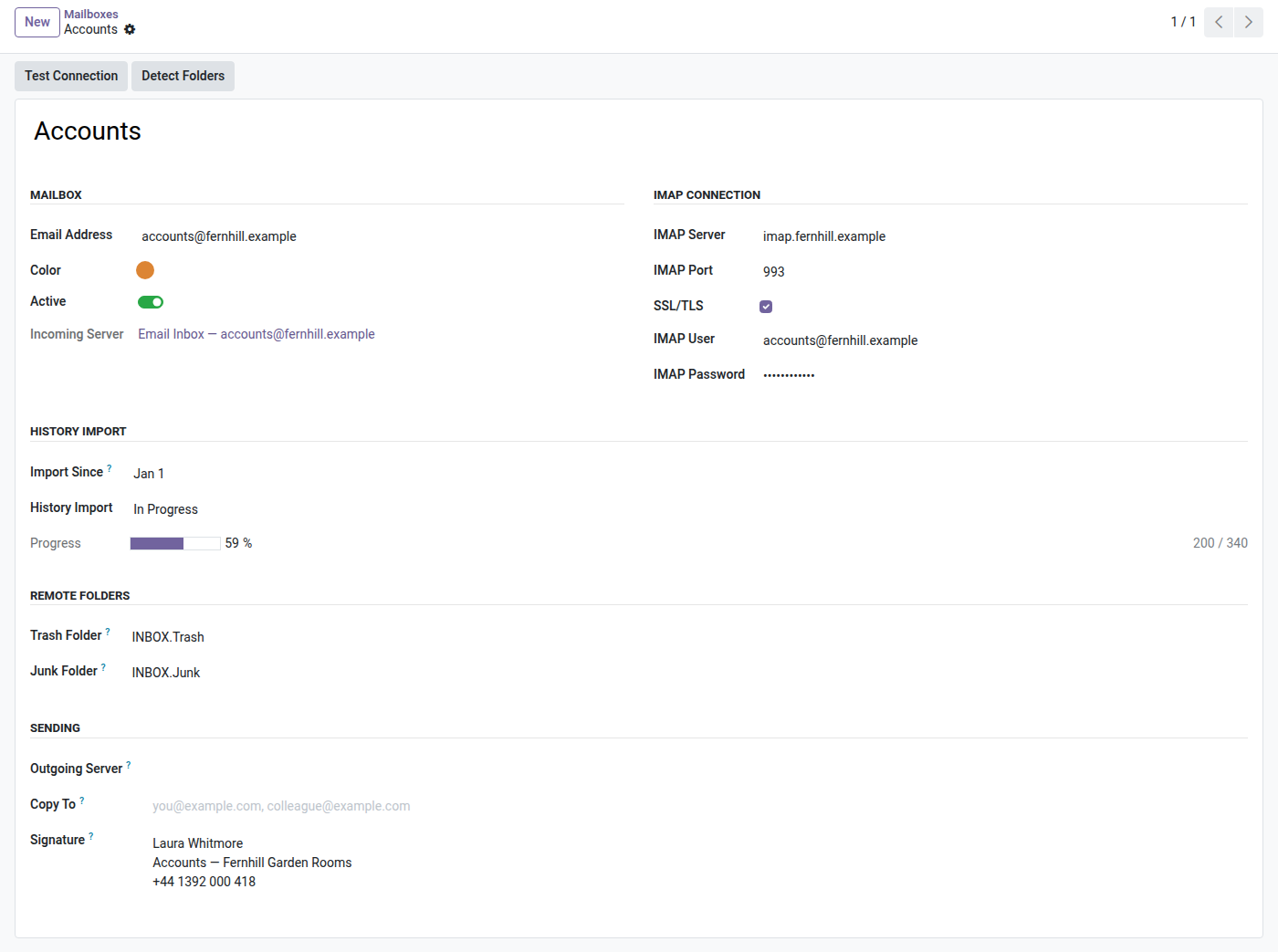
4. Mailbox and history import
IMAP connection, history import since a date with its progress gauge, remote folders, copy address and signature.
5. Junk once, blocked for good
Marking an email as junk moves it on the server and blocks its sender on every mailbox.
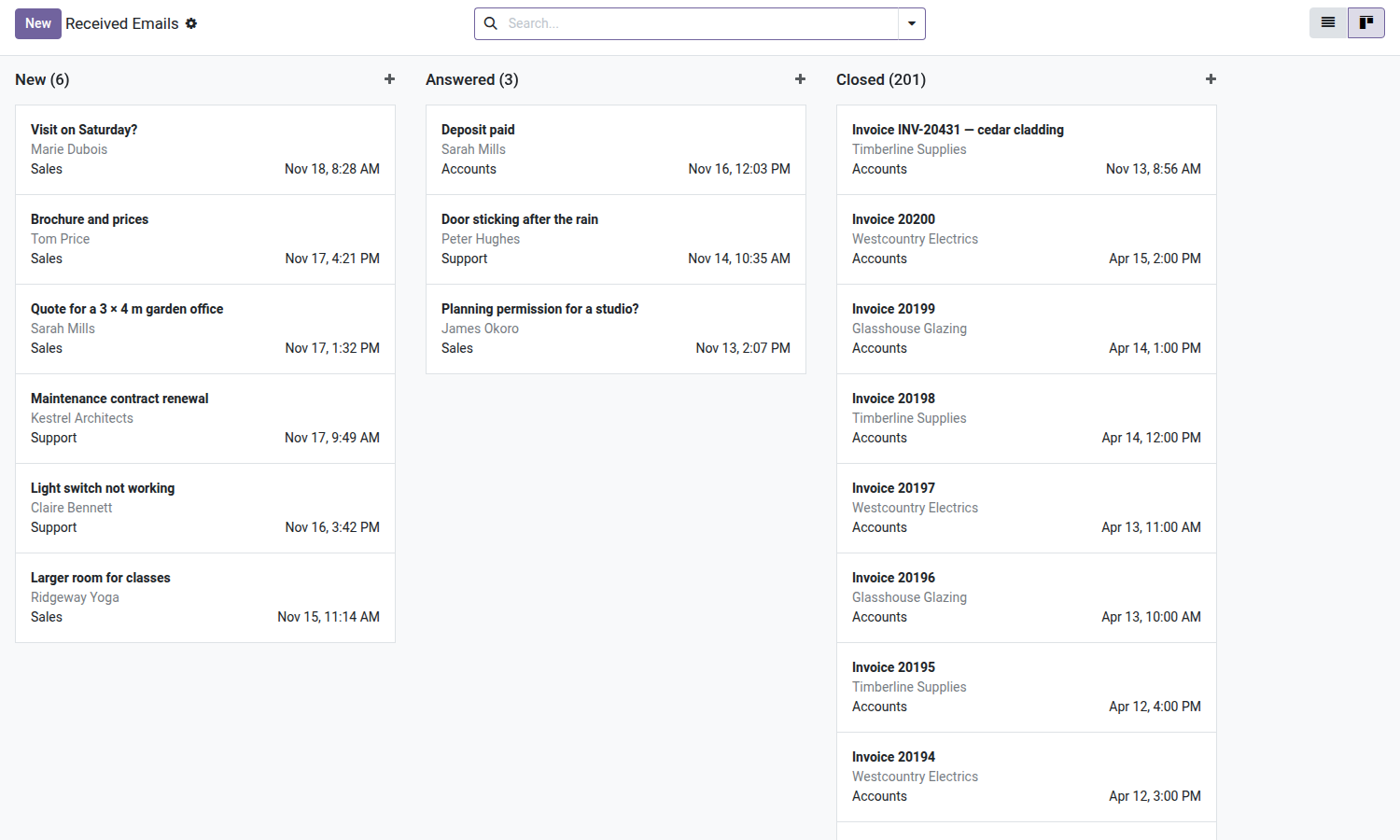
6. Track what is left to handle
The board follows the handling order: new, answered, closed.
Why install it
- Customer messages stop living outside the ERP: the team can read them, they are linked to a contact, and tracked with a status.
- An action taken in Odoo shows up in the webmail — a deleted email really is in the server's trash, not just hidden on one side.
- No stray contacts: replying to an address does not create a partner record along the way, so the customer base stays clean.
- Standalone install: the module only depends on
mail, shipped with Odoo Community. Nothing else to buy.
What the module does not do
It is not a three-pane mail client: no drag-and-drop between folders, no copy of sent messages into the server's "Sent" folder, no blocking of an entire domain. Sent messages stay tracked in Odoo, on the original email's record.
License OPL-1 — Odoo 19.0 Community and Enterprise. Support: apps@odooskills.com — apps.odooskills.com.
Discussion
Sign in to join the discussion.