
Helpdesk Website & Portal
Premium Launch −30%Open a structured channel on your website: a public ticket form and a "My Tickets" customer portal, without Odoo Enterprise.
| Technical name | oski_helpdesk_website |
|---|---|
| License | OPL-1 |
| Author | OdooSkills |
$ 39.00
$ 27.30
Launch price — 30% off until December 31, 2026
A ready-to-use Odoo database with demo data, deleted after 1 hour. Odoo 20, 19, 18.
Missing a feature or found a bug?
Request a change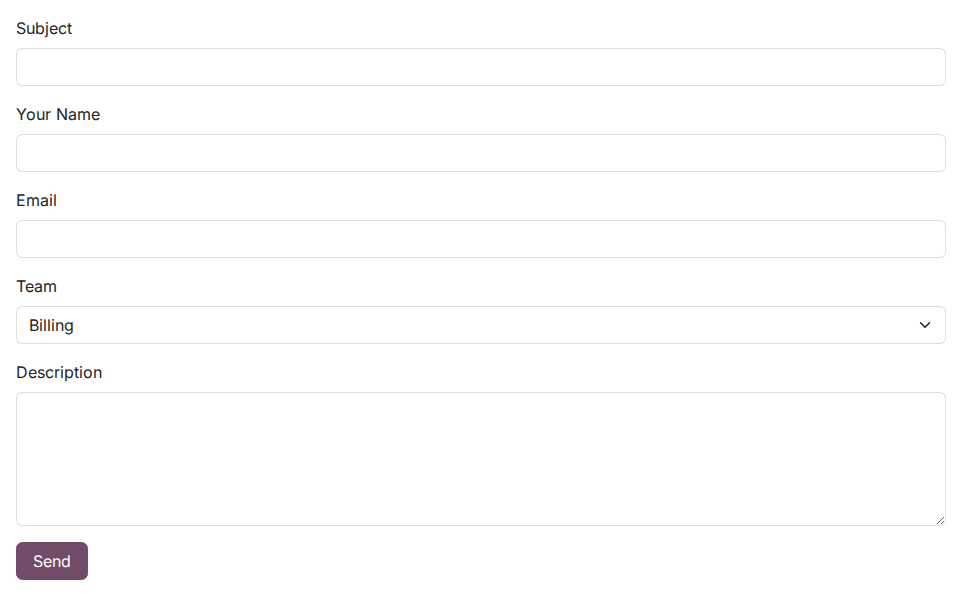
Helpdesk Website & Customer Portal
Your customers open tickets from your website and follow their resolution on their own — without calling support.
Without a structured channel, your customers send informal emails, call directly or give up in silence. Your agents receive scattered requests, create contacts by hand and do not know who is waiting for what. The result: lost tickets, piling follow-ups and a customer service that feels opaque.
What it adds
-
🌐 Public form at
/helpdesk— any visitor (logged in or not) can submit a ticket in seconds: subject, name, email, description, and team selection when several are published. -
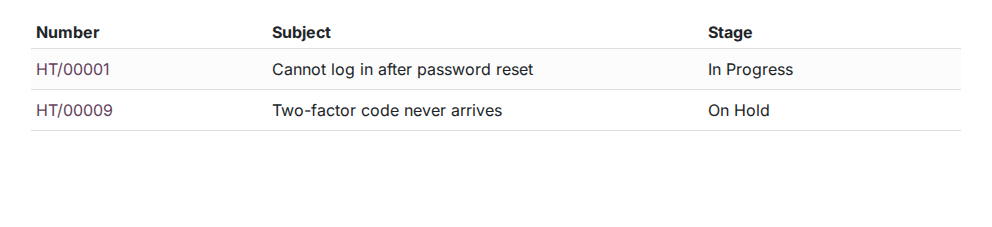
📋 "My Tickets" portal — logged-in customers find the full history of their requests at
/my/tickets, check the current stage and exchange through the built-in message thread. - 🛡️ Native honeypot anti-spam — a field invisible to bots, no CAPTCHA to configure; automated submissions are silently ignored.
- 👤 Automatic contact creation — an unknown email? An Odoo partner is created on the fly from the name and email provided, with no double entry for the agent.
- 🔗 Configurable multi-team — each team can be published on the website or not; if only one is active, assignment is automatic; if several are, the customer picks from a list.
-
🗺️ Automatic sitemap indexing — the
/helpdeskpage is declared in the Odoo sitemap, so search engines can index it.
In screenshots
1. A support form on your website
Customers open a ticket from /helpdesk, choosing the team; their contact is created or recognised.
2. Customers follow their tickets
In "My Account", each customer sees their own tickets and their stage.
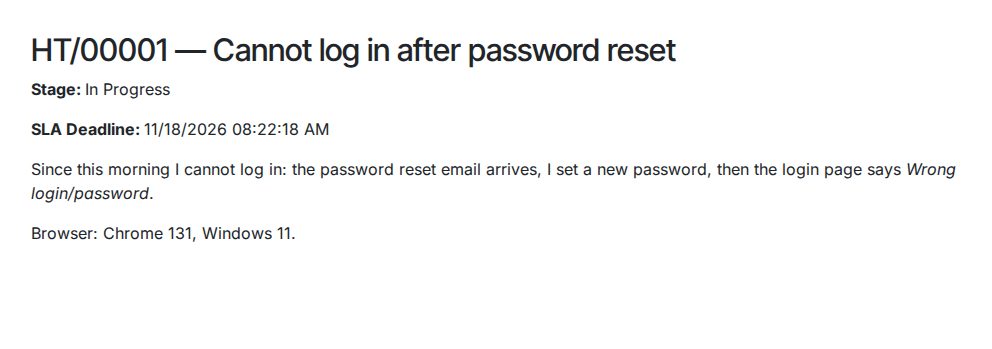
3. Every detail, without calling
Stage, SLA deadline and description of the request, from the customer portal.
Why install it
- A feature reserved for Odoo Enterprise (built-in helpdesk portal) — available here on Community Edition, with no extra Odoo license cost.
- Self-service customers rely less on phone support and untracked email: every request is recorded, numbered and assigned in Odoo.
- Works with oski_helpdesk_sla: if you enable SLA policies, the deadline appears directly on the customer portal detail page.
- No external dependency: everything is handled by Odoo (portal.mixin, website.published.mixin), with no third-party plugin or special network setup.
Part of the Helpdesk Pro suite
Add oski_helpdesk_sla (SLA policies and deadline alerts) and oski_helpdesk_canned (canned responses for agents) for a Community helpdesk on par with an Enterprise solution. The Helpdesk Pro bundle (6 modules) is available at a reduced price on apps.odooskills.com.
📦 Need it all? The Helpdesk suite installs all eight modules at once for $129 instead of $194.
License OPL-1 — compatible with Odoo 19.0 Community Edition. Requires the open-source oski_helpdesk module. Support: apps@odooskills.com.
Discussion
Sign in to join the discussion.