Helpdesk Analysis
Premium Launch −30%Manage your support: volume, resolution time, SLA and customer satisfaction in a single report.
| Technical name | oski_helpdesk_report |
|---|---|
| License | OPL-1 |
| Author | OdooSkills |
$ 29.00
$ 20.30
Launch price — 30% off until December 31, 2026
A ready-to-use Odoo database with demo data, deleted after 1 hour. Odoo 20, 19, 18.
Missing a feature or found a bug?
Request a change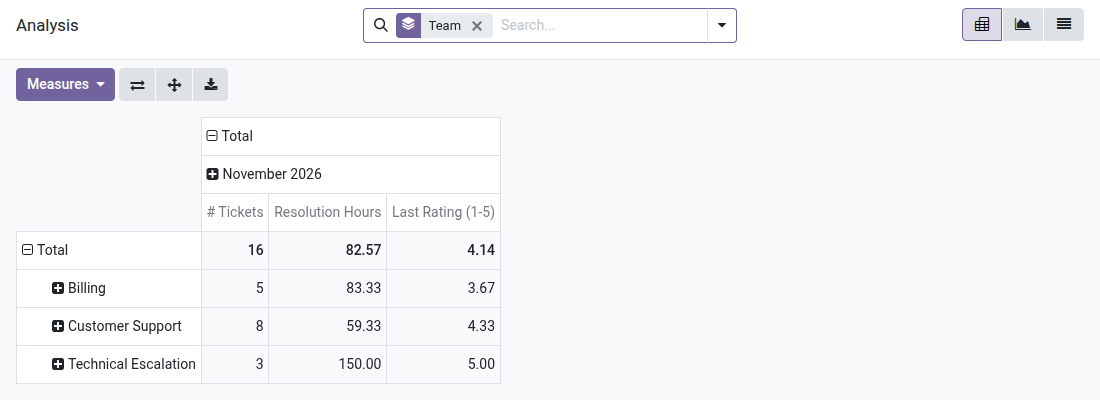
Helpdesk Analysis
See in a single report: ticket volume, resolution time, SLA compliance and customer satisfaction.
You handle dozens of tickets every week, but you do not know which team resolves fastest, how many SLAs were met this month, or whether your customers leave satisfied. The data is indeed in Odoo — but scattered across the ticket list, the SLA policies and the satisfaction ratings. Without a consolidated analytical view, managing support performance means flying blind.
What it adds
- 📊 Team × month pivot view — cross ticket volume and average resolution time by team and by period, without exporting anything.
- ⚡ Resolution time computed automatically — in hours, averaged over all closed tickets, straight from Odoo's dates.
- 🔒 Built-in SLA tracking — identify with one filter the tickets subject to an SLA, those that met the deadline and those that exceeded it.
- ⭐ Average satisfaction rating — aggregate customer ratings (1-5) by team or by agent to spot friction points.
- 🔁 Graph and list alongside the pivot — switch to a bar chart (tickets per team) or a detailed list depending on what you need to analyze.
- ✅ Ready-to-use filters and grouping — by agent, by stage, by priority, by creation month — with no configuration.
In screenshots
1. Volumes, resolution time, satisfaction
Per team and per month: number of tickets, average hours to resolve and last rating, in a pivot you can reshape.
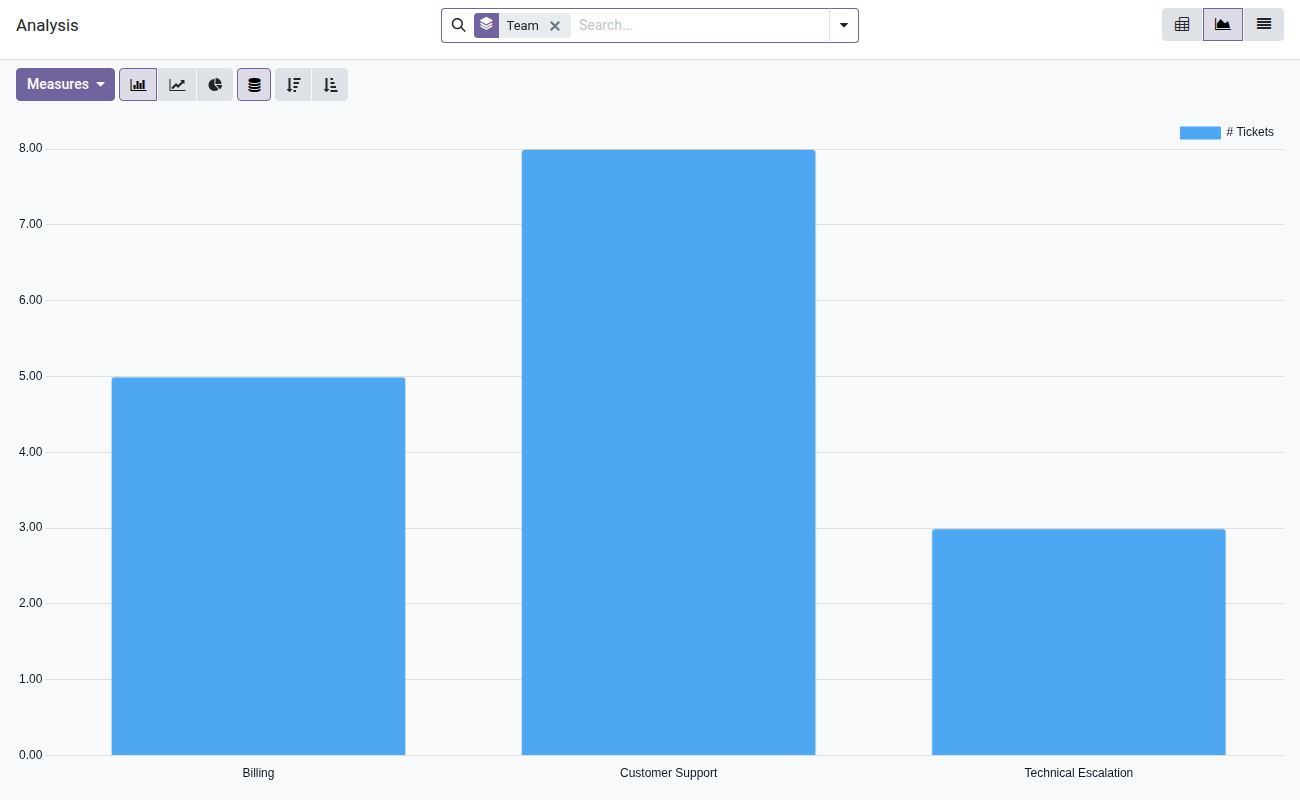
2. The load of each team
Bar, line or pie charts on any measure, with filters on SLA failures, priority or customer.
Why adopt it
- The analytical view relies on a direct SQL query (model
helpdesk.ticket.report): no on-the-fly computation, instant response even on several thousand tickets. - Brings together in a single menu SLA, satisfaction and lead times — indicators normally scattered across Odoo Enterprise or requiring manual exports in Community.
- Compatible with your OdooSkills Helpdesk stack: installs on top of
oski_helpdesk,oski_helpdesk_slaandoski_helpdesk_ratingwith no additional configuration. - Support managers get a weekly operational dashboard right inside Odoo — no third-party tool, no CSV export.
Part of the Helpdesk Pro suite
This module uses the data produced by the suite's other add-ons. Combine them for complete support:
- oski_helpdesk_sla — define SLA policies by team and priority (required for SLA analysis).
- oski_helpdesk_rating — collect customer satisfaction ratings after closure (required for the average rating).
- oski_helpdesk_canned — canned replies to speed up handling of frequent tickets.
- oski_helpdesk_website — customer portal to submit and track tickets from the website.
See the full suite and the Helpdesk Pro bundle (-39%) on apps.odooskills.com.
📦 Need it all? The Helpdesk suite installs all eight modules at once for $129 instead of $194.
License OPL-1 — compatible with Odoo 19.0. Requires oski_helpdesk, oski_helpdesk_sla and oski_helpdesk_rating. Support: apps@odooskills.com.
Discussion
Sign in to join the discussion.