
Cost & Margin: POS Screen
Premium Launch −30%Cost and margin invisible on the POS terminal's product info for unauthorized cashiers — without blocking the checkout.
| Technical name | oski_cost_margin_security_pos_frontend |
|---|---|
| License | OPL-1 |
| Author | OdooSkills |
$ 19.00
$ 13.30
Launch price — 30% off until December 31, 2026
A ready-to-use Odoo database with demo data, deleted after 1 hour. Odoo 20, 19, 18.
Missing a feature or found a bug?
Request a change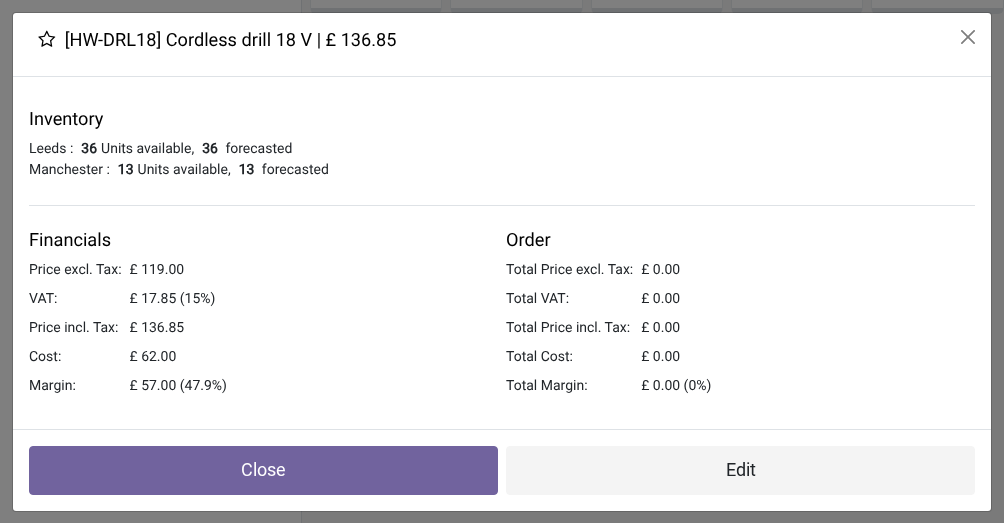
Cost/Margin Hiding — POS Checkout Screen
Purchase cost and margin stay invisible on the POS terminal's product info for unauthorized cashiers — without ever blocking the checkout.
Without protection at the interface level, any cashier can open a product's info and read its purchase cost or margin — strategic information exposed in the wrong place. And if access to the cost field is restricted on the server side (via oski_cost_margin_security_pos), the POS terminal crashes with an access error as soon as the product info is opened: the checkout becomes unusable. This module solves both problems at once.
What it adds
- 🔒 Cost removed from the POS payload — for cashiers outside the "View cost & margin" group, the
standard_pricefield is no longer sent to the browser: zero sensitive data on the client side. - ✅ Stable terminal, zero AccessError — even when access to cost is restricted by the POS bridge, the product info opens normally and the manager can keep working.
- 🙈 Clean product popup — the cost & margin section of the ProductInfoPopup is hidden automatically for unauthorized users, whatever the point of sale's "Margins & Costs" setting.
- ⚡ Double protection (server + client) — the field is filtered at read time in Python and the popup is patched in JavaScript: no possible leak, not even through the browser's developer tools.
In pictures
1. Cost and margin at the till, for managers
On the POS terminal, product info shows cost and margin to authorised people, as in standard Odoo.
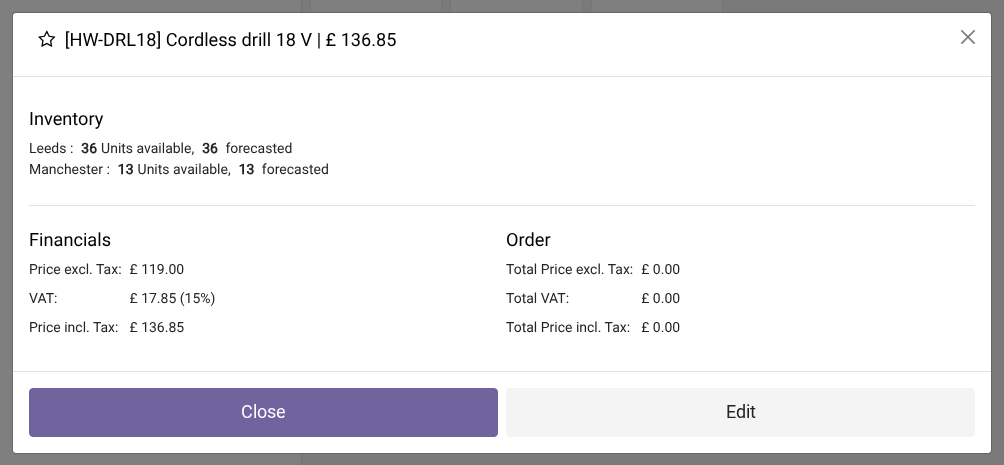
2. Nothing for the cashier
Even with "margins and costs visible to everyone" ticked on the POS, the cashier only sees prices and stock. The checkout keeps working.
Why install it
- Without this add-on, installing oski_cost_margin_security_pos would make the POS terminal unusable for cashiers: this module is the missing link for a complete, non-intrusive restriction.
- The protection is transparent for managers: users who belong to the "View cost & margin" group still see cost and margin in the product info, with nothing changed in their experience.
- Meets internal confidentiality requirements: profitability data no longer leaves the server — it is not even sent to the cashier's browser.
Part of the Dimension Security suite
This module requires oski_cost_margin_security_pos (server-side POS bridge) and oski_cost_margin_security (core — defines the "View cost & margin" group). Complete it with oski_cost_margin_security_sale to extend the restriction to quotations and sales orders. See the full suite on apps.odooskills.com.
OPL-1 license — compatible with Odoo 19.0 Community. Support: apps@odooskills.com.
Discussion
Sign in to join the discussion.