
Clinic Ward Stock
Premium Launch −30%Ward cabinets for a private clinic: stock per department, par levels, replenishment by the pharmacy, usage charged to the patient, controlled-substance register.
| Technical name | oski_clinic_ward_stock |
|---|---|
| License | OPL-1 |
| Author | OdooSkills |
$ 59.00
$ 41.30
Launch price — 30% off until December 31, 2026
A ready-to-use Odoo database with demo data, deleted after 1 hour. Odoo 20, 19, 18.
Missing a feature or found a bug?
Request a change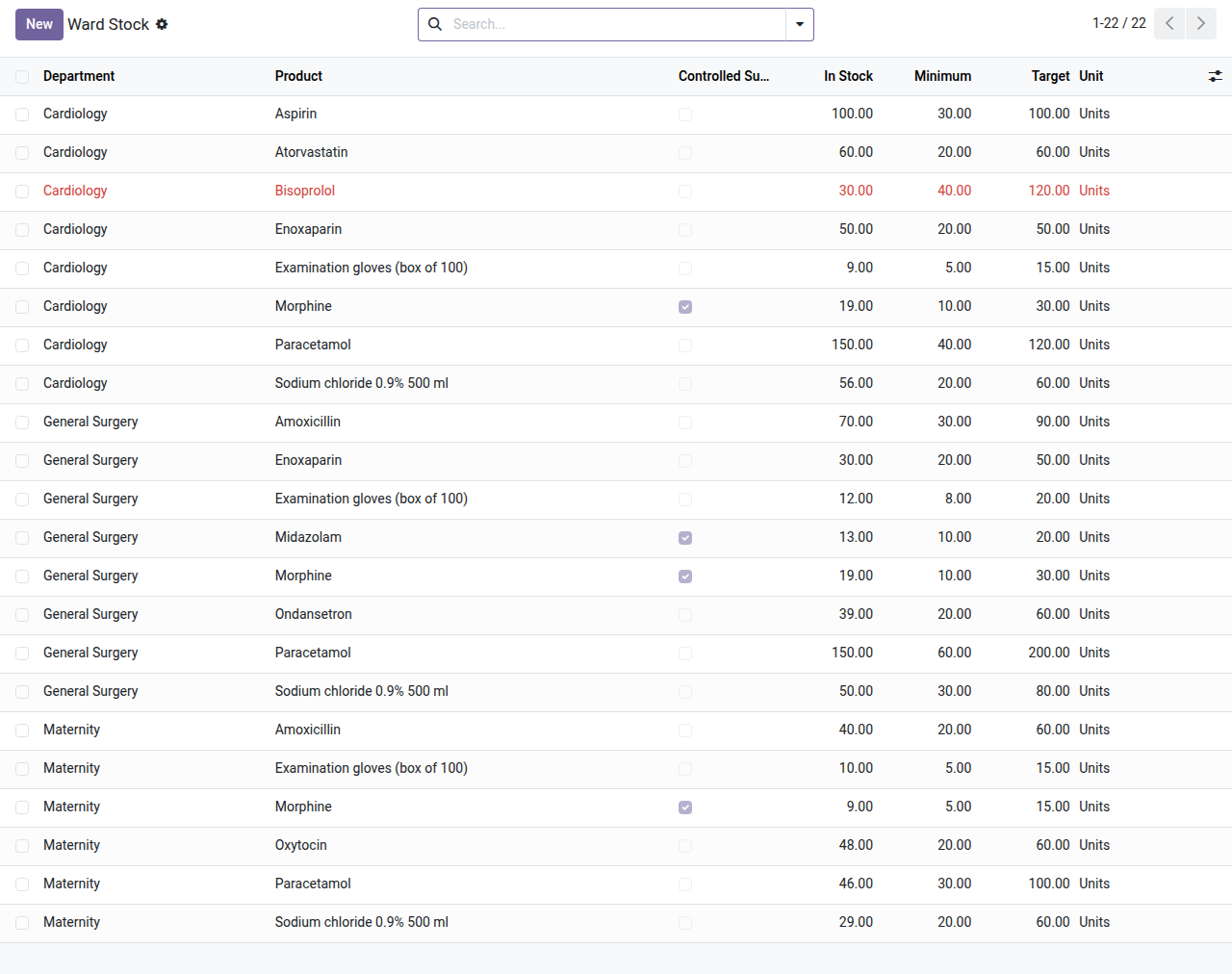
Clinic Ward Stock
A cabinet in every ward: what it should hold, what it used, who witnessed the controlled drugs.
The ward cabinet is a shelf that nobody counts until the morphine does not add up. Replenishment is a phone call to the pharmacy, what a nurse took for a patient is written on a sheet and never reaches the bill, and the controlled-substance register is a paper book. This module gives each department a stock location of its own in Odoo Inventory, with the levels it should hold, the replenishment requests served by the pharmacy, what the ward uses (for a patient or for itself), and a register of controlled substances written by the stock moves themselves.
What it does
- 🗄️ One cabinet per department — a stock location created on first use; the stock of a ward is the stock of Odoo Inventory.
- 🎯 Par levels — a minimum and a target per department and product; what is under its minimum shows in red, with what is in stock now.
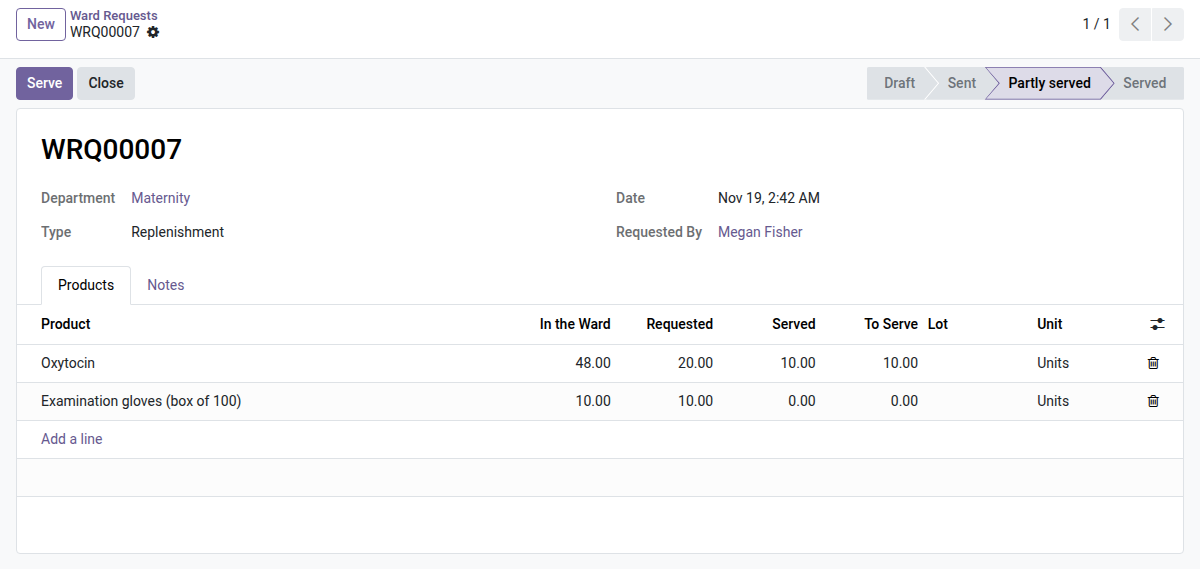
- 📝 Replenishment requests — “Propose replenishment” makes one draft request per department with what is under its minimum: target minus stock minus what is already asked. The pharmacy serves it, in full or in part (“Partly served”), with the lot, chosen or picked automatically.
- ↩️ Returns to the pharmacy — a request of type “Return to pharmacy” sends products back to the pharmacy stock.
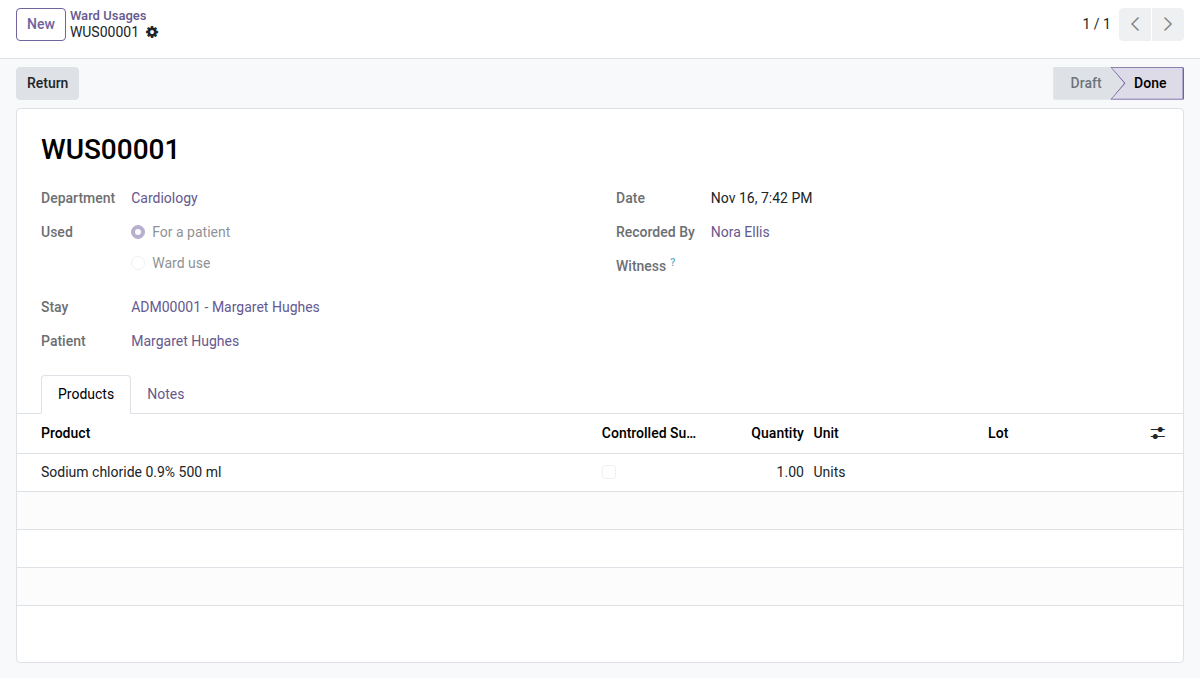
- 🧑⚕️ Usage for a patient — the nurse records what she takes for a patient: the stock leaves the cabinet, the lot is kept, and a line is added to the patient's statement, on their open stay when there is one. The lot is chosen automatically when you leave it empty.
- 🏥 Usage for the ward — gloves, flushes and consumables used by the ward itself: the stock leaves the cabinet and nothing is charged to a patient.
- 🔁 Returns — a validated usage can be returned, all or in part, in the lot it came from; the statement gets a negative line at the price charged, never more than is still charged.
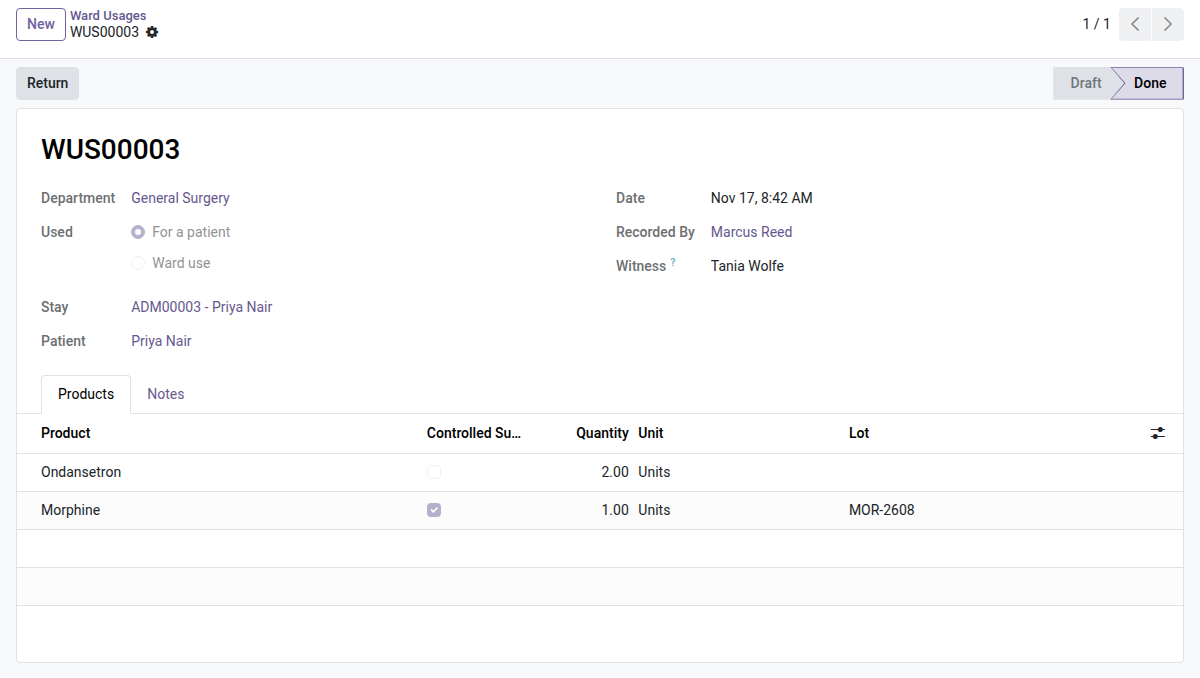
- 🔒 Controlled substances — mark a product as controlled: every usage of it needs a witness, another person of the care or pharmacy staff. The witness is named on the usage, not authenticated (there is no second login).
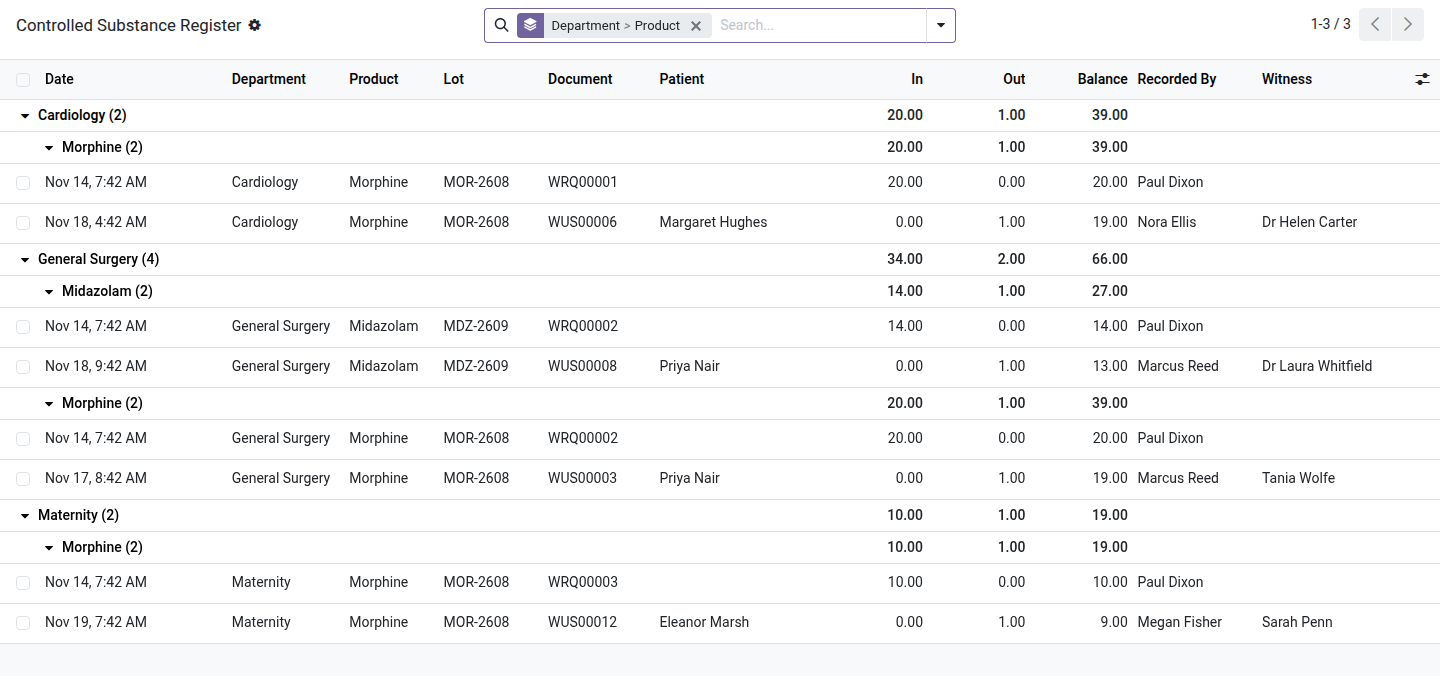
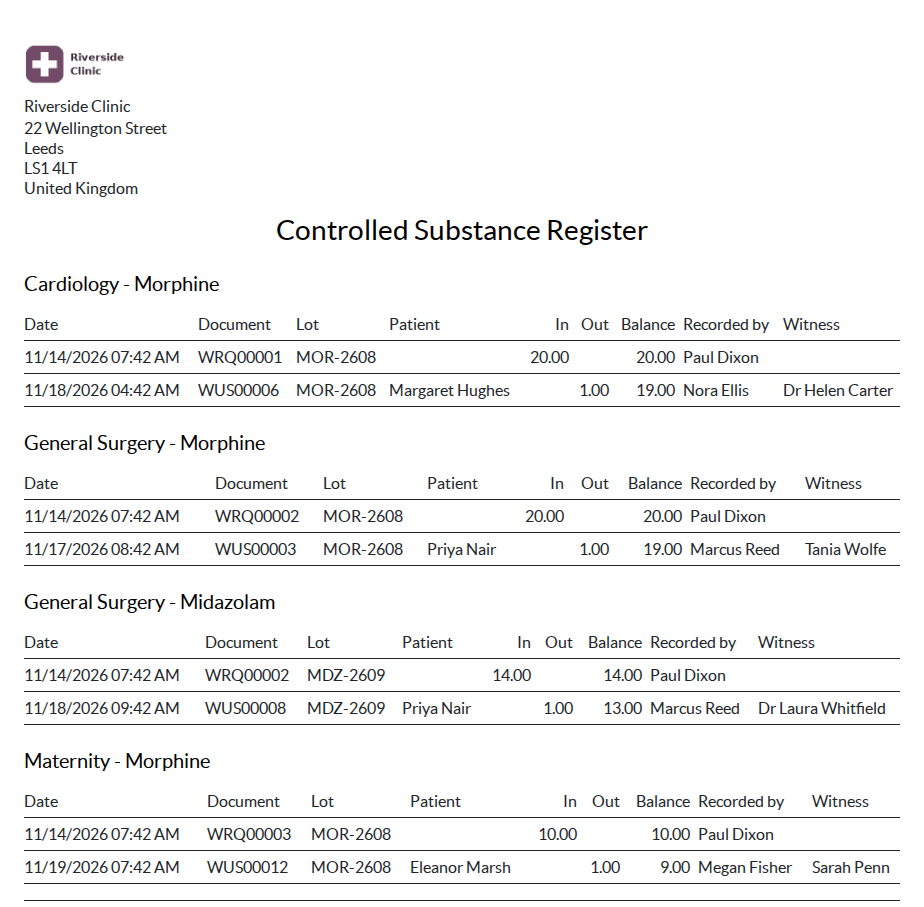
- 📒 Controlled register — one entry per lot moved in or out of a cabinet, with the lot, the document, the patient, who recorded it, the witness and the balance after the movement. It is written by the stock move itself, so an Inventory adjustment or a transfer appears too; entries are read-only. Printable by department and product.
- 💊 Supply source of a prescription — choose per prescription whether the pharmacy dispenses it or the ward gives it from its cabinet; one source, so a product is charged once.
In screenshots
1. Stock levels per ward
What each cabinet should hold, what it holds now; what is under its minimum is in red.
2. A replenishment request
Asked by the ward, served by the pharmacy in part: requested, served and still to serve per product.
3. Usage for a patient
What the nurse took from the cabinet for a patient; the stock leaves and the stay statement gets its line.
4. A controlled substance, with its witness
The product is flagged as controlled, its lot is recorded and a second person is named as witness.
5. The controlled-substance register
In, out and balance per department and product, written by the stock moves themselves.
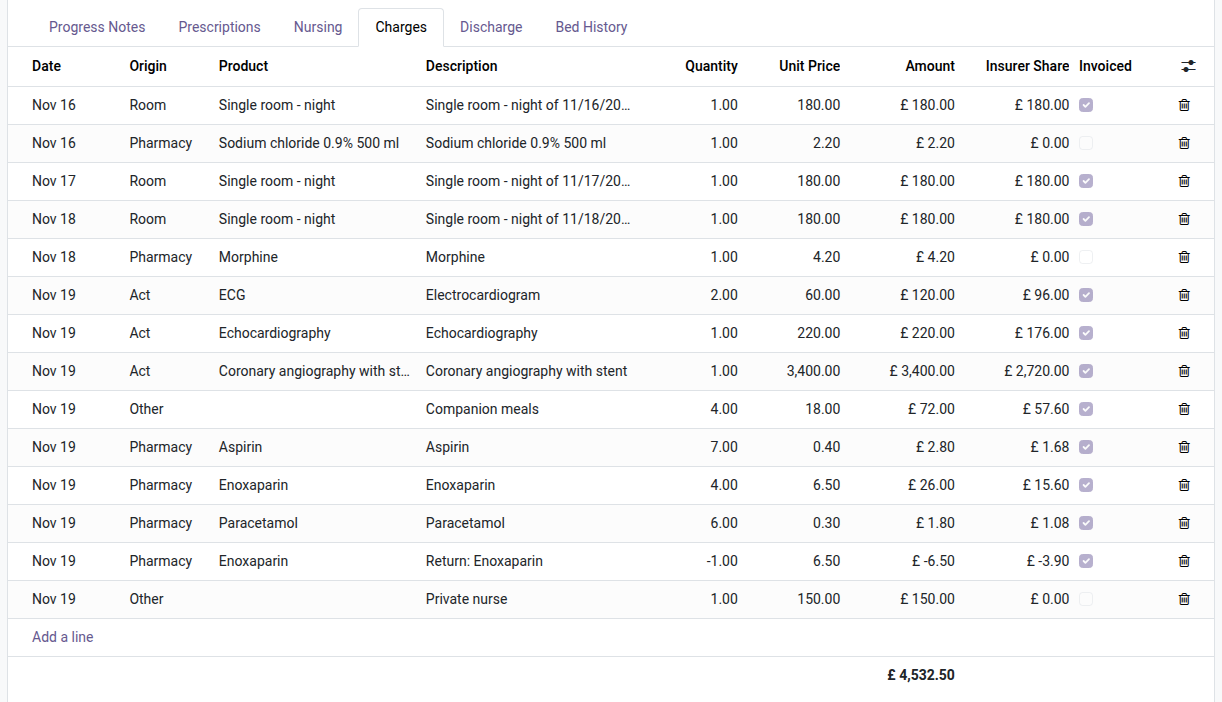
6. On the statement of the stay
What the ward took for the patient joins the charges of the stay (here sodium chloride and morphine, origin Pharmacy), ready to be invoiced with Clinic Billing.
7. The printed register
Per department and product: date, document, lot, patient, quantities, balance, who recorded and who witnessed.
Why install it
- The cabinet is counted by Odoo: you see what is missing before the shelf is empty.
- What leaves the cabinet for a patient reaches the statement without retyping.
- The controlled register cannot drift from the stock: it is written by the stock moves.
- Care staff use the cabinet of their department without any Inventory right (every cabinet if they belong to no department); the pharmacist keeps control of what is served.
A hospital extension of the OdooSkills Clinic family
It plugs into the clinic and installs alone or with the other extensions:
- 🤰 Clinic Maternity — $79: pregnancy record, prenatal visits, labour chart, delivery, newborns and their documents.
- 📅 Clinic Duty Roster — $59: shifts, minimum staffing and coverage board, rotation patterns, swaps, who is on duty now.
🏥 The Clinic Management Suite installs the eight Clinic modules and the six Medical Practice and Queue modules they build on for $449 (14 modules).
📦 Need the whole hospital? The Hospital Management Suite installs the Clinic Management Suite, maternity, ward stock, duty roster, Resource Planning and Gantt View, with the links between them, for $599 instead of $824.
Compatibility and license
Odoo 18, 19 and 20, Community and Enterprise. OPL-1 license. Requires Clinic Pharmacy (oski_clinic_pharmacy, $59), itself built on Clinic Management ($99), and the Odoo Inventory app. English interface, French translation included; nothing specific to one country; multi-company. A specific need? The “Request a change” button on this page sends it to us. Support: apps@odooskills.com.
Discussion
Sign in to join the discussion.