
Clinic Duty Roster
Premium Launch −30%Duty roster for a clinic or hospital: shift types, minimum staffing and coverage, rest and night rules, rotation patterns, shift swaps, who is on duty now.
| Technical name | oski_clinic_roster |
|---|---|
| License | OPL-1 |
| Author | OdooSkills |
$ 59.00
$ 41.30
Launch price — 30% off until December 31, 2026
A ready-to-use Odoo database with demo data, deleted after 1 hour. Odoo 20, 19, 18.
Missing a feature or found a bug?
Request a change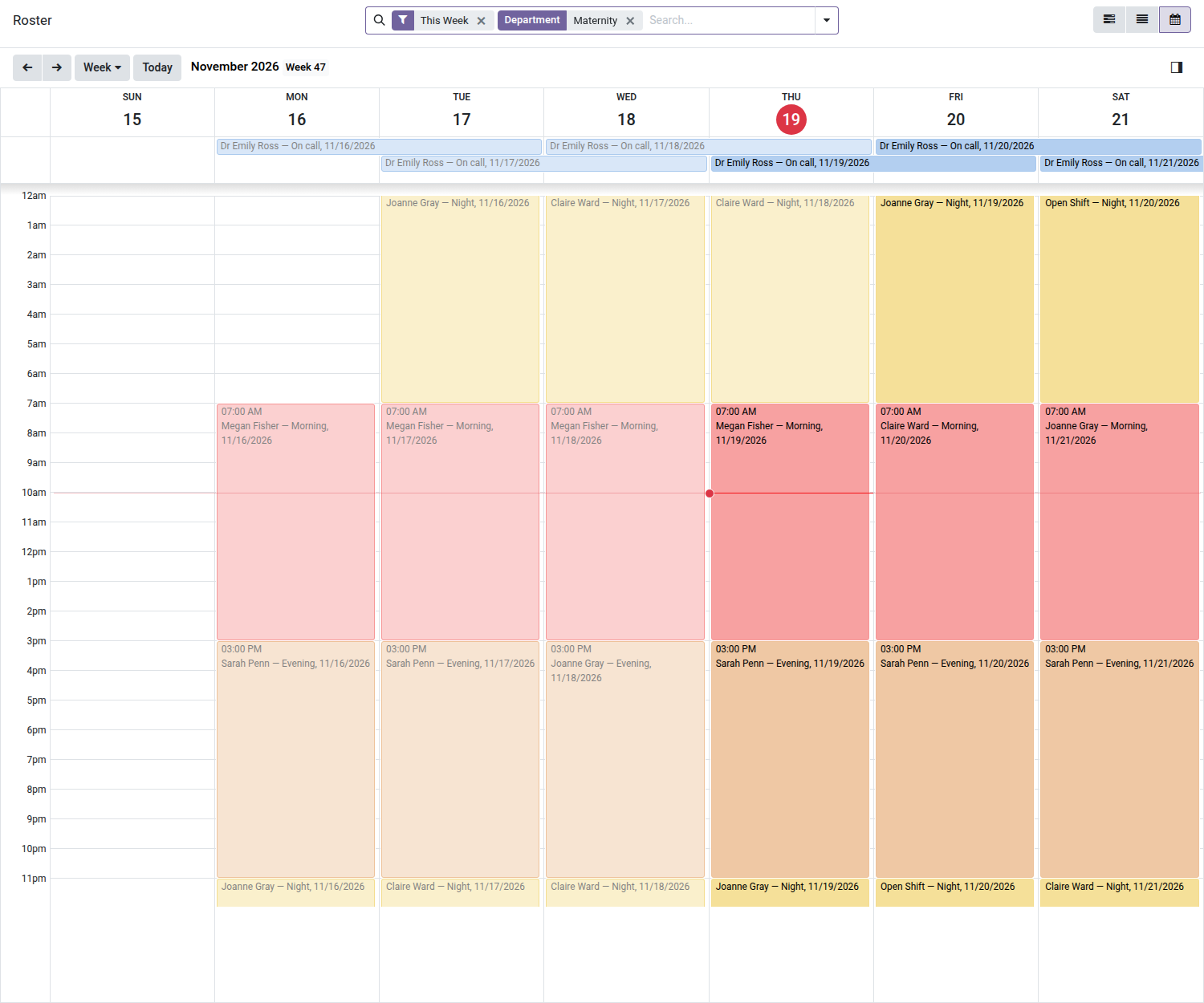
Clinic Duty Roster
Who works where and when: shifts, minimum staffing, swaps and who is on duty right now.
The duty roster of a clinic is a spreadsheet that one person updates by hand: nobody sees a gap before the night it is empty, a nurse works two shifts at once without anyone noticing, a swap is agreed in a corridor, and the person to call is found by asking around. This module builds the roster on Odoo's Resource Planning: shifts per department with the hours of the shift type, minimum staffing with a coverage board, rotation patterns, swaps accepted by the substitute and approved by the planner, and a list of who is on duty now with a phone number.
What it does
- 🕐 Shift types — Morning, Evening, Night and On call are delivered with their hours; a clinic manager can change them or add others. A night shift runs past midnight; an on-call shift keeps the person reachable and may overlap an on-site shift. Hours follow the clinic's time zone.
- 🗓️ The roster — a shift is a department, a shift type, a day and a person; the Gantt, list and calendar views show who works when; Gantt and calendar are coloured by shift type. Shifts stay drafts until you publish them.
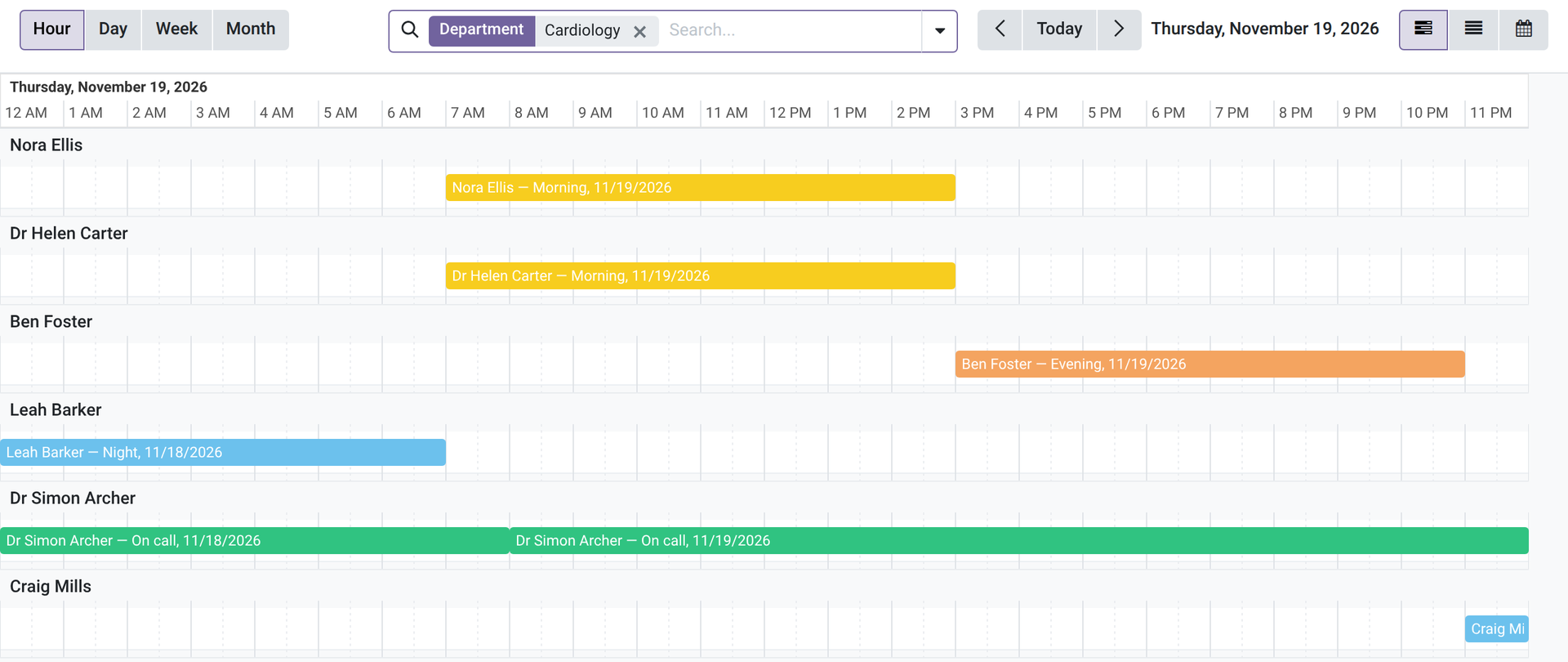
- ⏱️ Hour scale for round-the-clock wards — the Gantt shows one day over the whole 24 hours, hour by hour; a night shift that started the evening before appears from midnight, so you see who is on at 3 a.m. Previous day and next day buttons; a shift snaps to the quarter hour when you drag it.
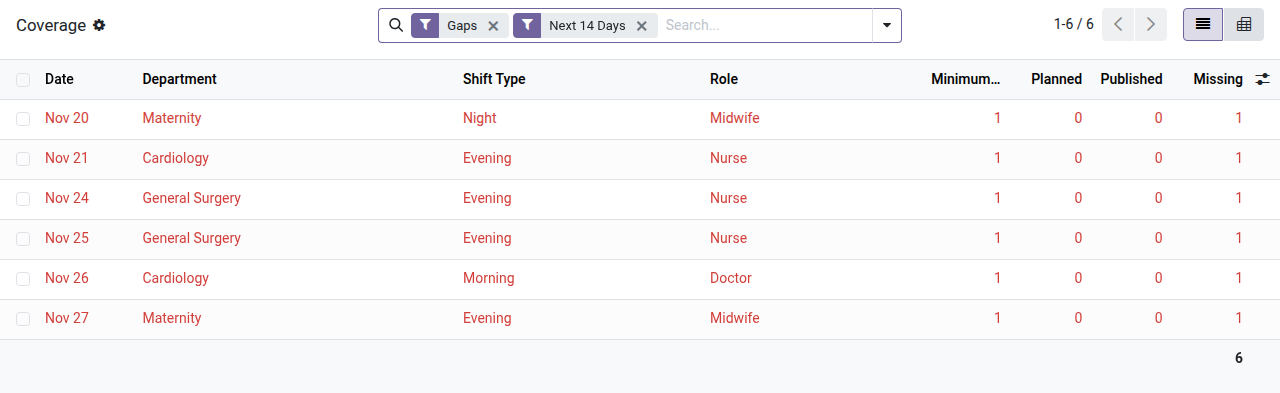
- 🚦 Minimum staffing and coverage board — set the minimum per department, shift type and role, and the weekdays it applies to; the board lists, day by day (7 days back to 60 days ahead), what is planned against the minimum and what is missing, in red. An open shift without a person covers nothing. Publishing shifts while the roster is short of staff warns you; it never blocks.
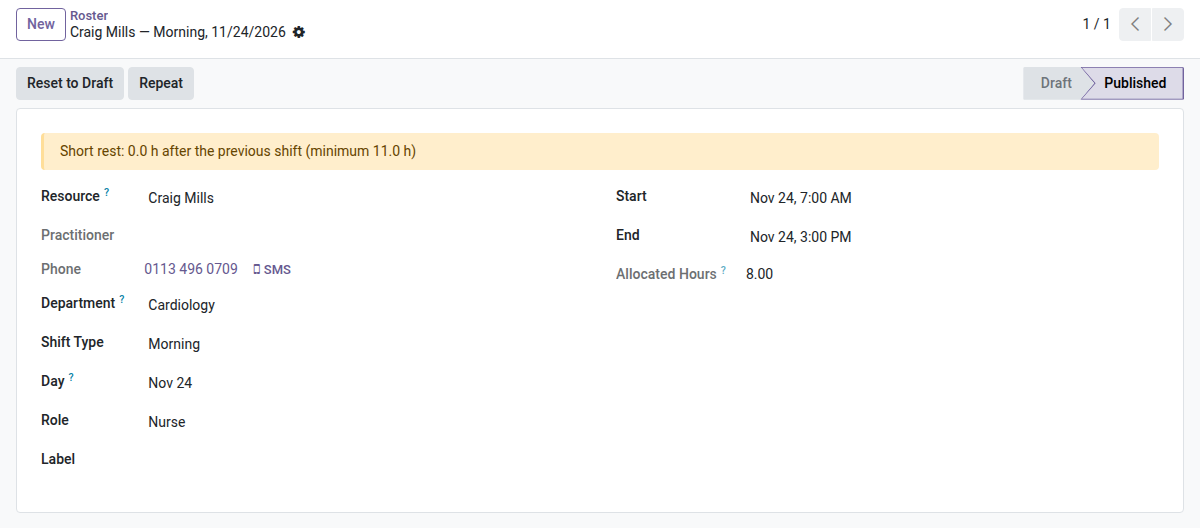
- ⚠️ Rest and night warnings — an on-site shift that starts less than 11 hours after the previous one, or a fifth night in a row, is flagged on the shift (those are the default limits; both are set on the Clinic tab of the company). It is a warning, never a refusal.
- ⛔ No double booking on site — publishing refuses a person on two on-site shifts at the same time, across companies; on-call shifts are the exception.
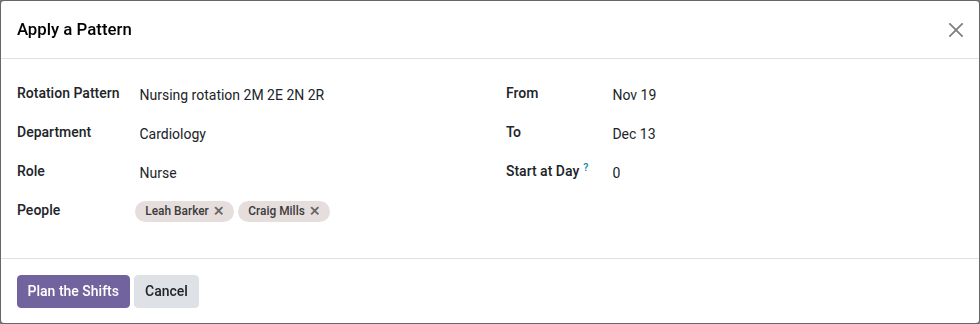
- 🔄 Rotation patterns and copy of a week — define a pattern (for example 2 mornings, 2 evenings, 2 nights, 2 rest days) and plan it for several people over a period; or copy a week to another. The shifts created are drafts, and shifts already there are not created twice.
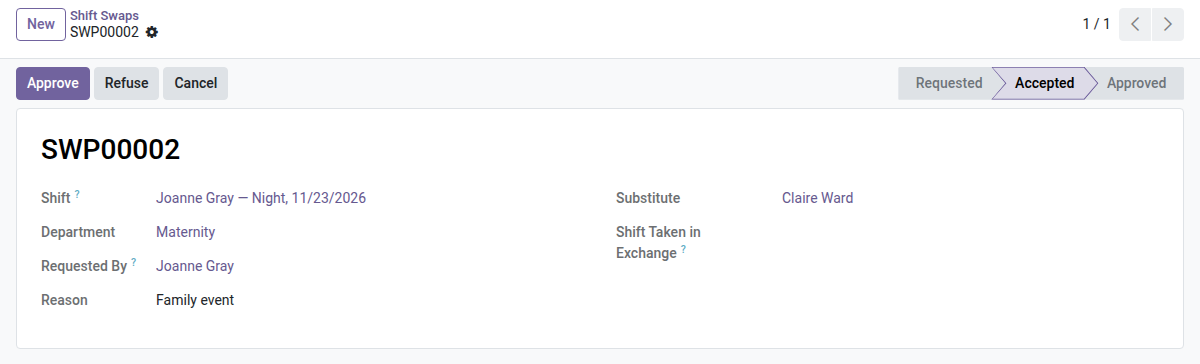
- 🤝 Shift swaps — the holder asks, the substitute accepts, a planner approves; the shift (or the two shifts of an exchange) changes hands and the chatter keeps the trace. Only a shift that has not started can be swapped.
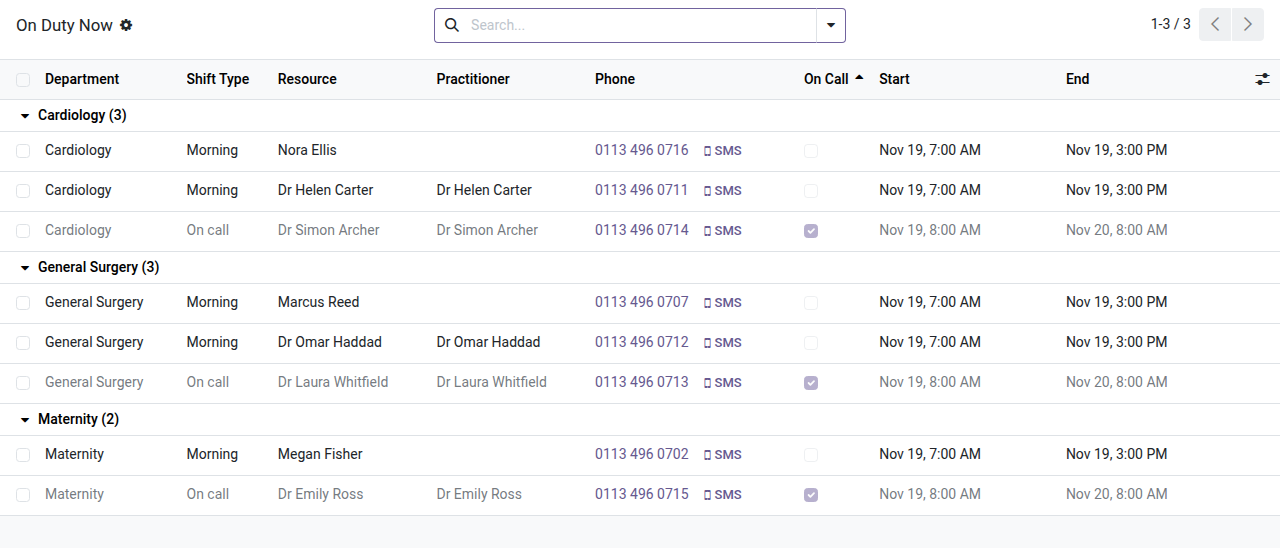
- 📞 On duty now — who is on site and who is on call at this moment, from the published roster, by department, with their phone number when it is recorded.
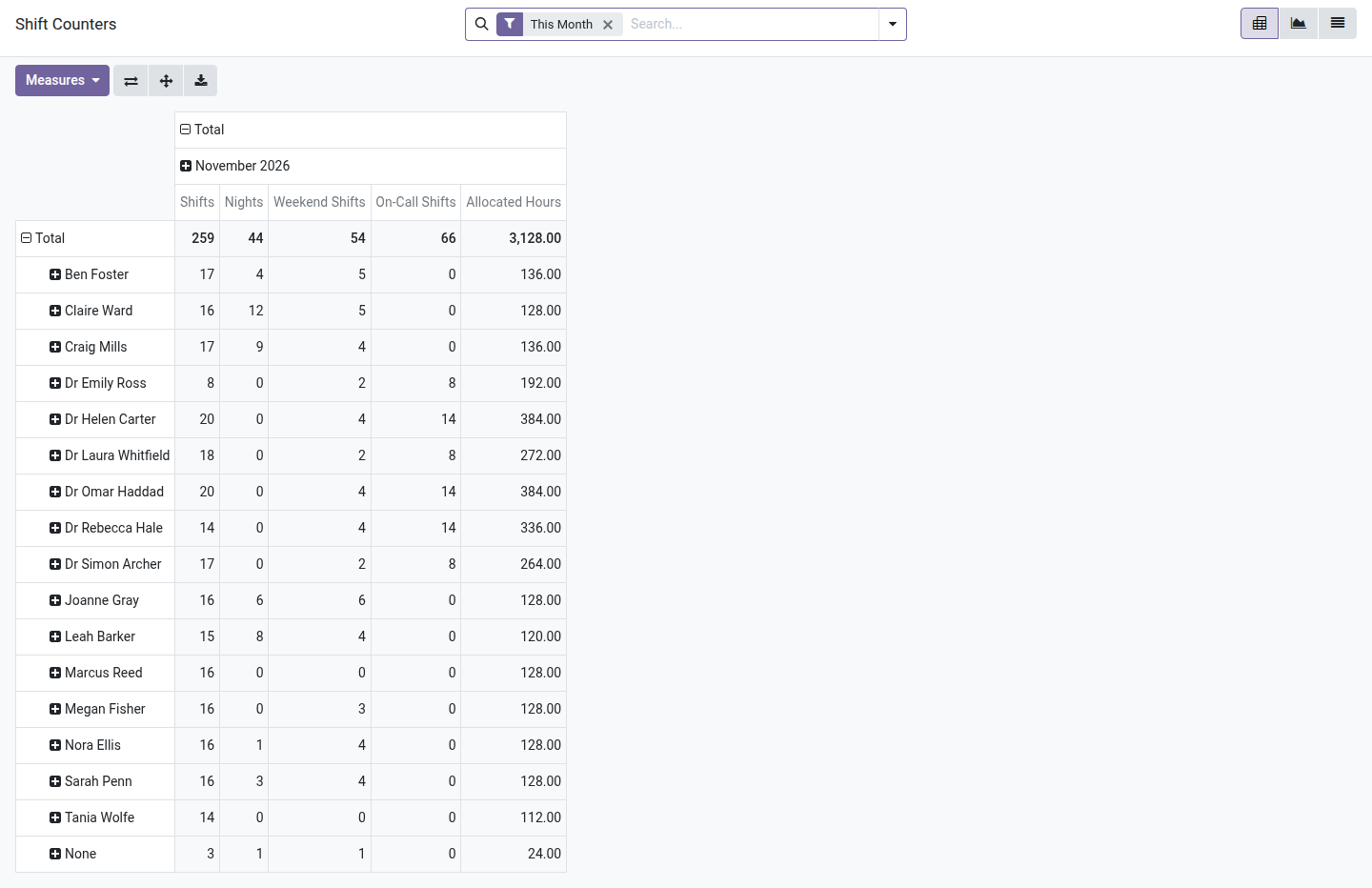
- 📊 Monthly counters — shifts, nights, weekend shifts, on-call shifts and hours per person and per month (on-call shifts count at full length).
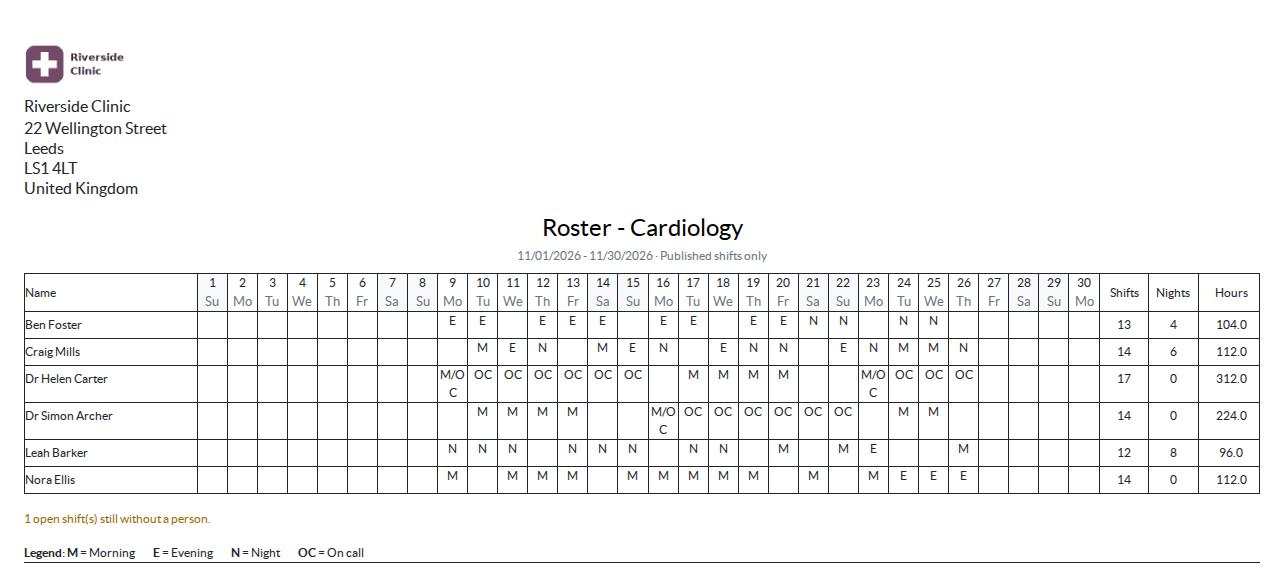
- 🖨️ Two printouts — the monthly roster grid (landscape, with the shift codes and a legend) and the duty list, for a department and a period.
- 🔒 Roster planner profile — a planner plans the departments he belongs to (all of them if he is attached to none); managers plan everywhere. Staff read the whole roster; My Shifts lists their own published shifts.
In screenshots
1. The roster of a department
The week of the Maternity department on the calendar view: morning, evening, night and on-call shifts coloured by shift type, and a night shift still without a person.
2. The coverage board
Minimum staff against planned staff, day by day; the lines that are short of people are in red.
3. A shift with a warning
A short rest after the previous shift is flagged on the shift; it warns, it does not block.
4. Apply a rotation pattern
Pick the pattern, the department, the role, the people and the period: the shifts are planned as drafts.
5. A shift swap
The substitute has accepted; the planner approves or refuses.
6. On duty now
Who is on site and who is on call, by department, with a phone number when it is recorded.
7. Counters per person
Shifts, nights, weekend shifts, on-call shifts and hours per person and per month (on-call shifts count at full length).
8. The monthly roster
The grid of the month for a department, with shift codes, totals and a legend, printed in landscape.
9. A ward over the whole 24 hours
On the Hour scale of the Gantt, one day is shown over the full 24 hours: morning and evening shifts, the night shift that started the day before and the on-call cover. Filter on a department to read who is on at 3 a.m., and use the arrows to move to the previous or next day.
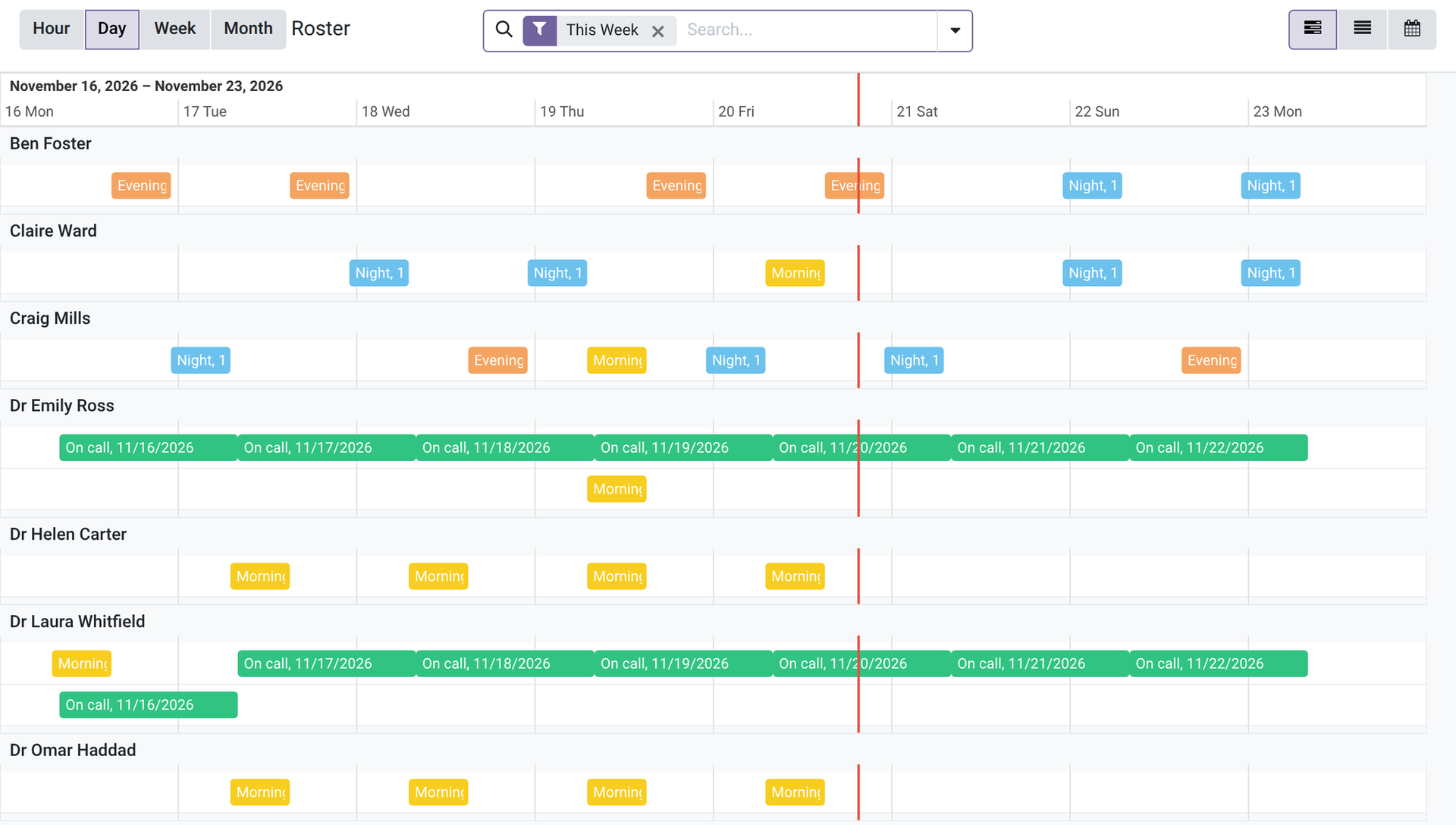
10. The week of the whole staff
On the Day scale of the Gantt, one lane per person and one column per day over the whole screen: the morning, evening and night shifts and the on-call cover of the week, each at its hours. Drag a shift to move it by a day.
Why install it
- A gap in the minimum staffing shows up weeks before the night it matters.
- The roster is read in the same place by the planner, the doctors and the nurses.
- A swap leaves a trace: who asked, who accepted, who approved.
- The person to call is on screen, not in someone's memory.
A hospital extension of the OdooSkills Clinic family
It plugs into the clinic and installs alone or with the other extensions:
- 🤰 Clinic Maternity — $79: pregnancy record, prenatal visits, labour chart, delivery, newborns and their documents.
- 💉 Clinic Ward Stock — $59: ward cabinets, par levels, replenishment by the pharmacy, usage charged to the patient, controlled-substance register.
🏥 The Clinic Management Suite installs the eight Clinic modules and the six Medical Practice and Queue modules they build on for $449 (14 modules).
📦 Need the whole hospital? The Hospital Management Suite installs the Clinic Management Suite, maternity, ward stock, duty roster, Resource Planning and Gantt View, with the links between them, for $599 instead of $824.
Compatibility and license
Odoo 18, 19 and 20, Community and Enterprise. OPL-1 license. Requires Clinic Management (oski_clinic, $99) and Resource Planning (oski_planning, $89), itself built on Gantt View (oski_gantt, $89). English interface, French translation included; nothing specific to one country; multi-company. A specific need? The “Request a change” button on this page sends it to us. Support: apps@odooskills.com.
Discussion
Sign in to join the discussion.