
Journal Access Control
Premium Launch −30%Partition access to accounting journals by user or group — two levels, full coverage, no Enterprise needed.
| Technical name | oski_account_journal_security |
|---|---|
| License | OPL-1 |
| Author | OdooSkills |
$ 29.00
$ 20.30
Launch price — 30% off until December 31, 2026
A ready-to-use Odoo database with demo data, deleted after 1 hour. Odoo 20, 19, 18.
Missing a feature or found a bug?
Request a change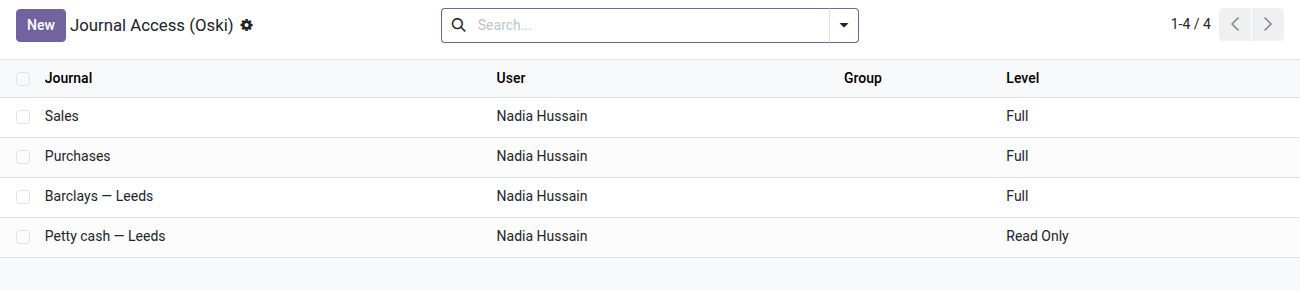
Journal Access Control
Decide who sees bank, cash or purchases — and with which level of action — without Odoo Enterprise.
In Odoo Community, every accountant has access to all journals: bank, cash, sales, purchases, payroll… An assistant who should only handle cash can see — and potentially edit — bank entries or confidential statements. There is no native mechanism to partition access by journal. The result: either you grant everything, or you remove accounting access entirely. This module brings the missing granularity.
What it adds
- 🔒 Per-journal partitioning — assign each journal (bank, cash, sales, purchases…) to the users or groups allowed to see it, and only them.
- 📊 Two permission levels — read-only to consult safely, full to create, edit, reverse and delete entries.
- ✅ Full coverage of accounting objects — the rules apply to journals, entries (account.move), lines, payments and bank statements in a single configuration.
- ⚡ Assignment by user or by group — fine-tune per person or delegate per business group; resolution combines both sources automatically.
- 🛡️ Lockout safeguard — Odoo refuses to remove the last journal of a restricted user, so no accountant is left without any access to accounting.
In screenshots
1. Who sees which journal, at which level
One line per user or group: Full lets them act, Read Only lets them look. Lines can also be set from the user or group form.
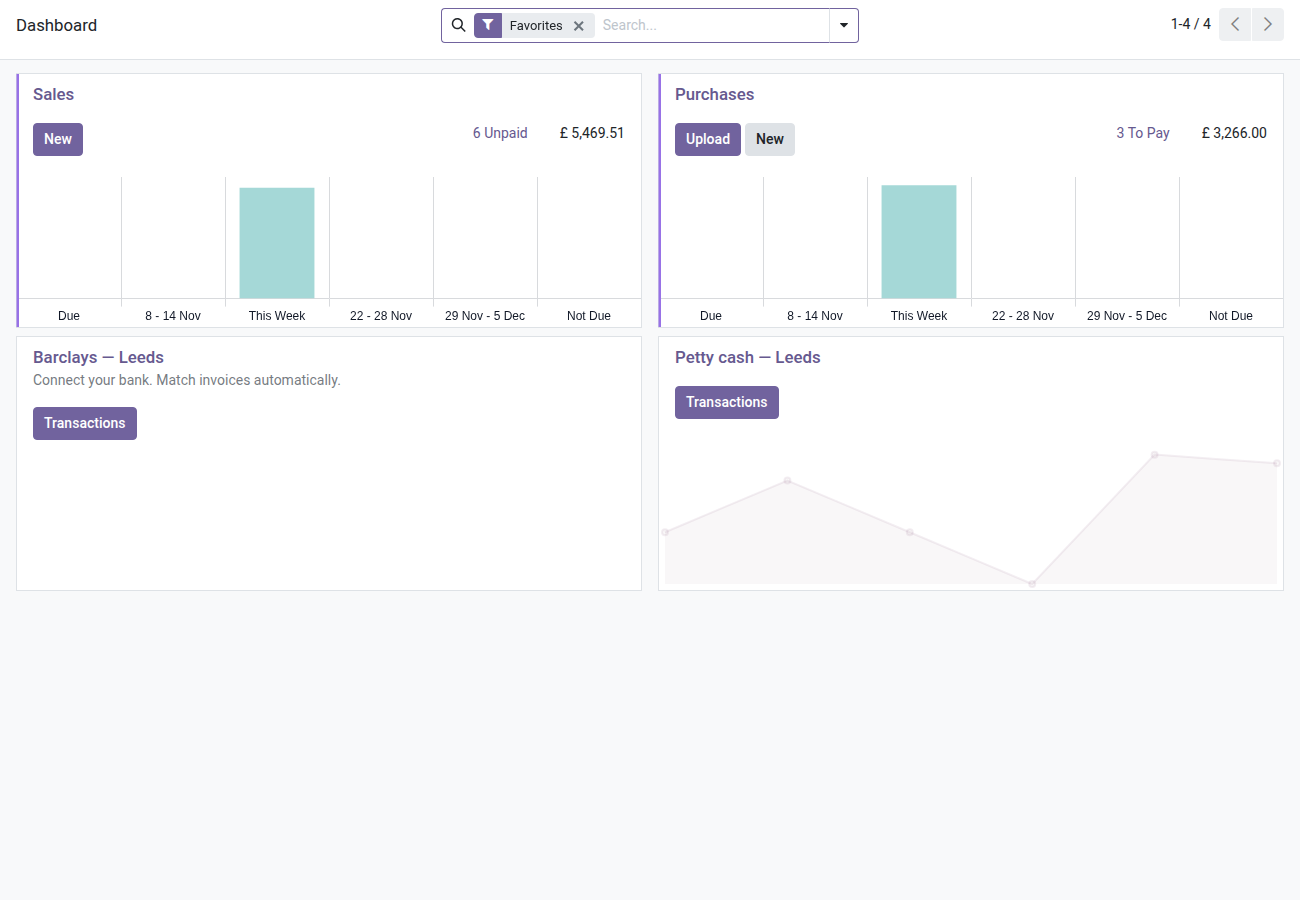
2. The accountant's dashboard
Sales, purchases, the Leeds bank and petty cash read only: the Manchester bank account does not appear.
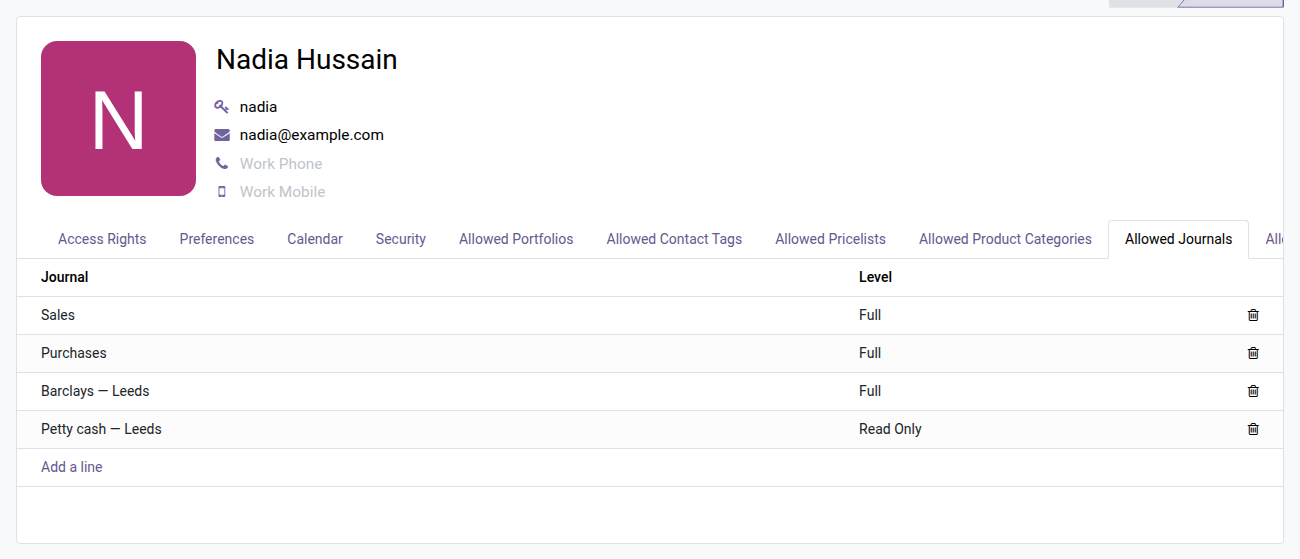
3. Set it from the user form
The Allowed Journals tab on the accountant's form lists what they can see and do, line by line.
Why install it
- You get dimension-based accounting access control, usually reserved for custom Enterprise setups — with no migration and no extra license cost.
- Configuration is done directly from Accounting > Configuration > Journal Access, or from the dedicated tab on each user and group form — without a line of code.
- The rules are global and airtight: no other group rule can bypass the partitioning through an unintended OR effect.
- Meets audit and segregation-of-duties requirements: a cashier cannot read payroll entries, a salesperson does not see bank statements.
Part of the Dimension Security Suite
This module builds on the open-source oski_access_core core. Combine it with oski_analytic_security (restriction by analytic plan), oski_product_category_security (restriction by product category) or oski_sale_team_security (restriction by sales team) for complete partitioning of your Odoo Community instance. See the full suite on apps.odooskills.com.
License OPL-1 — compatible with Odoo 19.0. Requires the open-source oski_access_core module. Support: apps@odooskills.com.
Discussion
Sign in to join the discussion.