
QR & Portal Reporting
Premium Launch −30%A QR code stuck on the machine: breakdowns are reported from a phone, without an Odoo account.
| Technical name | oski_maintenance_portal |
|---|---|
| License | OPL-1 |
| Author | OdooSkills |
$ 29.00
$ 20.30
Launch price — 30% off until December 31, 2026
A ready-to-use Odoo database with demo data, deleted after 1 hour. Odoo 20, 19, 18.
Missing a feature or found a bug?
Request a change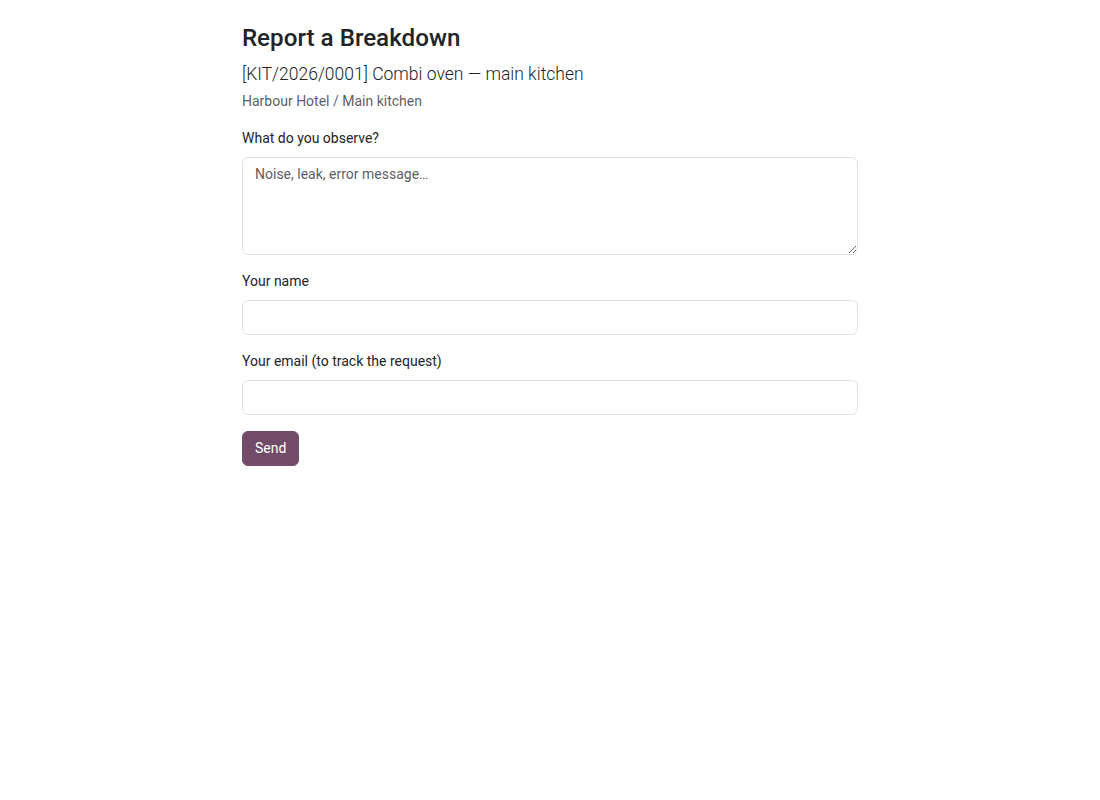
QR & Portal Reporting
A QR code stuck on the machine: a breakdown is reported in ten seconds, from a phone, without an Odoo account.
Breakdown reports die in the hallways. The person who notices has no Odoo account, does not know whom to write to, and assumes someone else has surely already said something. When the information finally reaches the workshop, it is vague — "the AC on the second floor" — and it takes two calls to find out which machine is meant. A QR label on the equipment removes that whole chain: the phone opens a form that asks only for the finding, and the request reaches the workshop already linked to the right equipment, with its location.
What it adds
- 📱 No account, no training — the visitor scans, describes, sends. Name and email are optional: making them mandatory means losing half of the reports.
- 🏷️ One printable label per piece of equipment — name, code, location and QR code. The token is created at the first print and never changes again: reprinting a label does not invalidate those already stuck on.
- 🔒 The public page exposes nothing else — the machine's name and location, nothing more. No cost, no history, no technician name: a QR code on a wall can be read by any visitor, and the module starts from that principle.
- 🤖 Two safeguards against bots and duplicates — an invisible honeypot field for automatically filled forms, and a cooldown period (two minutes by default) that absorbs the five people gathered in front of the same machine.
- 🔗 A private tracking link — after sending, the requester receives a tokenized link showing the progress of their request: status, finding, and the reason if it was refused. Never any cost or time spent.
- 👤 "My Requests" for portal users — a customer, a tenant or a branch manager finds all their reports in their usual space, with the equipment named on each line.
- ⚙️ A login wall if you want one — a system parameter switches the public form to "login required", without touching anything else.
Screenshots
1. Report a breakdown from a QR code
Anyone scans the label on the equipment and describes the problem.
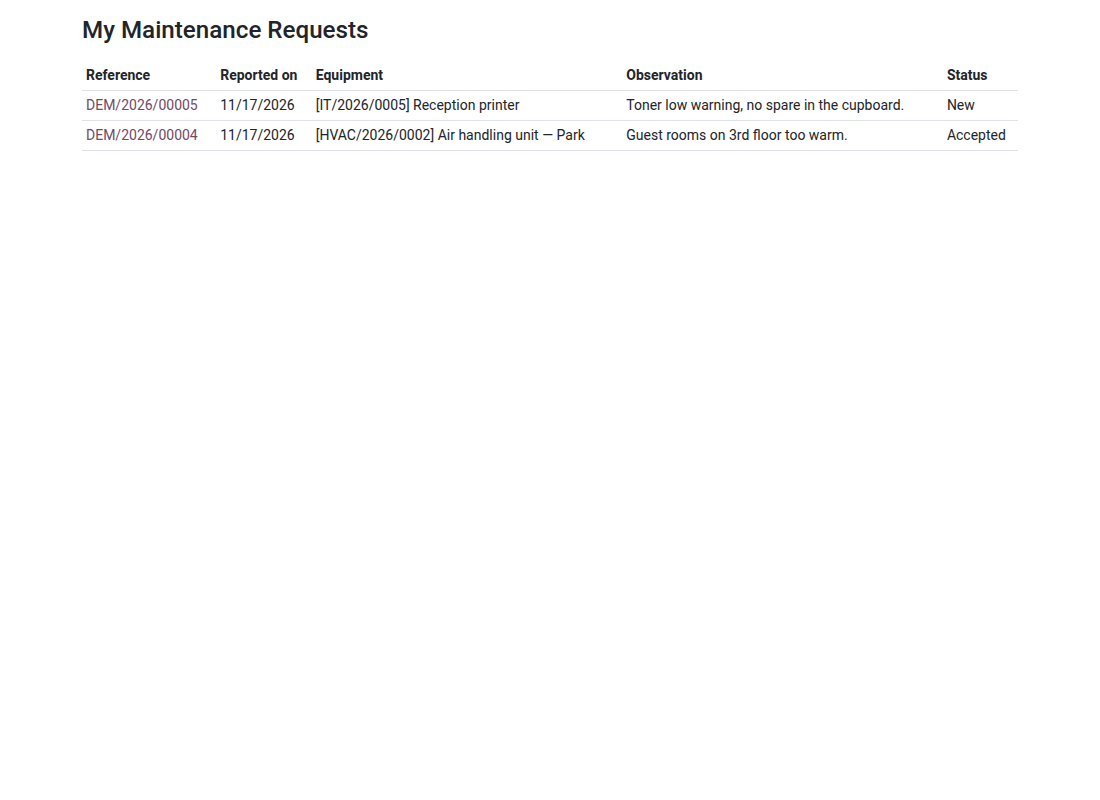
2. Requests followed online
Staff see the status of the breakdowns they reported.
Why adopt it
- Reporting no longer depends on the goodwill of someone who has an Odoo account.
- The request arrives linked to the right equipment: no more "which one, exactly?" over the phone.
- A requester who can track their request does not chase the workshop three times.
- Visitors, contractors and temporary staff become useful eyes without receiving a single access right.
- The module does not require Odoo's Website app: the public form works on the installation as it is.
The Assets & Maintenance suite
This add-on opens the front door to the CMMS engine. So it needs it:
- 🔧 Asset Maintenance (
oski_maintenance) — $89: required. Work orders, meter-based preventive maintenance, real cost per piece of equipment. - 🏢 Asset Management (
oski_asset) — $49: required. The fleet register the requests are linked to. - 📦 Maintenance Spare Parts (
oski_maintenance_stock) — $39: parts leave the warehouse at the moment they are consumed.
The Assets & Maintenance suite — seven paid modules and two open-source bridges — is $199 instead of $343. Details on apps.odooskills.com.
📦 Need it all? The Asset & Maintenance suite installs all ten modules at once for $299 instead of $460.
License OPL-1 — compatible with Odoo 19.0 Community and Enterprise. Requires oski_maintenance and portal (a standard Odoo module); the Website app is not required. The cooldown period and the login requirement are set through system parameters. Interface in French. Support: apps@odooskills.com.
Discussion
Sign in to join the discussion.