
Sales Approvals
Premium Launch −30%Block order confirmation until the manager signs off: traceability and sales control with no development.
| Technical name | oski_sale_approval |
|---|---|
| License | OPL-1 |
| Author | OdooSkills |
$ 19.00
$ 13.30
Launch price — 30% off until December 31, 2026
A ready-to-use Odoo database with demo data, deleted after 1 hour. Odoo 20, 19, 18.
Missing a feature or found a bug?
Request a change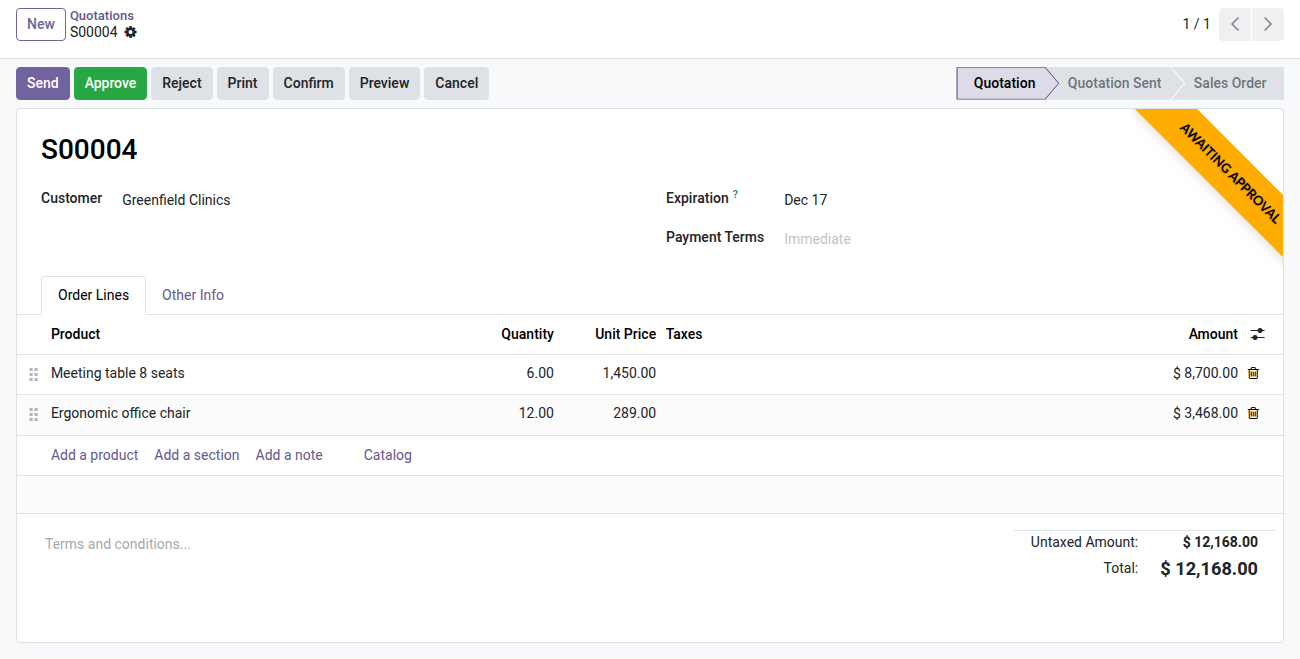
OdooSkills — Sales Approvals
No sales order goes out without sign-off — lock confirmation behind your approval workflow.
In Odoo Community, any salesperson can confirm an order — even one worth €50,000 — in a single click. There is no control over the discounts granted, exceptional terms or sacrificed margins. In case of a dispute, it is impossible to know who authorized what: the log does not record human decisions, only clicks. The only safeguard available in Enterprise covers purchases, not sales.
What it adds
- ✅ Confirmation blocked until sign-off — as soon as an approval rule applies, the order shows a "Waiting for approval" banner and confirmation is suspended until an explicit decision.
- 📊 Conditional rules based on Odoo domains — trigger approval only when needed: total amount above a threshold, a specific sales team, a customer outside the portfolio, or any criterion expressed as a standard Odoo filter.
- 👥 Approvers by group or by name — designate the Sales Administrator group or named users; only they see the Approve and Reject buttons on the order form.
- 🔁 Traceability in the chatter — every approval granted or reasoned rejection is timestamped, signed and visible in the order's chatter, with no log extraction.
- ⚡ Automatic confirmation after approval — once all levels are approved, the order confirms itself with no extra manual step for the salesperson.
- 📦 Plug-and-play on the native Sales module — no change to Odoo's source code; install, configure a rule in the interface, up and running in under 5 minutes.
Real screenshots
1. Large quotations wait for approval
Above your threshold, Confirm sends the request; the approver sees Approve and Reject on the quotation.
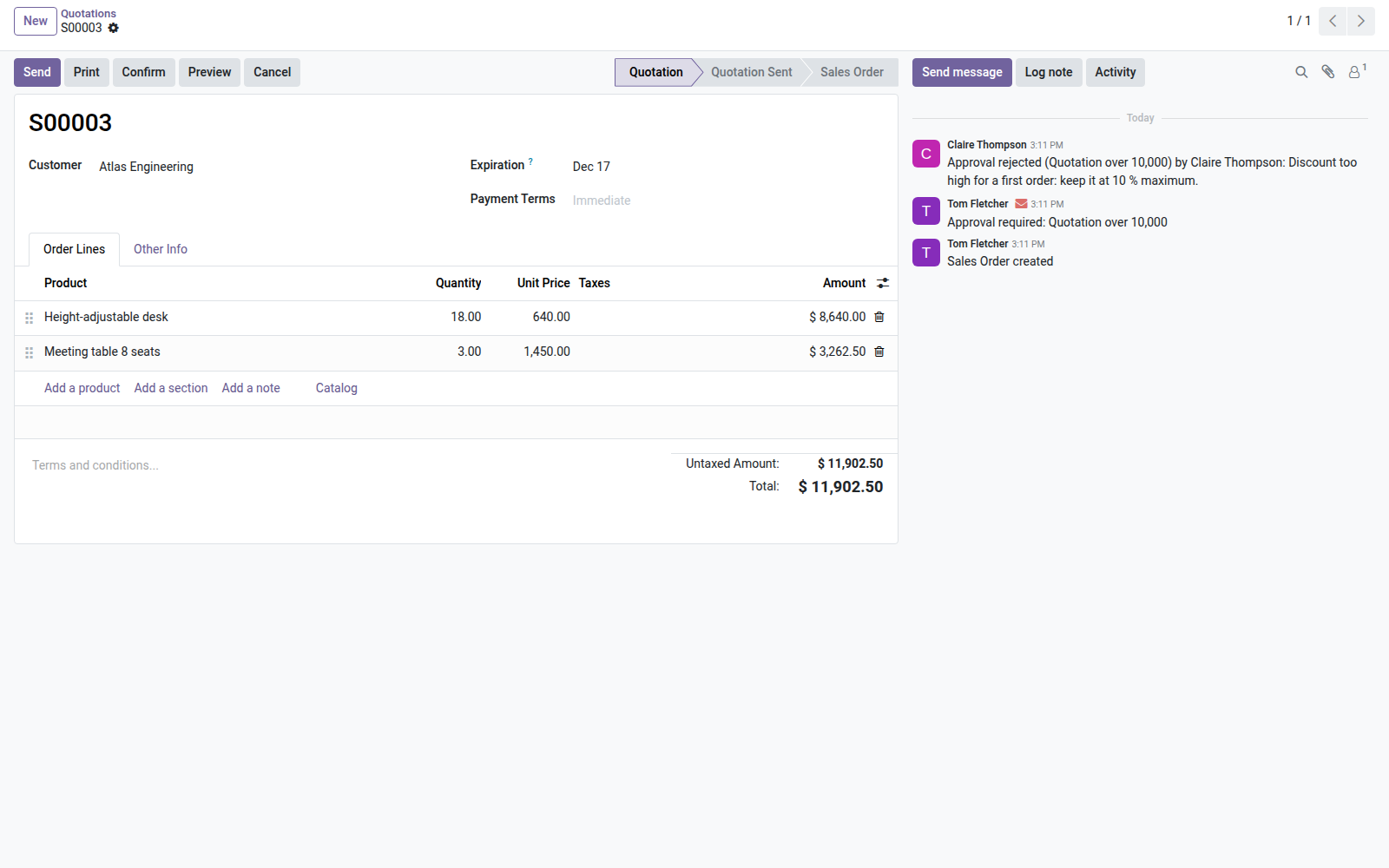
2. The salesperson knows why
The rejection and its reason land in the quotation's history.
Why install it
- Odoo Enterprise offers approval workflows on purchases only. This bridge brings the same feature to sales orders in Community, with no Enterprise license fees.
- Protect your margins and commercial terms: exceptional discounts, turnkey orders or risky new customers must go through a manager before shipping.
- Make internal audit and compliance easier: every decision is recorded with the author, the date and the reason — viewable directly on the order, with no third-party tool.
- A sample rule is provided (orders > €5,000 → Sales Administrator approval), ready to activate; adjust the threshold and the group in 1 minute, with no restart.
Part of the Approvals suite
This module is a bridge — it requires oski_approval (the core engine, $49). Complete the suite to cover all your flows:
- oski_purchase_approval — approval of purchase orders
- oski_account_approval — validation of invoices and credit notes
- oski_product_approval & oski_contact_approval — control over product and contact creation
Full bundle (core + 5 bridges) at $99 on apps.odooskills.com.
📦 Need it all? The Approvals suite installs all six modules at once for $99 instead of $144.
License OPL-1 — compatible with Odoo 19.0. Requires the oski_approval module. Support: apps@odooskills.com.
Discussion
Sign in to join the discussion.