
Assisted Reconciliation
Premium Launch −30%Reconcile many documents against many, from the partner, and write off the payment gap instead of letting it run.
| Technical name | oski_partner_balance_reconcile |
|---|---|
| License | OPL-1 |
| Author | OdooSkills |
$ 79.00
$ 55.30
Launch price — 30% off until December 31, 2026
A ready-to-use Odoo database with demo data, deleted after 1 hour. Odoo 20, 19, 18.
Missing a feature or found a bug?
Request a change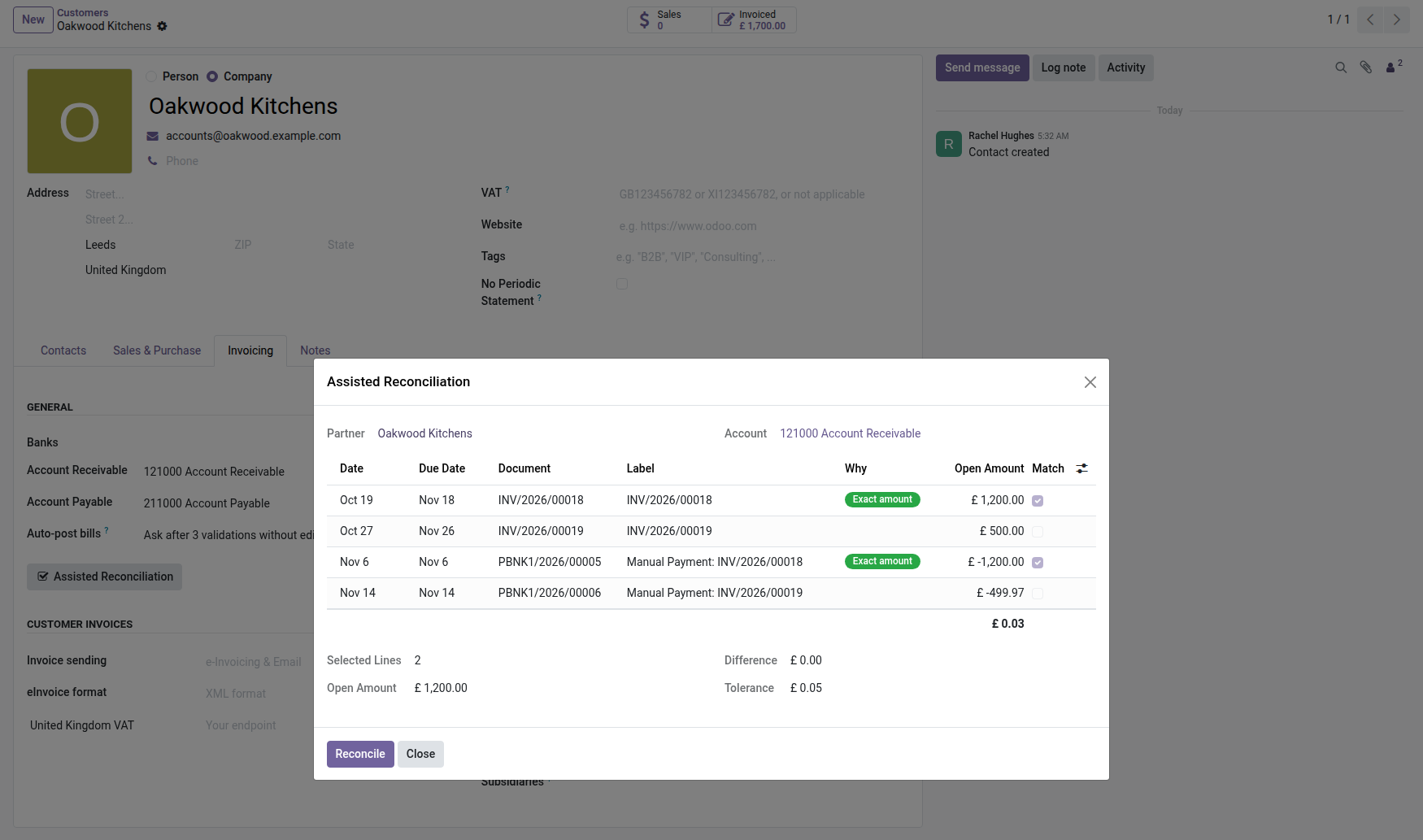

Assisted Reconciliation
Several documents against several, from the partner, with the payment gap written off instead of left running on the account indefinitely.
Odoo Community ships an Unreconcile action on journal items — but no symmetric one. There is no "Reconcile" action on the accounting entries list. The only reconciliation move starts from an invoice's own form, one invoice at a time, through the outstanding payments widget: never several documents against three, never two payments against an old remainder, never from a partner's own record.
And above all: nothing absorbs the gap. A customer pays $999.97 for three invoices totalling $1,000 — three cents of rounding, a bank fee, or a forgotten discount. That three-cent remainder stays open indefinitely: it resurfaces every month in the aged balance, inflates an exposure that no longer really exists, and triggers a follow-up — then, as the tone climbs on its own, a formal notice for three cents.
What it adds
- 🔘 A multi-document screen — from a partner's record, already filled with their open items, or from a selection of journal items on the accounting list: the exact symmetric of Unreconcile, which core Odoo only shipped in one direction.
- 🎯 A reasoned pre-selection, never silent — every checked box says why: exact amount when a single item matches to the cent, shared payment reference when a partial payment names the invoice it targets, oldest first as a last resort. Three separate readings, never mixed, so the suggestion can be judged rather than just trusted.
- ⚖️ The gap absorbed, within a company-configured cap — shipped at five cents. Exceeding it from the reconciliation screen is impossible: raising it is a bookkeeping manager's decision, made in settings, and logged as such.
- 📝 A fresh write-off entry, balanced, posted to a dedicated journal and account — never mixed into the regular ledger. A ribbon flags it on its own record, and it stays reversible: one button unreconciles and reverses it in a single action, guarded against a double click.
- 📖 One menu listing every write-off, past, cancelled ones included — Accounting → Transactions → Reconciliation write-offs. For an audit, the only question that matters is: what got written off, and who decided.
In screenshots
1. The screen opens filled in, the suggestion reasoned
From the partner record: the account set, four open items, and two lines already checked — an invoice and a payment matching to the penny, tagged "Exact amount".
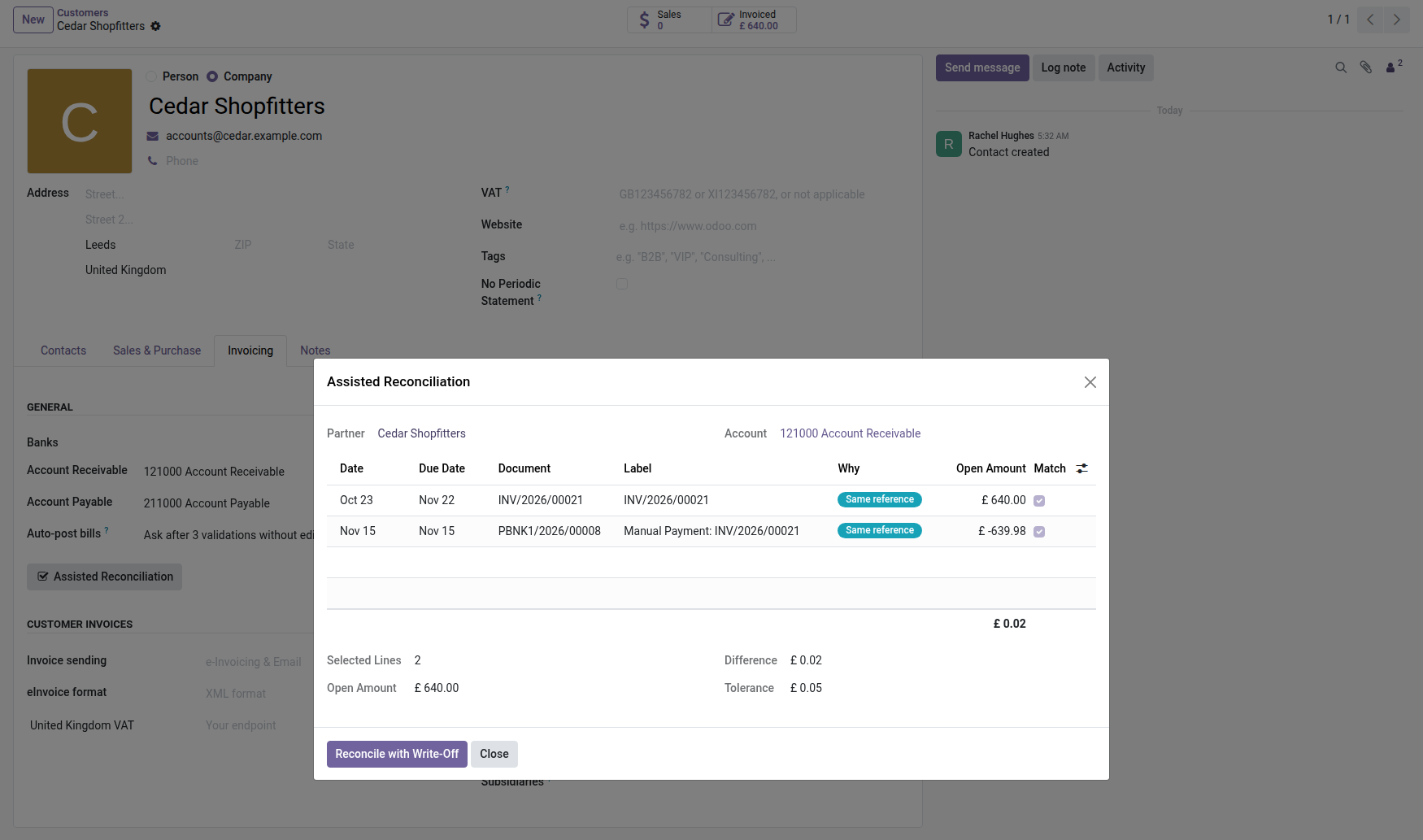
2. The gap, ready to be absorbed
A 640.00 invoice and a 639.98 payment carrying its reference: two pence of difference, within the company's tolerance. "Reconcile with Write-Off" closes both in one click.
3. Every write-off, in its own menu
Accounting → Transactions → Reconciliation Write-Offs: each write-off entry, dated and amounted, kept apart from the regular entries.
Why install it
- A lingering three-cent remainder costs more to watch, chase and explain than to write off properly — this module writes it off, within a limit the bookkeeping manager set themselves.
- Nothing gets swallowed silently: the gap becomes an entry you can open, justify and, if needed, undo — never an invisible adjustment on the partner's account.
- A partner settled to the cent no longer shows up in the aged balance or the follow-up worklist: the exposure module and the follow-up module read the same balance, cleaned up once and for all.
- Same engine as the rest of the Partner Balance suite: same open items, same exclusions, same journal filters. The family's screens cannot disagree on what's still owed.
What this module does not do
No bank reconciliation: this module reconciles customer or vendor items against each other, not a bank statement against the ledger — two distinct actions, two distinct engines. No automation: no scheduled action, no bulk reconciliation firing on its own — a user checks the screen, every time, for every partner. No multi-currency: a selection carrying a foreign-currency item is refused, and that refusal applies even to a reconciliation with no gap at all — not only when a gap needs absorbing — because a residual computed in company currency would always mix a real payment gap with a plain currency effect, two problems Odoo's own multi-currency reconciliation already knows how to keep apart. No inter-company matching: each company keeps its own ledger, a selection spanning two companies is refused. No OWL screen: a standard wizard and list views, like the rest of the family.
Part of the Partner Balance suite
Requires the open-source Partner Balance core, and reuses its engine, filters and out-of-balance exclusion. It does not replace native reconciliation from a single invoice's own form — it covers everything beyond one invoice, one payment. Part of the Partner Balance suite — nine paid modules and two open-source add-ons, built on the open-source Partner Balance core. See it on apps.odooskills.com.
License OPL-1. Compatible with Odoo 19, 18, 17. Support: apps@odooskills.com.
Discussion
Sign in to join the discussion.