Lab Waiting Queue
Premium Launch −30%Connect the laboratory to the waiting queue: patient arrival → ticket → sample collection.
| Technical name | oski_medical_lab_queue |
|---|---|
| License | OPL-1 |
| Author | OdooSkills |
$ 29.00
$ 20.30
Launch price — 30% off until December 31, 2026
A ready-to-use Odoo database with demo data, deleted after 1 hour. Odoo 20, 19, 18.
Missing a feature or found a bug?
Request a change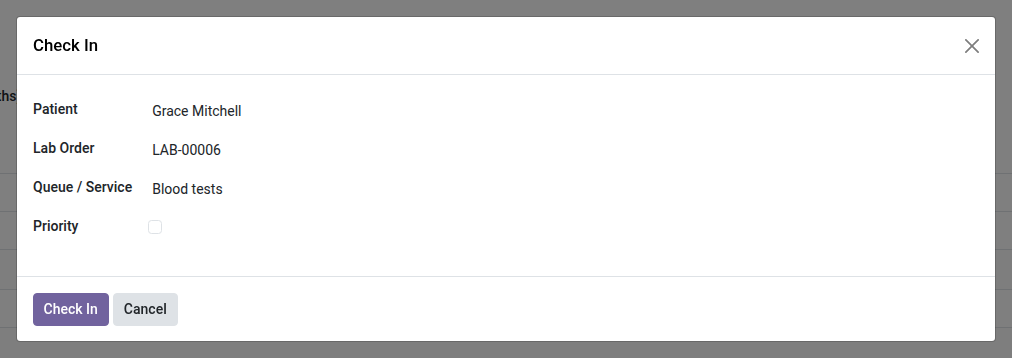
Laboratory: Sample Collection Queue
Patient arrival → ticket shown in the waiting room → sample collection, with the test order attached to the ticket.
In the morning, the collection room fills up all at once. Arrivals are noted in a notebook, patients are called out loud, and nobody knows anymore who has been waiting for how long. When the patient finally sits down, their test order has to be found in the day's list. This bridge connects the two: the arrival creates a numbered ticket, and the ticket carries the order.
What it adds
- 🎫 Check-in in one click — from the test order, a wizard creates the queue ticket: patient and order are prefilled, all that remains is to choose the queue.
- 🔗 The ticket carries the test order — visible on the ticket, in the ticket list and filterable in search: the sample collector knows immediately which tubes to prepare.
- 🏷️ "Laboratory" origin identified — tickets coming from the laboratory stand apart from those from reception, the kiosk or the web, and can be filtered in one click.
- ⏱️ Priority and waiting time — a priority patient is flagged on arrival; waiting time is measured as for any ticket in the queue.
- 📺 Waiting room display and calling console reused — the ticket shows on the waiting screen and is called from the existing console, with no laboratory-specific screen.
- 🔐 Aligned access rights — the Lab Technician / Secretary group becomes a queue agent, without getting access to the whole queue configuration.
In screenshots
1. Check the patient in from the order
Patient and order are filled in: pick the queue, tick priority if needed, and the patient gets a ticket.
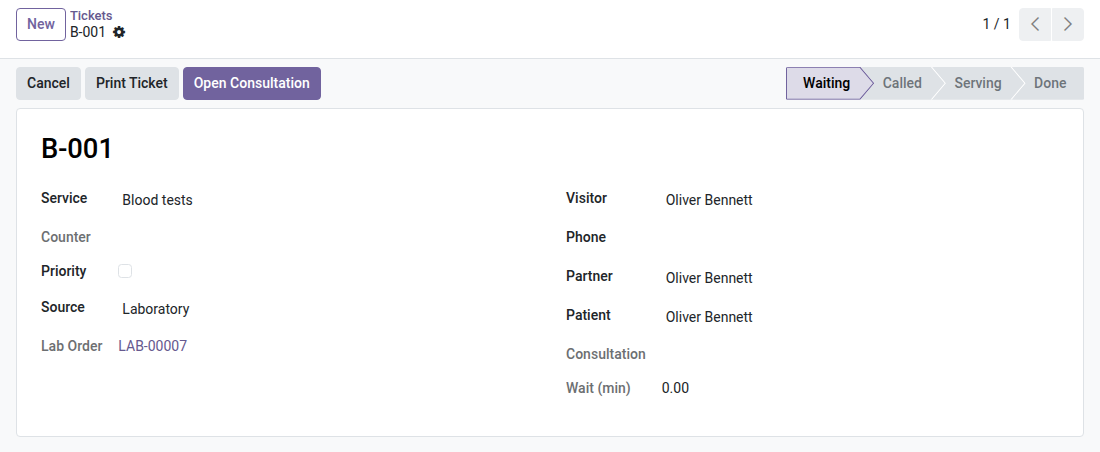
2. A ticket that knows its order
The ticket carries the patient and the lab order: the collection room calls the number and opens the right order.
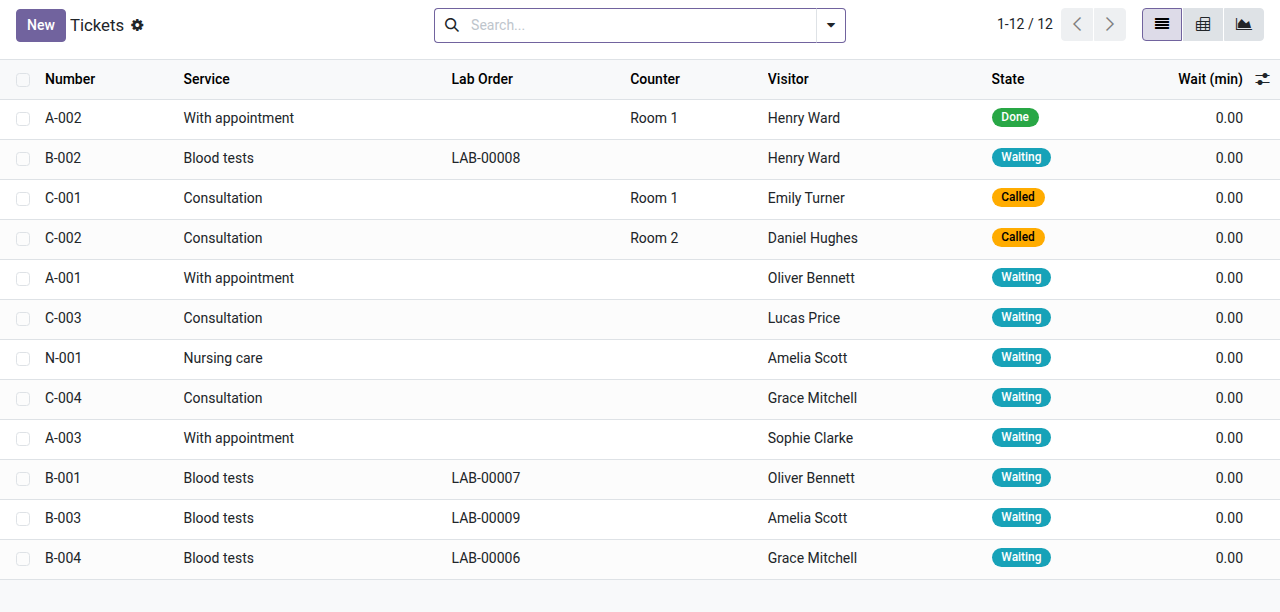
3. Lab and practice share one queue
Blood-test tickets sit next to consultation tickets, each with its service, counter, state and wait.
Why install it
- The arrivals notebook disappears: order of service and waiting time become data, not a guess called out loud.
- No more searching for the order at needle time: it is attached to the called ticket.
- The laboratory shares the waiting screen and calling console already in place — nothing extra to install in the room.
- The queue's attendance statistics also cover sample collection, which helps plan morning staffing.
Part of the OdooSkills Laboratory suite
This bridge requires the Medical Laboratory module and the Queue Management module:
- 🧪 Medical Laboratory (
oski_medical_lab) — $79: catalog, ranges by sex and age, sample collection, biologist validation, reports. Prerequisite. - 🎟️ Queue Management (
oski_queue) — tickets, calling console and waiting room display. Prerequisite. - 🧾 Lab Test Invoicing (
oski_medical_lab_sale) — $39: the order's invoice in one click. - 🔒 Lab Patient Portal (
oski_medical_lab_portal) — $29: secure web access to delivered results.
Complete suite on apps.odooskills.com.
📦 Need it all? The Medical Laboratory suite installs all eight modules at once for $229 instead of $362.
License OPL-1 — compatible with Odoo 19.0. Support: apps@odooskills.com.
Discussion
Sign in to join the discussion.