
Medical Laboratory
Premium Launch −30%Test orders, sample collection, validated results and printable reports for a medical testing laboratory.
| Technical name | oski_medical_lab |
|---|---|
| License | OPL-1 |
| Author | OdooSkills |
$ 79.00
$ 55.30
Launch price — 30% off until December 31, 2026
A ready-to-use Odoo database with demo data, deleted after 1 hour. Odoo 20, 19, 18.
Missing a feature or found a bug?
Request a change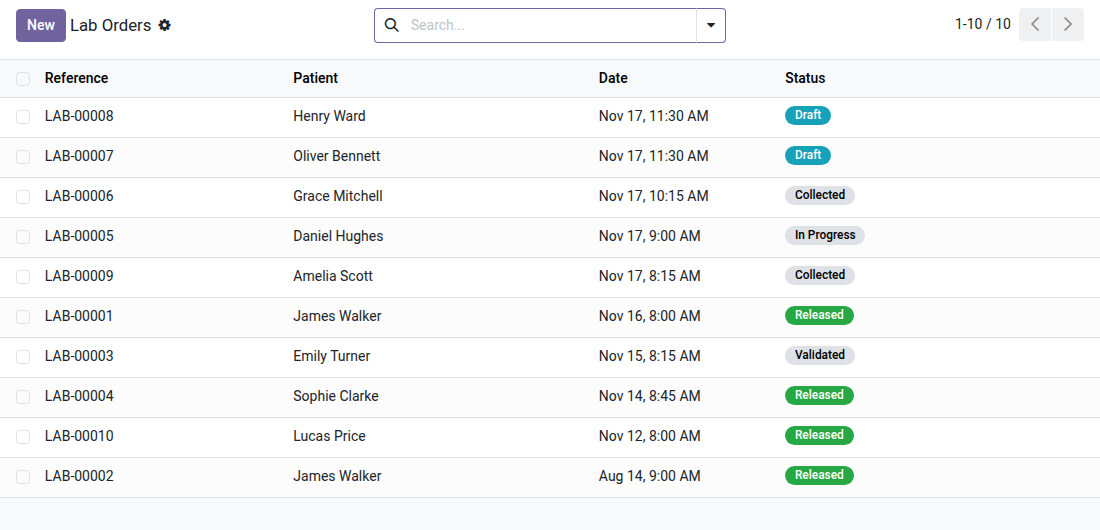
Medical Testing Laboratory
From test order to signed report: traced sample collection, reference ranges matched to the patient, validation reserved for the biologist.
In a testing laboratory, a spreadsheet stops being enough at the very first audit. You need to know which tube belongs to which patient, find the reference range that applies to this age and this sex, prevent a result from going out to the patient without the biologist's review, and produce a clean report at the end. Laboratory software on the market meets this need — at the cost of a separate system, with its own data entry and its own billing. This module puts the complete chain in Odoo, next to the patient record already in place.
What it adds
- 🧪 Structured test catalog — categories (hematology, biochemistry, immunology…), unit, turnaround time, required tube type and billing product; quantitative, qualitative or text results depending on the test.
- 📊 Reference ranges stratified by sex and age — a single test carries several ranges (child, adult male, adult female). The module automatically picks the one that matches the patient: exact gender first, then the narrowest age window.
- 🩸 Sample collection traced, tube by tube — when the order is confirmed, one tube is generated per required type, with a unique code and a barcode label to stick on. Who collected it, and when, stays recorded on the tube.
- 🚦 Automatic low / normal / high flag — each value entered is checked against the selected range and flagged clearly, on the entry screen as on the report.
- 🔒 Validation reserved for the biologist, with no workaround — an incomplete order is refused, and only a user in the Biologist group can validate. The lock also holds against a direct call: neither creation, nor modification, nor deletion can produce a validated order behind the scenes.
- 📄 Three ready-to-use printouts — the report grouped by category (available only once validated), the tube barcode label and the window envelope for mailing on paper.
- 🔁 Complete lifecycle — draft → collected → in progress → validated → delivered, with cancellation and reset to draft as long as nothing is validated, and the exchanges tracked in the order's chatter.
- 👥 Three access levels — Technician / Secretary for data entry, Biologist for validation, Manager for catalog configuration. Multi-company isolation included.
In screenshots
1. Every lab order and where it stands
Draft, collected, in progress, validated, released: the front desk and the technicians see at a glance which orders are waiting for them.
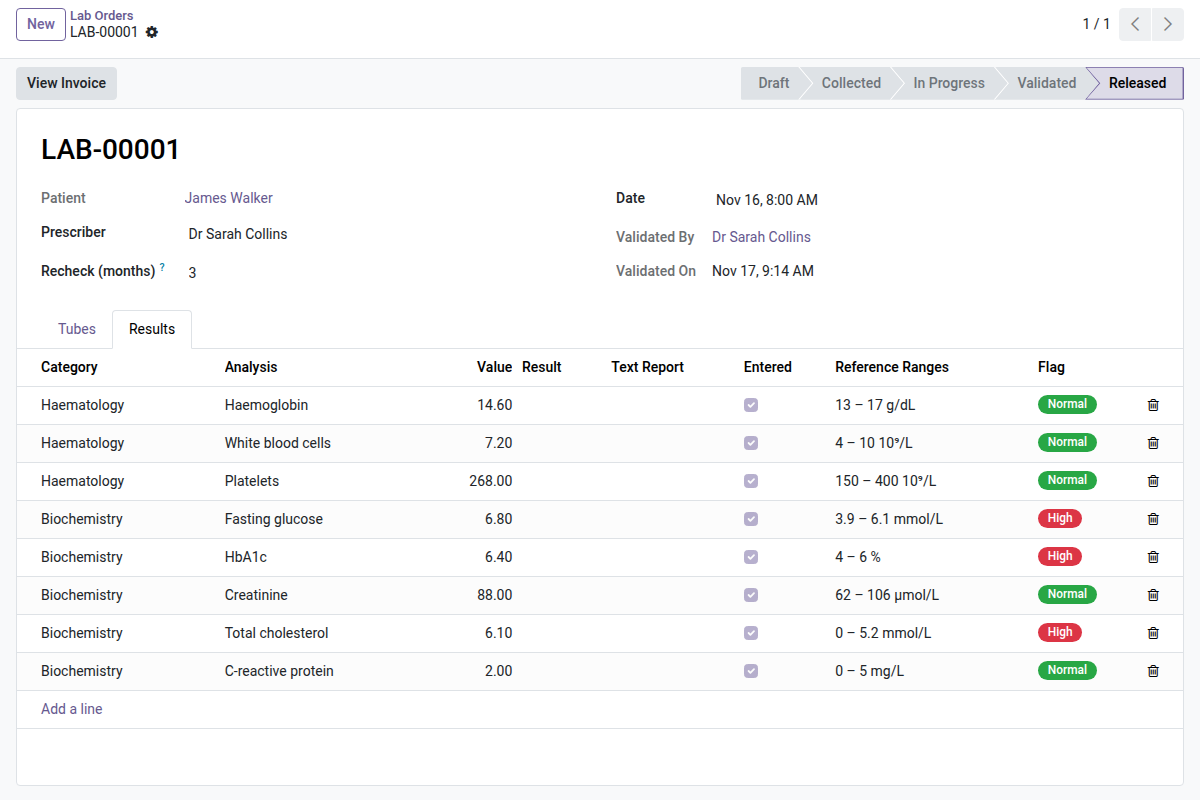
2. Results flagged automatically
Each value is compared with the reference range that matches the patient's sex and age: Low, High or Normal is set as you type. Once validated by the biologist, results are locked.
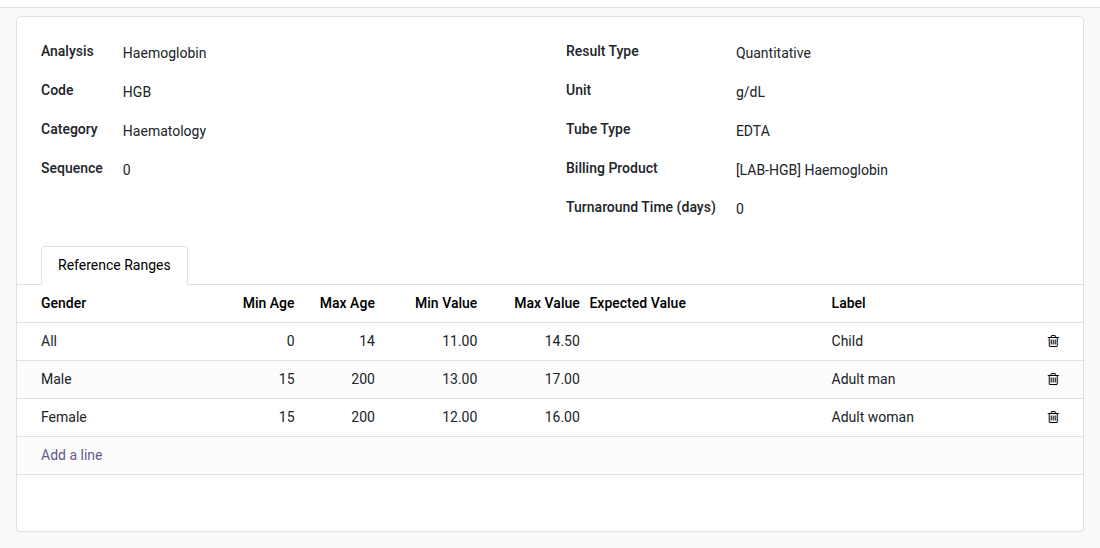
3. Reference ranges by sex and age
One analysis, several ranges: adult man, adult woman, child. The narrowest matching range wins, so the flag is right for every patient.
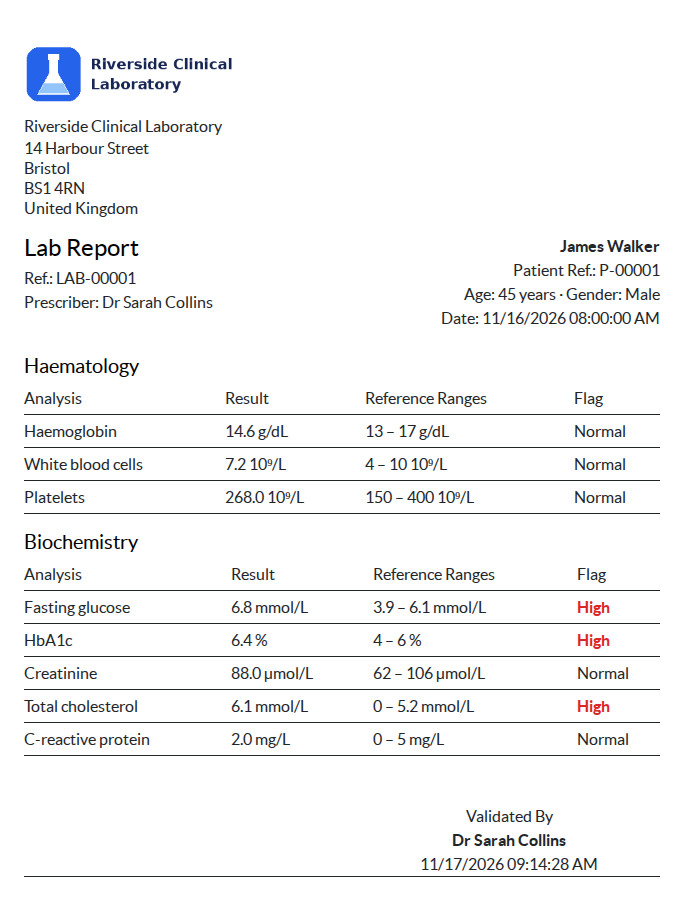
4. The lab report, ready to hand over
Grouped by section, with units, reference ranges, out-of-range values in red and the validating biologist's name.
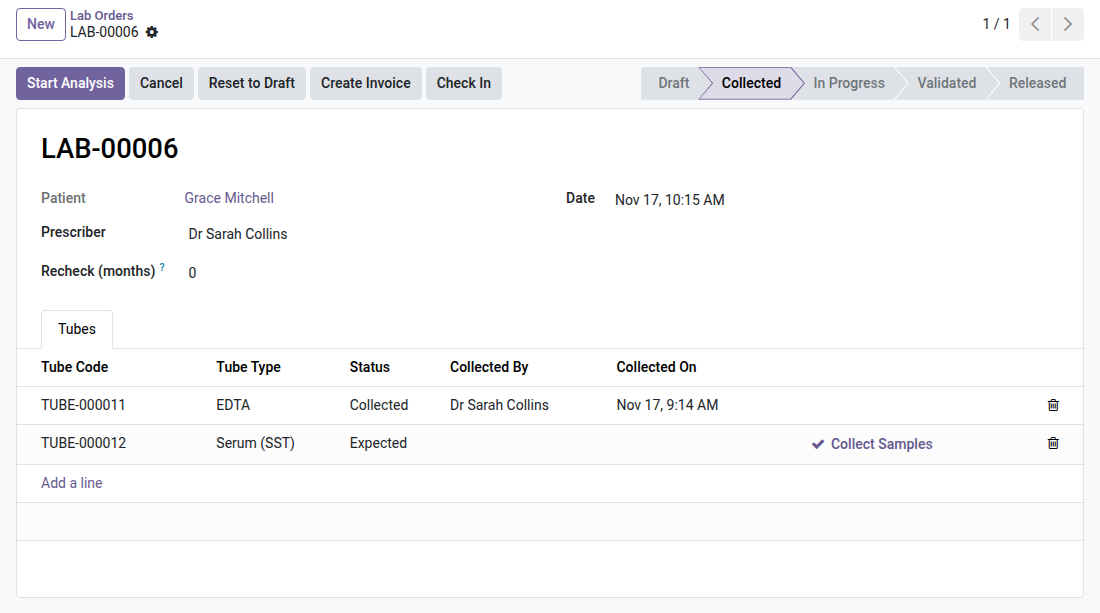
5. The right tubes, generated for you
Confirming the order creates one tube per tube type needed by the analyses; the technician ticks each one when collected, with name and time recorded.
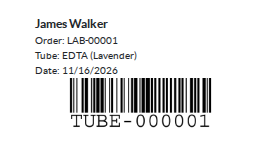
6. A barcode label for each tube
Patient, order, tube type and colour, date and a Code 128 barcode: print and stick, no handwriting.
Why install it
- A laboratory information system inside Odoo, with no separate specialized software to buy, host and reconcile with the patient record.
- Ranges by sex and age are entered once: no more paper charts looked up by hand, no more interpretation to recompute test by test.
- The validation lock sits in the model, not just on the screen: a result does not leave the laboratory without the biologist, whatever path is taken.
- The three documents the laboratory prints every day come ready to use, and can be customized like any Odoo report.
Part of the OdooSkills Laboratory suite
This module is the core of the suite. The bridges below add to it without redoing existing data:
- 🧾 Lab Test Invoicing (
oski_medical_lab_sale) — $39: the test order's invoice in one click, at the catalog price. - 🔒 Lab Patient Portal (
oski_medical_lab_portal) — $29: the patient views and downloads their delivered results, and nothing else. - 🎫 Lab Waiting Queue (
oski_medical_lab_queue) — $29: patient arrival, queue ticket linked to their test order.
The laboratory relies on the patient record of the Medical Practice suite (oski_medical). Complete suite on apps.odooskills.com.
📦 Need it all? The Medical Laboratory suite installs all eight modules at once for $229 instead of $362.
License OPL-1 — compatible with Odoo 19.0. Support: apps@odooskills.com.
Discussion
Sign in to join the discussion.