
Construction Crew Timesheets
Premium Launch −30%Record the day of a crew on a site in one screen: one timesheet per worker on a cost line, planned versus actual hours by cost line.
| Technical name | oski_construction_timesheet |
|---|---|
| License | OPL-1 |
| Author | OdooSkills |
$ 39.00
$ 27.30
Launch price — 30% off until December 31, 2026
A ready-to-use Odoo database with demo data, deleted after 1 hour. Odoo 20, 19, 18.
Missing a feature or found a bug?
Request a change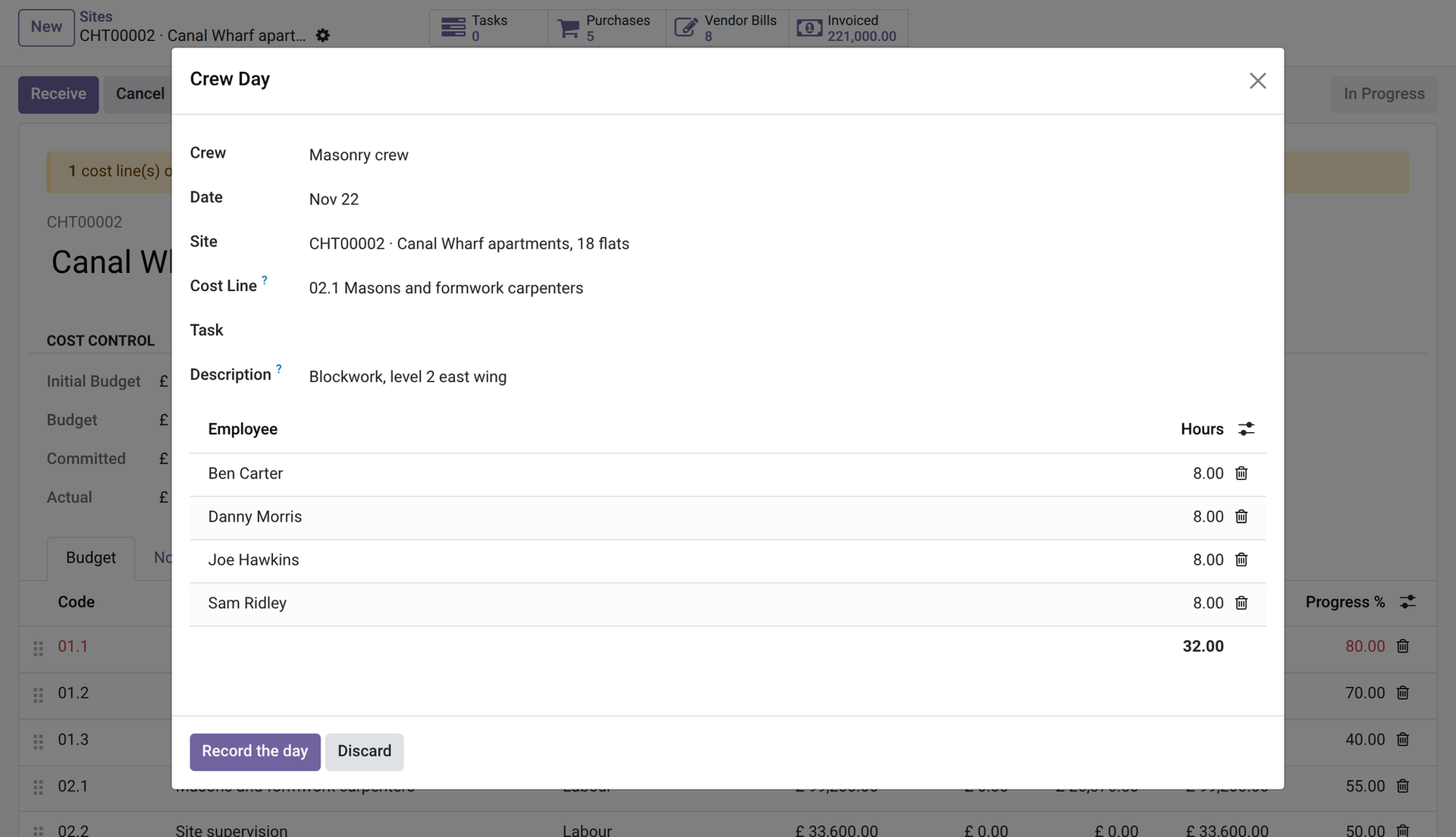
Construction Crew Timesheets
Record the day of a crew on a site in one screen: one timesheet per worker on a cost line, planned versus actual hours by cost line.
On a site the hours are written on a sheet of paper at the end of the day, then typed in the evening, worker by worker, by somebody who was not there. Labour is usually the biggest cost of a site and the one that reaches the budget last. This app lets the foreman record the whole crew's day in one screen, on his phone, on the right cost line.
What it does
- 👷 Crews — a crew has a leader and members (employees). A manager creates the crews; the leader must be a site manager user.
- 📱 The crew day — the leader opens “Crew day” on his phone: crew, site in progress, labour cost line, an optional task and a description. Each member comes with 8 hours; adjust them and confirm.
- 🧾 One timesheet per worker — confirming creates one timesheet per member who worked, on the project of the site, with the cost line. The leader records the day without any access to the timesheets app.
- 💶 Valued at the employee's cost — hours times the hourly cost of the employee make the actual labour cost of the cost line. An employee with no hourly cost gets a warning: their hours are valued at zero, never blocked.
- 🔍 Double entries are caught — a member who already has a timesheet on the same cost line that day is refused, and members who already have hours on the site that day are listed in a warning.
- ⏱️ Planned versus actual hours — when the unit of a cost line is a unit of time (a day counts as 8 hours), it shows its planned hours, its actual hours and the variance. Timesheets typed by hand with a cost line count in the same way.
In screenshots
1. One crew day, one screen
Pick the crew, the site and the cost line, check the hours of each member and record the day: one timesheet per worker.
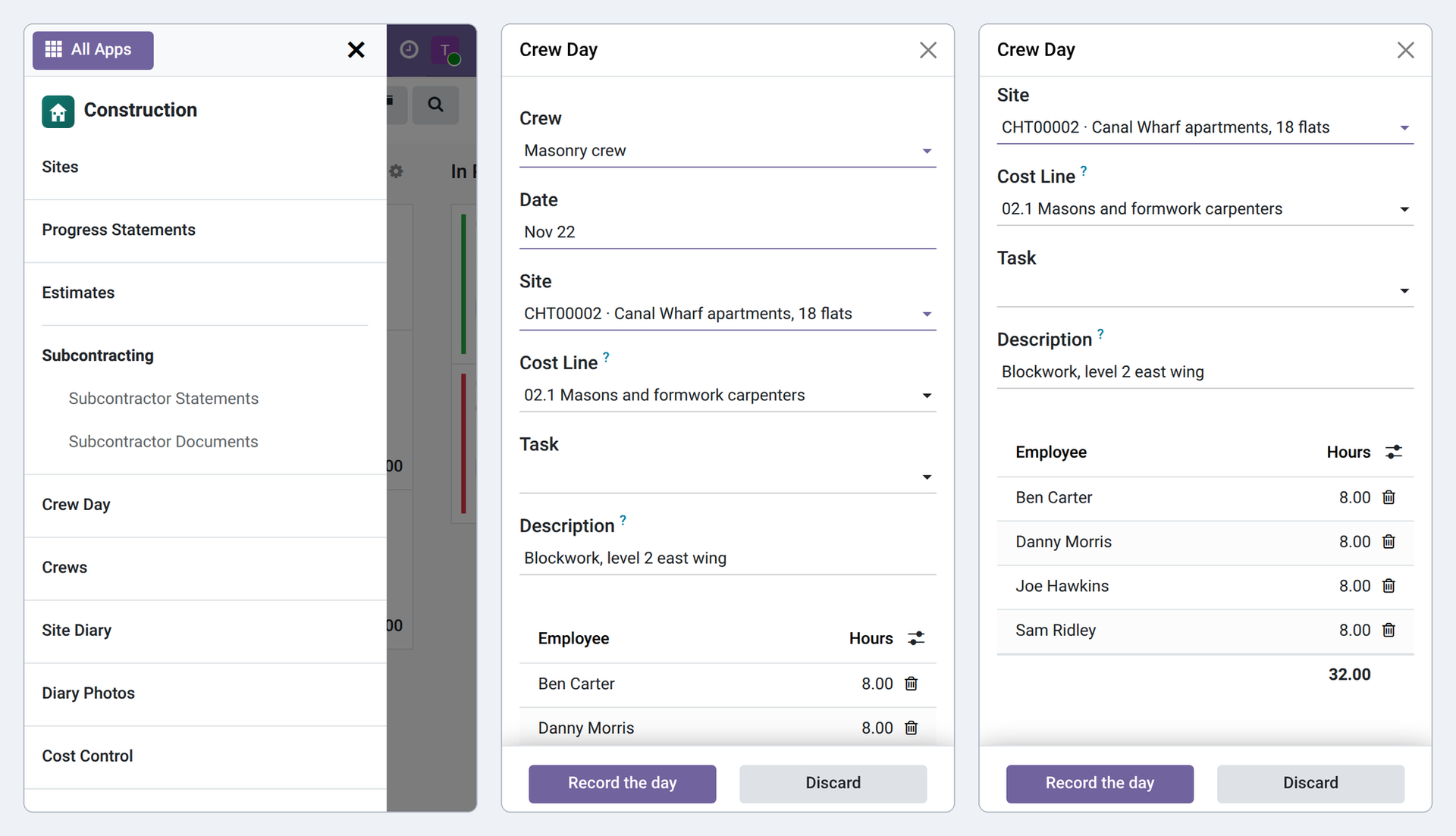
2. The foreman records the day from the site
On a phone the foreman picks the crew, the site and the cost line from short lists and records everyone's hours.
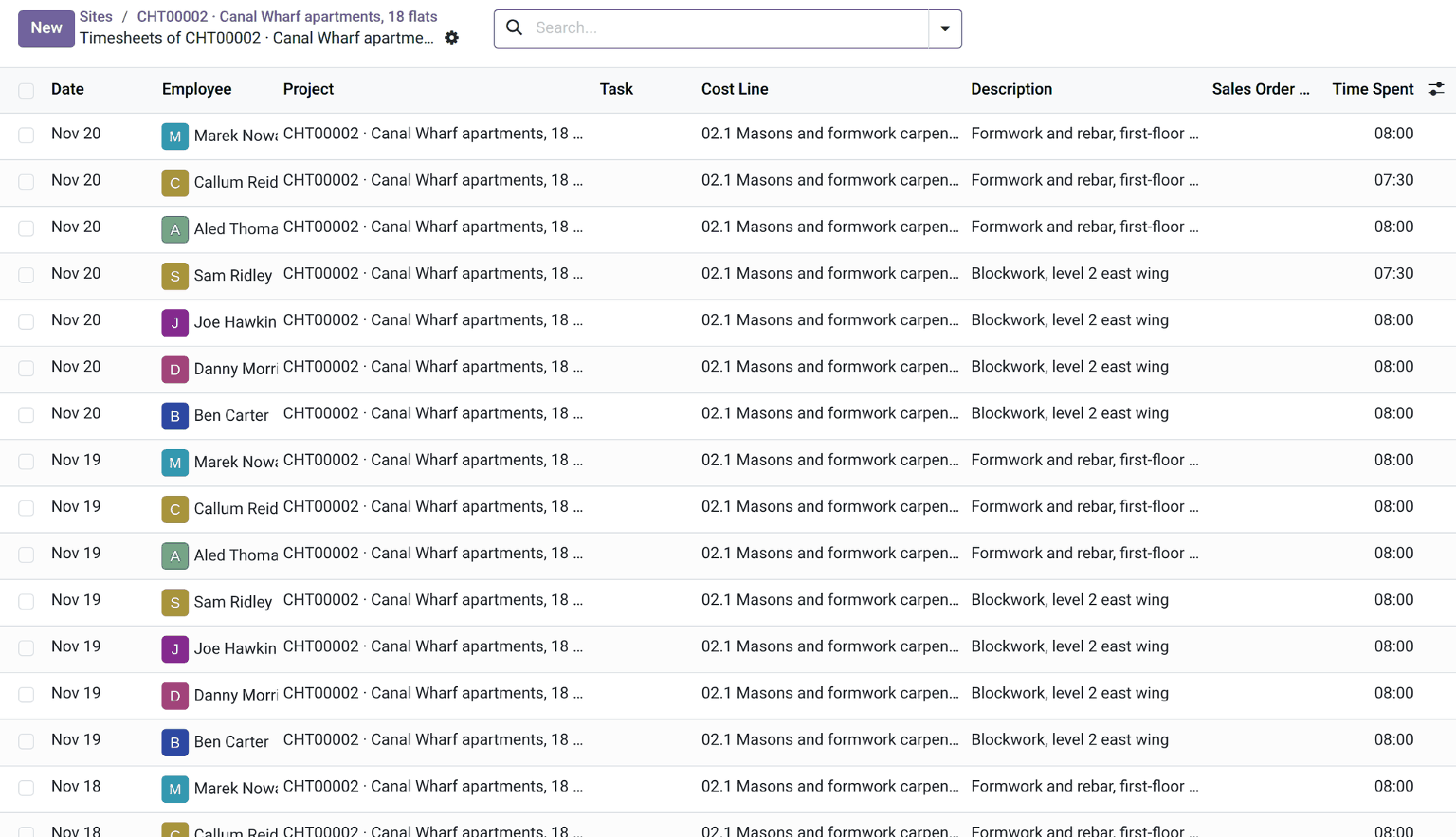
3. Hours that feed the budget
The timesheets of the site with the crew, employee and cost line: hours times the employee's hourly cost become the actual labour cost.
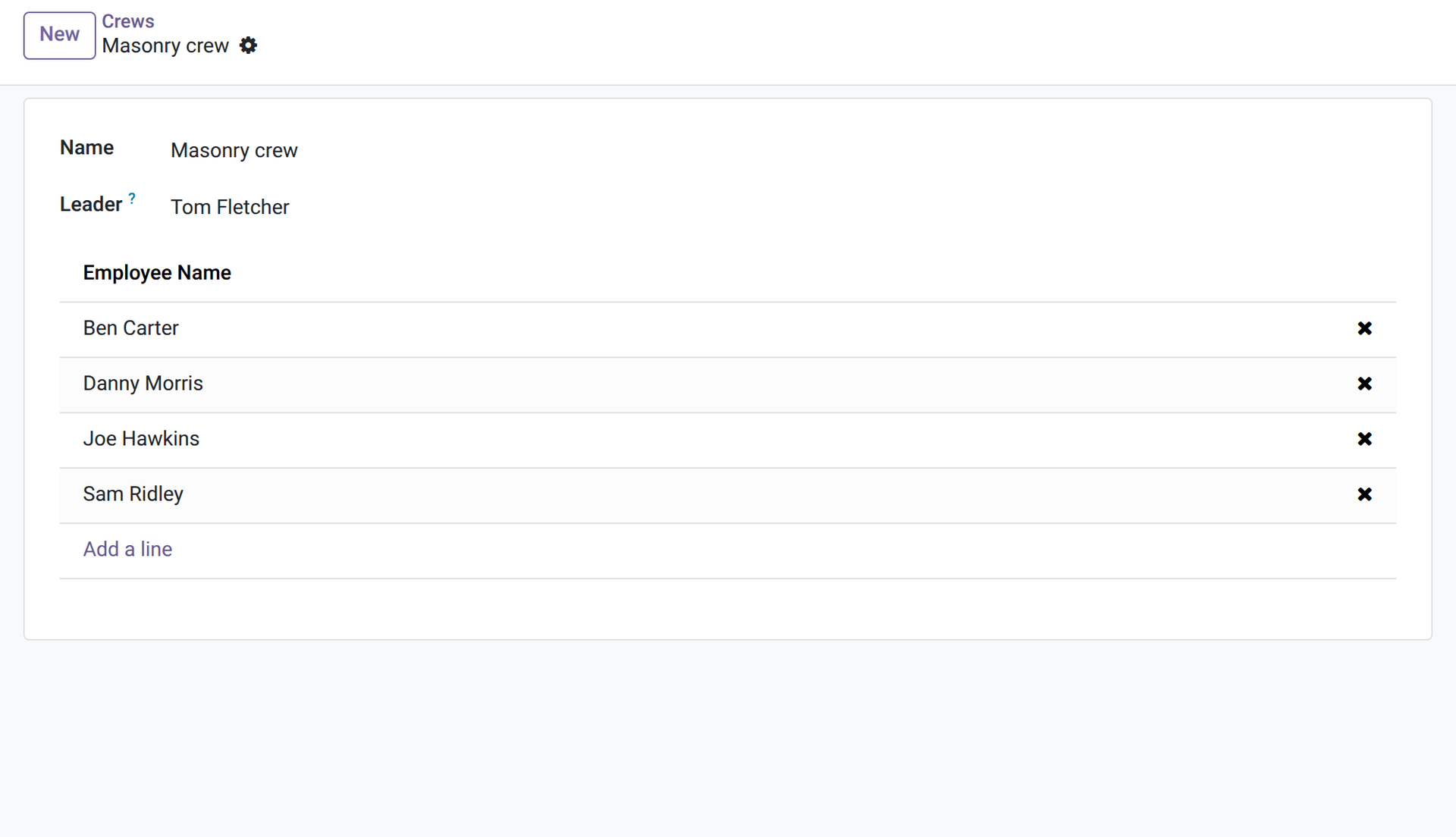
4. Crews and their leader
A crew has a leader, who can record its day, and its members; each member's hourly cost comes from the employee card.
Why install it
- The foreman records the crew in one minute, where the work is.
- Labour reaches the budget the day it is recorded, valued at the employee's hourly cost.
- Country-neutral: no legal rate, threshold or delay is built in.
- Honest limits: the cost is the hourly cost on the employee card, with no overtime or payroll rules; no payroll is made.
- Part of the Construction family: labour adds to purchases, subcontracting and materials on the same cost lines.
Part of the OdooSkills Construction Management family
Construction Management is the base and the other modules plug into it, some with a prerequisite: the planning needs Gantt View (sold separately), the customer portal needs the Odoo Portal, progress billing and estimates need the Sales app. Some also work together: the signed quotation of an estimate is billed by progress statements, the date of the handover report starts the guarantee of the retentions, and the portal shows the statements, the diary photos and the snags once their module is installed:
- 🏗️ Construction Management — $89: sites with a budget by cost line, purchase commitments, vendor bills, forecast margin, overrun alerts and a cost report.
- 🧮 Construction Estimates — $39: a library of work items, estimates with overheads and margin, the customer quotation and the site budget once it is signed.
- 📈 Construction Progress Billing — $59: progress statements on the signed quotation, retention, start-up advance and its recovery, retention release.
- 🤝 Construction Subcontracting — $39: subcontracts, mandatory subcontractor documents, statements validated before the bill, retention.
- 🧱 Construction Materials — $39: planned materials, deliveries to the site location, valued consumption on the cost line, returns of leftovers.
- 📒 Construction Site Diary — $29: the daily report written on the phone: weather, workforce, works, deliveries, incidents, visits and photos, with a weekly PDF.
- 🔑 Construction Reception and Snags — $39: the snag list, the handover report signed on the screen and the site received at the report date.
- 📅 Construction Planning (Gantt) — $29: the phases of each site on a Gantt chart with dependencies, and every site on one timeline (needs Gantt View, sold separately).
- 🌐 Construction Customer Portal — $29: your customers follow their sites online: progress, statements, invoices, photos you choose, snags and the handover report.
📦 Need it all? The Construction Suite installs the ten modules for $249 instead of $430. The planning and the suite also require Gantt View ($89), sold separately.
Compatibility and license
Odoo 18, 19 and 20, developed and tested on Community. OPL-1 license. Needs Construction Management (oski_construction); it uses the Odoo Timesheets app (installed automatically). No other paid module is needed. Interface available in English and French. A specific need? The “Request a change” button on this page sends it to us. Support: apps@odooskills.com.
Discussion
Sign in to join the discussion.