
Approval Engine
Premium Launch −30%Put any Odoo transition behind a multi-level approval workflow, with no development.
| Technical name | oski_approval |
|---|---|
| License | OPL-1 |
| Author | OdooSkills |
$ 49.00
$ 34.30
Launch price — 30% off until December 31, 2026
A ready-to-use Odoo database with demo data, deleted after 1 hour. Odoo 20, 19, 18.
Missing a feature or found a bug?
Request a change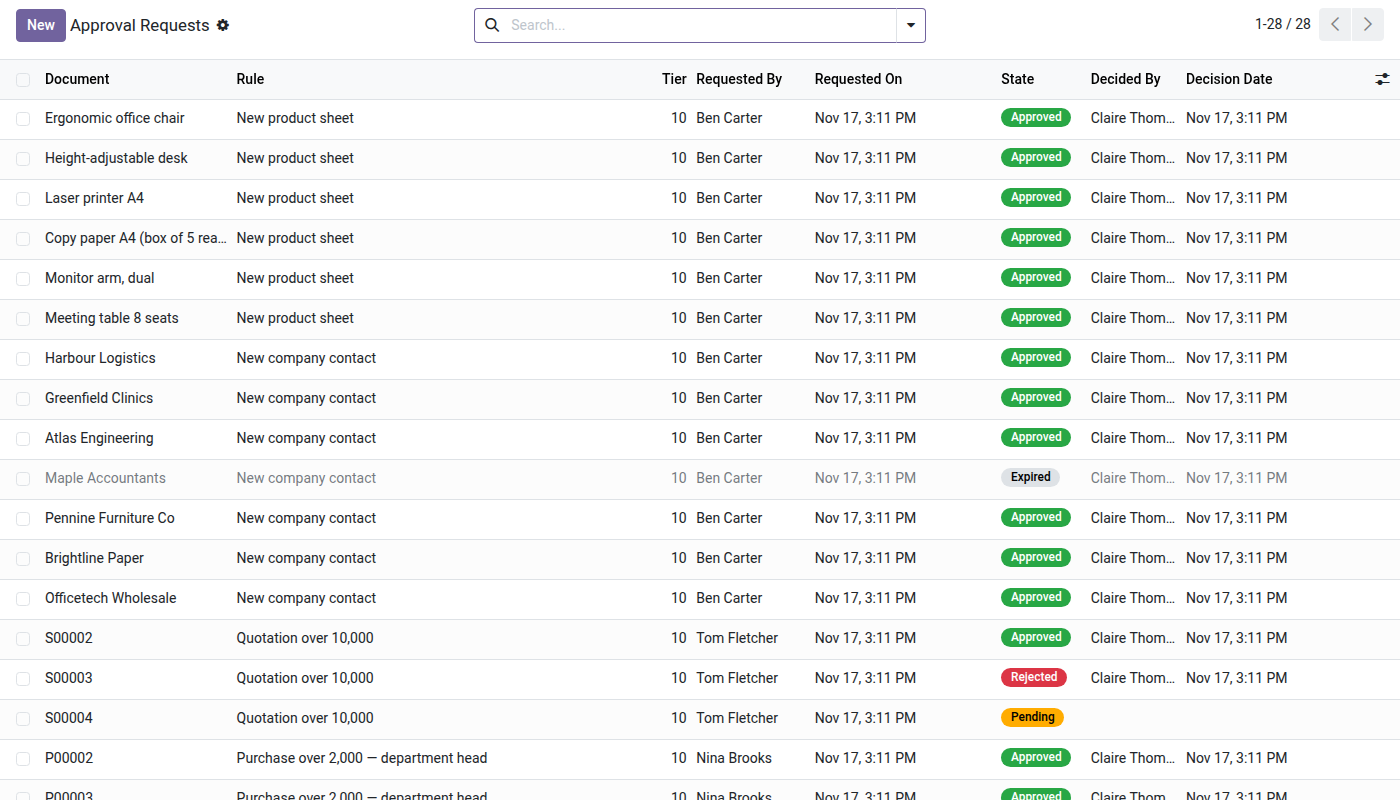
OdooSkills — Approvals
Put any Odoo transition behind an approval workflow — without a line of code.
In Odoo Community, confirming an order, validating an invoice or transferring stock requires no prior approval. Any user can trigger critical operations with no management control. The result: orders sent without sales sign-off, invoices validated without financial approval, and no record of who approved what. Fixing this normally means custom development for each transition, in each module.
What it adds
- ✅ Approval workflow on any model — define a rule on any Odoo method (
action_confirm,action_validate…) without touching the source code. - 📊 Sequenced multi-level — chain several approval tiers (manager → executive) through sequence order: the next tier is notified only after the previous one approves.
- 🔒 Built-in segregation of duties — enable the "no self-approval" option to stop the creator from approving their own operation; exclude specific users if needed.
- 👥 Approvers by group or by name — designate an existing Odoo group or a list of named users; in multi-company, the rule applies to the current company.
- 📋 Applicability condition (domain) — the rule only kicks in if the record meets the defined criterion (amount > threshold, product type, sales team…).
- 🔁 Full traceability in the chatter — every approval granted or reasoned rejection is recorded with author, date and reason, directly in the record's chatter.
- ⚡ Automatic execution — once all tiers are approved, the blocked transition runs with no further manual action.
In screenshots
1. Every request and its decision
Document, rule, tier, requester, status and who decided — orders, bills, products and contacts in one list.
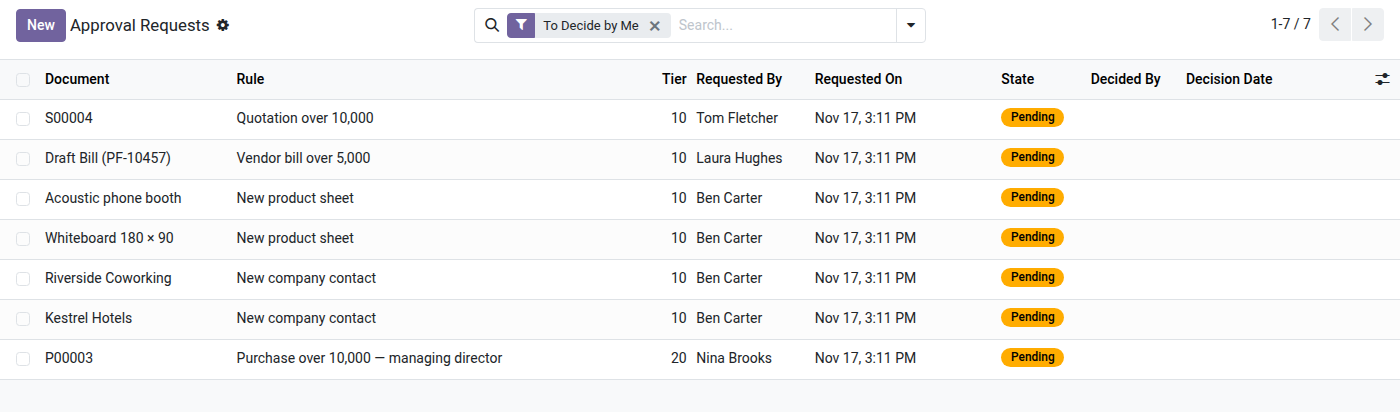
2. What is waiting for you
The To Decide by Me filter shows only the requests you can decide now, tier by tier.
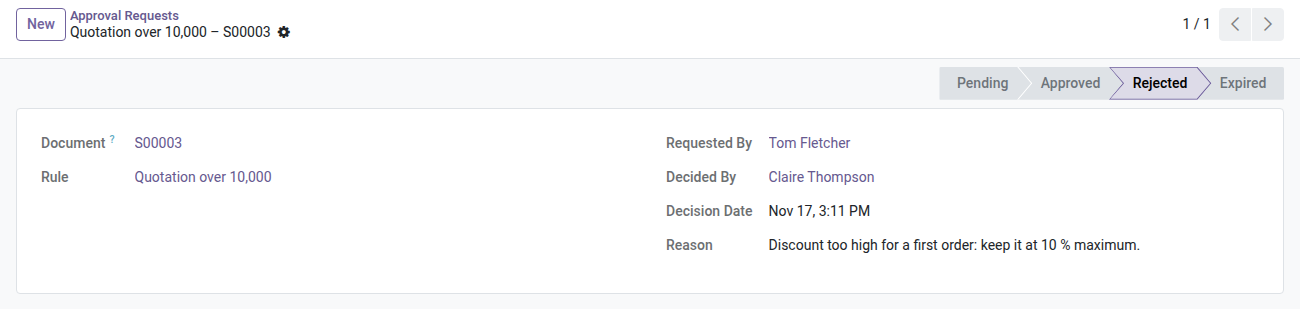
3. Rejections with their reason
Who decided, when and why: the reason is kept on the request and posted on the document.
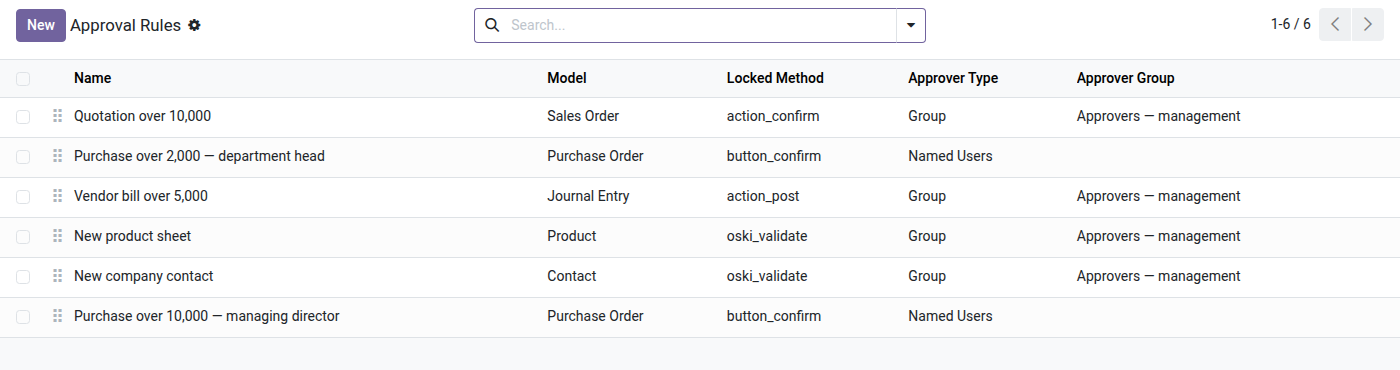
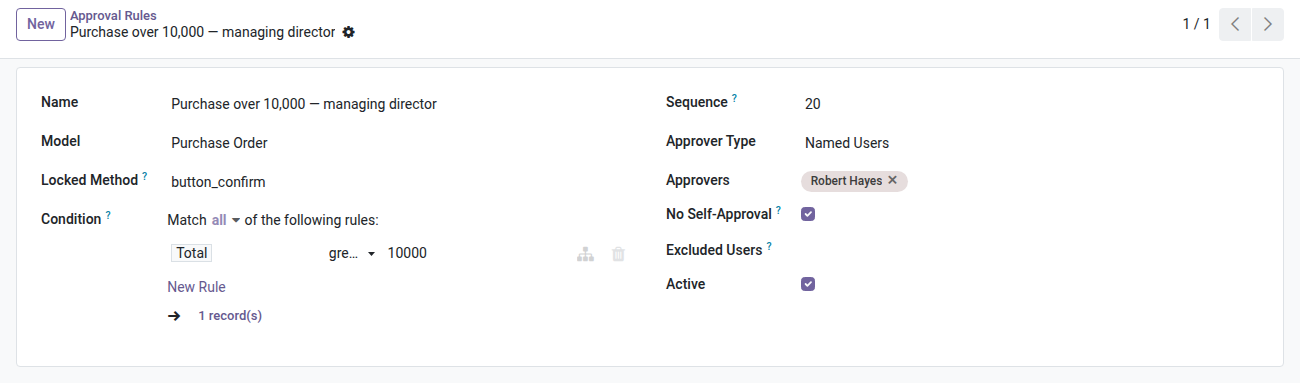
4. Rules on any document
Which action is locked, on which model, for which approvers — in a few lines.
5. Conditions, tiers and segregation of duties
Amount threshold as a condition, tier order, named approvers or a group, no self-approval.
Why install it
- Odoo Enterprise offers approval workflows only on purchases. This module covers every model — sales, invoices, contacts, products or any custom business object — in Community.
- Configuration happens in the interface (no development): create a rule in 2 minutes, change the threshold, disable it temporarily without restarting Odoo.
- The generic engine is the foundation for the suite's bridge modules (sales, purchases, invoices, contacts, products): a single purchase covers all your approval flows.
- Internal compliance and audit become easier: every decision is timestamped, signed and viewable without extracting logs.
Part of the Approvals suite
This module is the generic engine. Add the bridges to plug approval into your existing flows:
- oski_sale_approval — approval of quotations and sales orders
- oski_purchase_approval — approval of purchase requests and purchase orders
- oski_account_approval — validation of vendor bills and credit notes
- oski_product_approval & oski_contact_approval — control over product and contact creation/changes
Full bundle available on apps.odooskills.com.
📦 Need it all? The Approvals suite installs all six modules at once for $99 instead of $144.
License OPL-1 — compatible with Odoo 19.0. Support: apps@odooskills.com.
Discussion
Sign in to join the discussion.